Zelda Twilight Princess Dusk: What It Is and How to Play Dusklight
Zelda Twilight Princess Dusk is the older name for Dusklight, an unofficial native port of The Legend of Zelda: Twilight Princess for PC and mobile. It lets players run the GameCube version on modern devices without using Dolphin or another emulator. Players can use higher resolutions, faster frame rates, mouse controls, touch controls, texture packs, and wider platform support. Here are all of the details!
What is Zelda Twilight Princess Dusklight
Zelda Twilight Princess Dusk is a fan-made native port of Twilight Princess. The project now uses the name Dusklight.
A native port runs like a normal app on your device. It does not simulate GameCube hardware like an emulator. This matters because native ports can use modern hardware in a more direct way. That can mean better performance, cleaner controls, and more room for settings that the original GameCube release never had.
Dusklight builds on the Twilight Princess decompilation project. In simple terms, that means developers rebuilt the original game code so it can run on modern systems. The port still needs the original game assets, such as models, music, textures, and sound effects. Dusklight does not provide those files.
The port supports:
- Windows
- macOS
- Linux
- Android
- iOS
Steam Deck players can also run it through the Linux build.
How to play Zelda Twilight Princess Dusk
To play Zelda Twilight Princess Dusk, you need the Dusklight app and a supported dump of your own GameCube copy of Twilight Princess. The port supports North American and European GameCube disc images. Wii and other versions may not work unless future updates add support.
Here are the steps you should follow:
- Download Dusklight from the official project page or GitHub.
- Choose the correct build for your device.
- Dump your own GameCube copy of Twilight Princess.
- Open Dusklight and select the supported disc image.
- Set your controls, graphics, and display options.
New vs. original game
The original Twilight Princess ran on GameCube and Wii hardware from the mid-2000s. Dusklight keeps the same adventure, dungeons, combat, and story, but it gives the game a more modern setup.
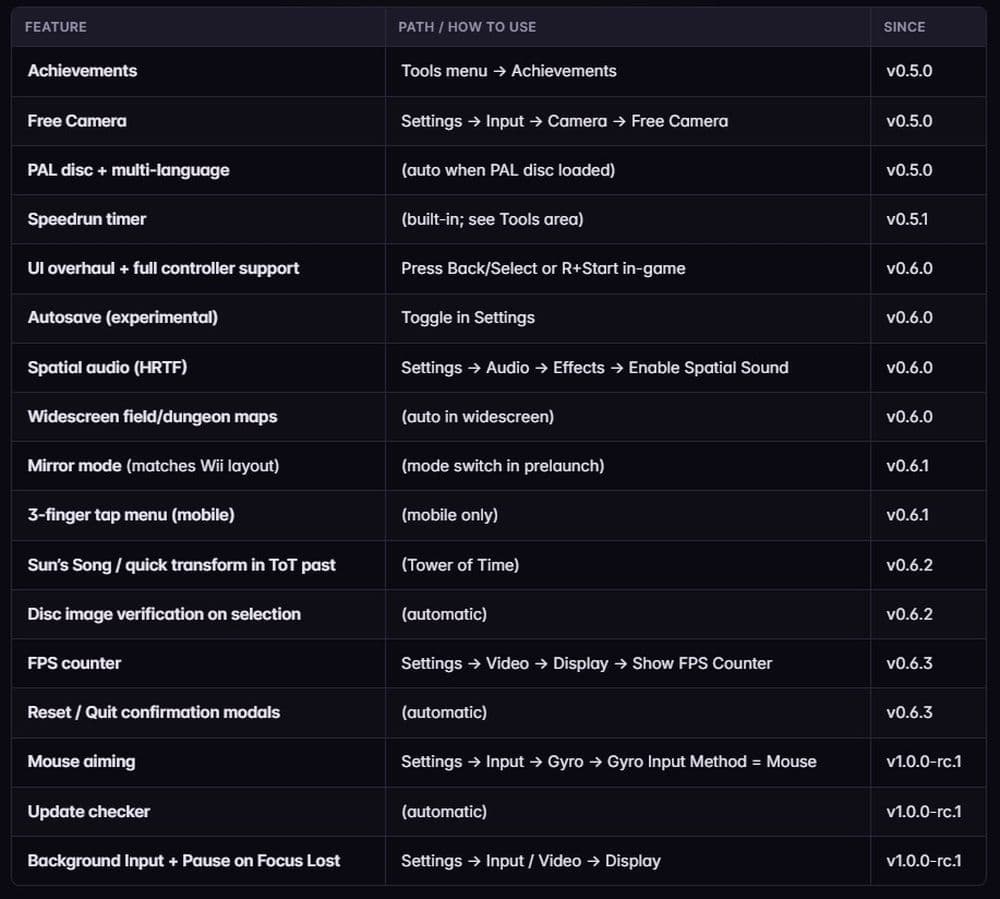
The biggest changes include:
- Higher resolutions for modern screens
- Frame rates above the original 30 FPS target
- Mouse controls on PC
- Touch controls on mobile
- Gyro support on compatible devices
- Texture pack support
- Better controller settings
- Autosave and quality-of-life options
- HUD scaling and other display settings
The higher frame rate support does not simply speed up the whole game. Dusklight keeps the game logic close to the original timing, then renders extra frames between those updates. This keeps the game more stable and avoids many problems that can happen when old games run too fast.
Is Zelda Twilight Princess Dusk legal to use?
Dusklight itself does not ship with Nintendo assets. That makes the setup different from downloading a full game file from a random site. The port requires players to provide their own game dump.
The safe route is simple: use your own legally obtained GameCube copy and create your own backup. Avoid third-party ROM sites. They can carry legal risk, broken files, or malware.
If Dusklight rejects your file, the issue usually comes from one of three things. You may have the wrong region, a Wii version, or a damaged dump. A clean North American or European GameCube dump gives you the best chance of a smooth setup.
Can I play this game with my friends?
No, Zelda Twilight Princess Dusk does not add multiplayer. Twilight Princess is a single-player Zelda game, and Dusklight keeps that structure.
You cannot play co-op, online multiplayer, or split-screen through Dusklight. The port improves how the game runs, but it does not change the main design into a shared adventure.
Players can still share texture packs, settings, save routes, and speedrun ideas with the community. That gives the port a strong social side, but the actual game remains solo.
Should you play Dusklight or use Dolphin?
Dusklight and Dolphin serve different players. Dolphin works as a full GameCube and Wii emulator, so it can run many games. Dusklight only targets Twilight Princess, but it gives that game a more direct modern port.
Use Dusklight if you want higher resolutions, native controls, texture packs, mobile support, and a setup built around Twilight Princess. Use Dolphin if you already emulate GameCube games and want one tool for a larger library.
Bring your own GameCube copy and use a proper dump. If you are a Zelda fan, check out more of our guides below:
- All Legend of Zelda games in order
- How to play Zelda Ocarina of Time on Switch
- What new Legend of Zelda projects are planned?
- The Legend of Zelda 40th Anniversary: Everything fans need to know
- Legend of Zelda: Breath of the Wild is now on VR: How to play
Featured Image Credit: Duskport
All Related Guides
 Zelda Ocarina of Time Remake changes: What's new on Nintendo Switch 2?Discover every confirmed Zelda Ocarina of Time remake change on Nintendo Switch 2, including new visuals, rede...
 How to complete the Crisis at Hyrule Castle mission in TOTKFind every step in the Crisis at Hyrule Castle mission, including the castle route, enemy fights, Phantom Gano...
 Zelda 2026: Everything We Know About Ocarina of TimeEverything we know about the Zelda 2026 Ocarina of Time remake, from its Switch 2 release window to the bigges...
 What new Legend of Zelda projects are planned?New Legend of Zelda projects include a movie, Switch 2 editions, and more. Here’s what is confirmed and what r...
 The Legend of Zelda 40th Anniversary: Everything fans need to know The Legend of Zelda 40th Anniversary guide: history, rumored remakes, Switch 2 ports, collectibles, and celebr...
 Legend of Zelda: Breath of the Wild is now on VR: How to playPlay Zelda Breath of the Wild VR on PC with the BetterVR mod. Learn key features, headset support, and the hig...
 All Legend of Zelda games in orderDiscover all Legend of Zelda games in order, from the NES classic to the latest adventures on the Nintendo Swi...
 How to unlock Sahasra Slope Skyview Tower in TOTKExplore how to unlock Sahasra Slope Skyview Tower in TOTK with our step-by-step guide. Find the cave, clear ro...
- 1
- 2
- 3