THESPIKE.GG
THESPIKE
    EN
    Login
    EN
    1. VALORANT
    2. Guides
    3. Skins
    4. How to gift in VALORANT

    How to gift in VALORANT

    Grab that special skin for that special someone.

    On this page:

    • Gifting addition date
    • How to gift in VALORANT
    • Rules to remember
    Written By Tyler Esguerra Freelance Writer
    Last UpdatedApril 29, 2025 at 04:01PM
    share on
    share on

    After many years of waiting and asking, Riot has finally added the ability to gift skins in VALORANT. It is a feature that has been long-awaited by duos all around the world, and should see a lot of usage for those celebrating birthdays, holidays, or for those e-daters looking to treat their special someone to a cute skin.

    When will gifting be available in VALORANT?

    Gifting will be available for players to use when Patch 10.08 goes live on either Wednesday, April 30 or Thursday, May 1. Players should get the option in their store right after they've updated their game through the Riot client. On launch, players will only be able to gift the featured bundle or item to friends, but Riot plans to expand this feature out in the future.

    Loading...
    The Store in VALORANT

    How do you gift a friend in VALORANT?

    To gift a friend in VALORANT, follow these simple steps:

    • Click on the Store tab.
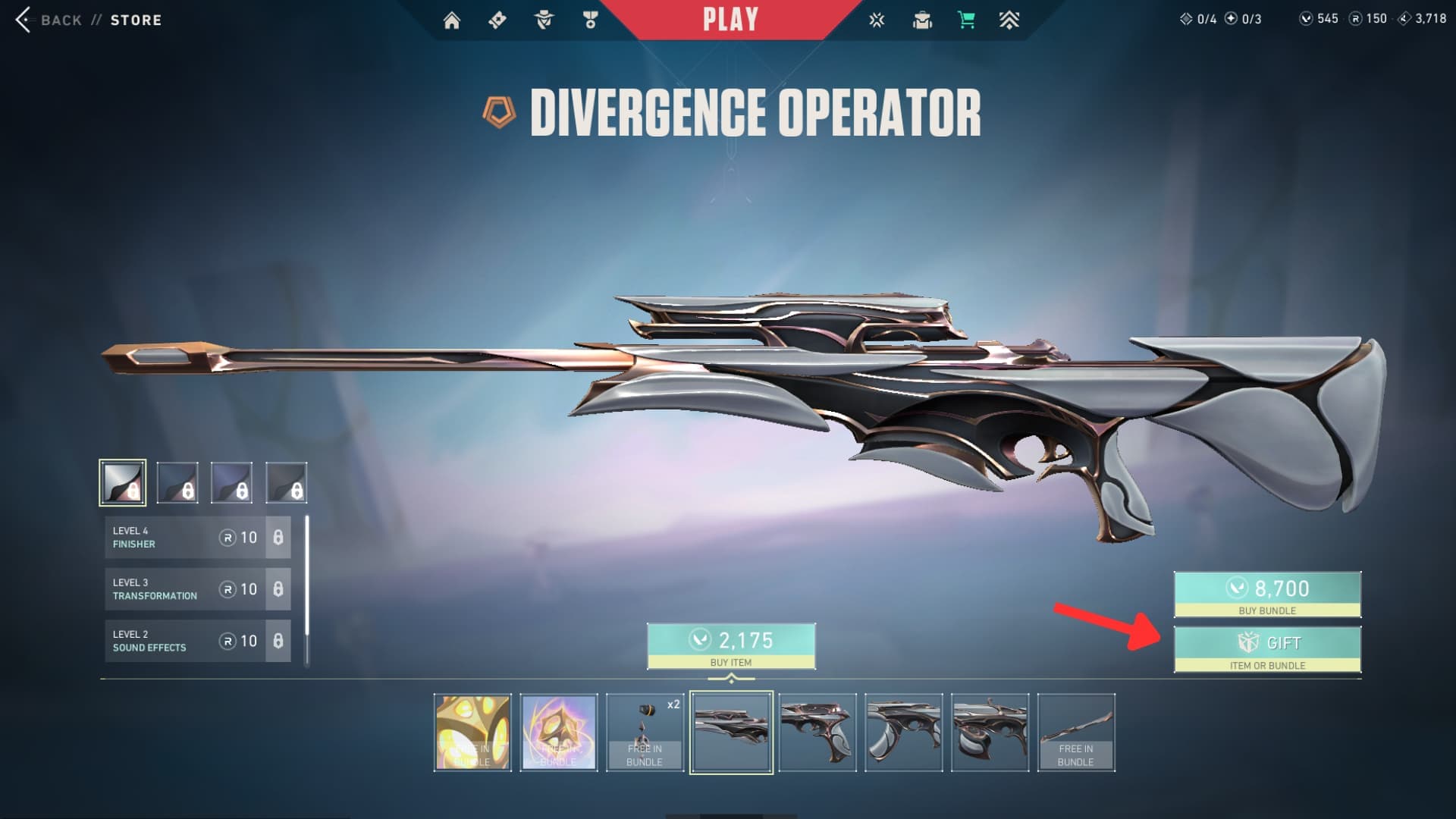
    • Open up details pages for the Featured bundle or item.
    • There will be a Gift button in the bottom-right corner of the screen.
    • If you wish to gift a specific skin in the bundle, cycle through the bundle until the weapon you wish to choose is on screen.
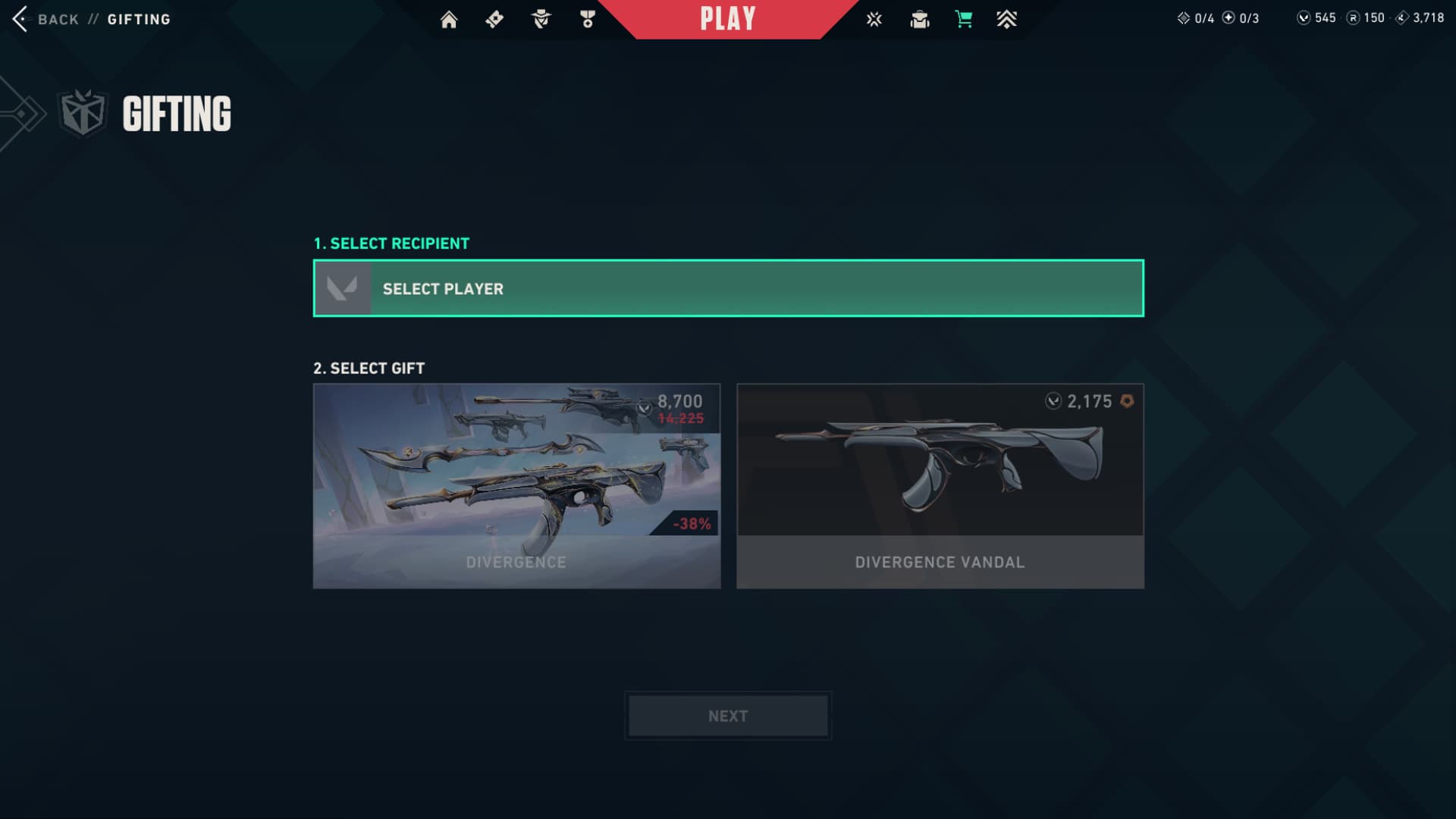
    • Choose your recipient in the following screen.
    • Choose whether to gift individual items from the bundle or the full bundle.
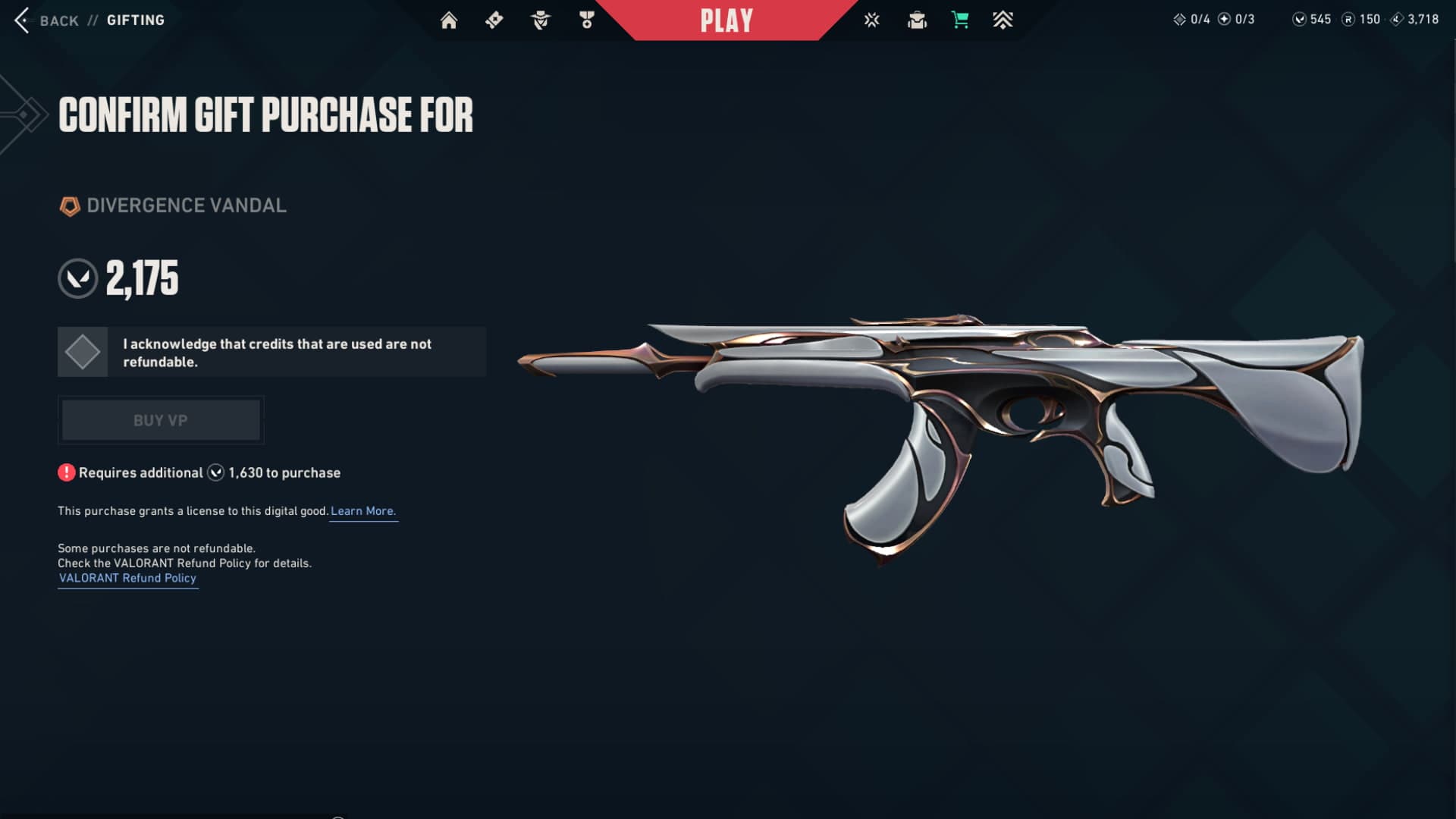
    • Confirm and send off your little gift.

    The recipient will be prompted to accept the gift when they log in. Recipients can also reject gifts for any reason.
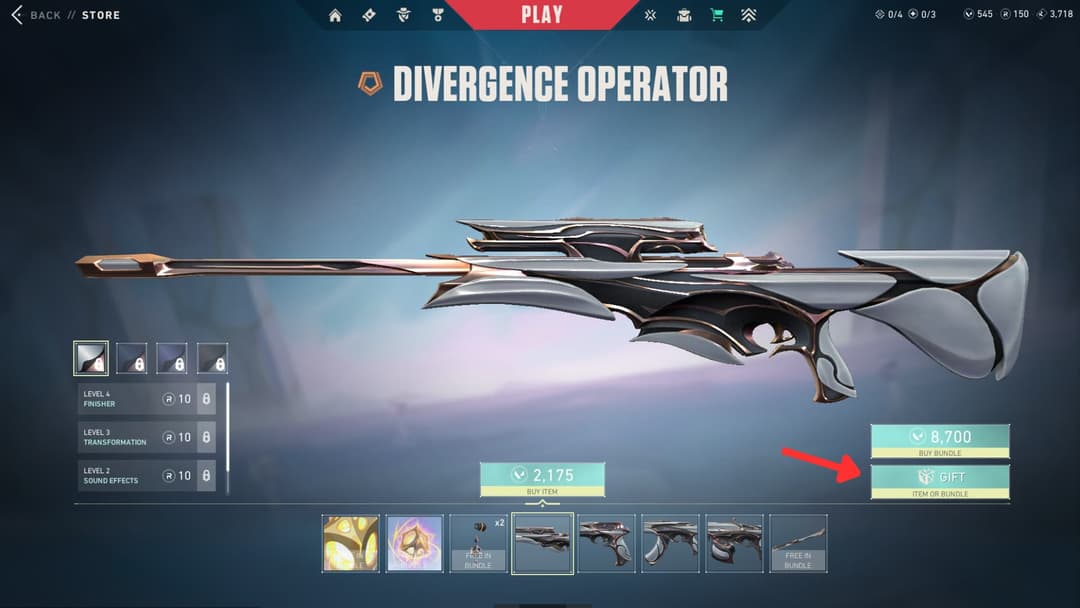
    Open the details page for the desired bundle.
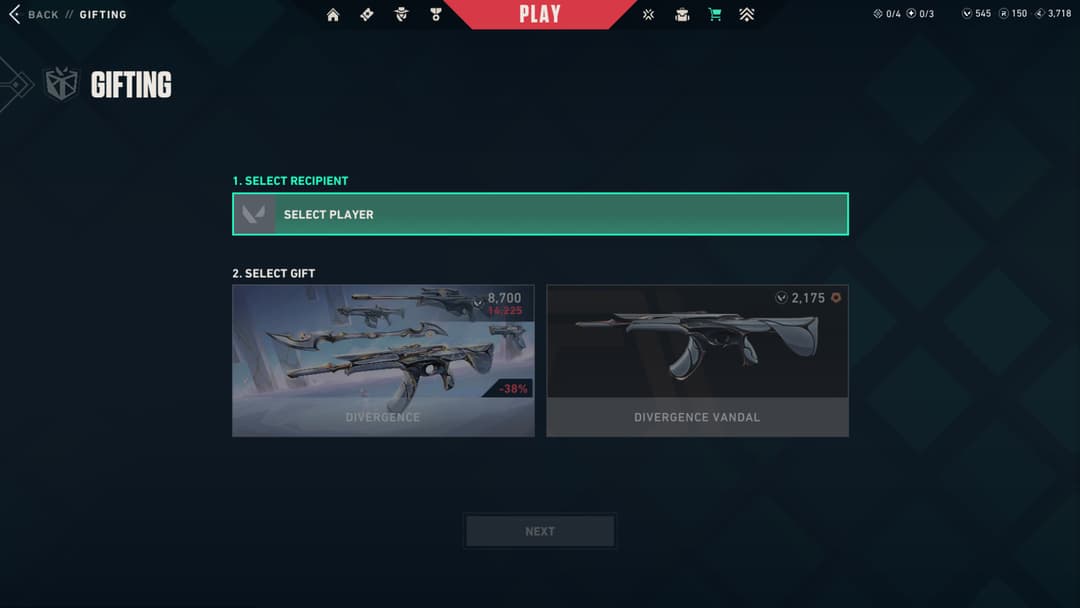
    Open the details page for the desired bundle.

    Choose the recipient from the dropdown menu and choose whether you're buying the full bundle or just one gun. If you want to gift a specific skin from the bundle, make sure to cycle through the bundle preview until you've selected the weapon you want before clicking gift.
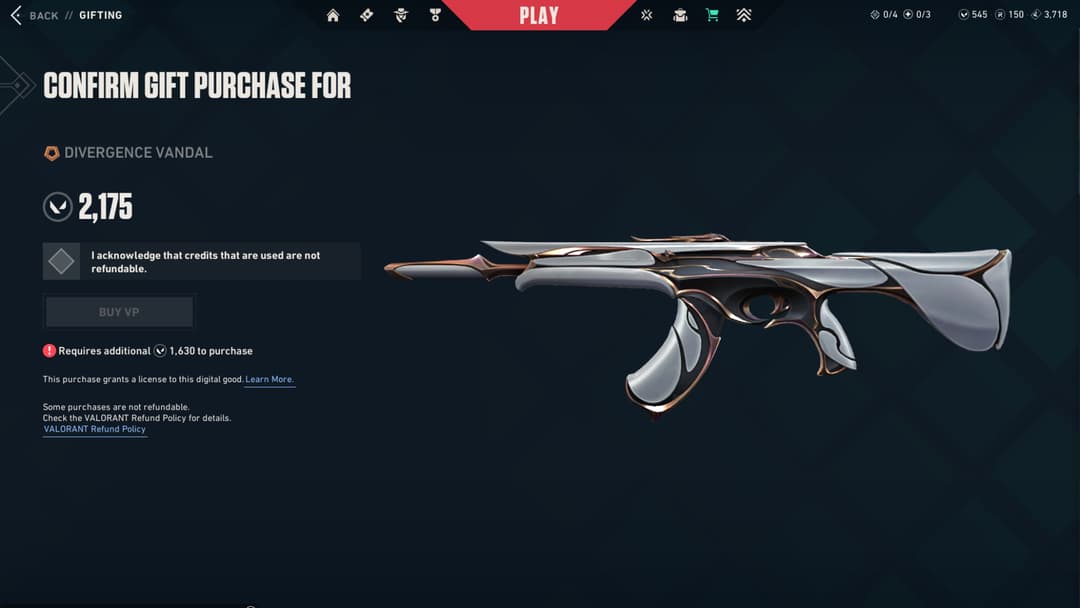
    Choose the recipient from the dropdown menu and choose whether you're buying the full bundle or just one gun. If you want to gift a specific skin from the bundle, make sure to cycle through the bundle preview until you've selected the weapon you want before clicking gift.

    Confirm that you want to send the gift to your recipient.
    Confirm that you want to send the gift to your recipient.

    Open the details page for the desired bundle.
    Choose the recipient from the dropdown menu and choose whether you're buying the full bundle or just one gun. If you want to gift a specific skin from the bundle, make sure to cycle through the bundle preview until you've selected the weapon you want before clicking gift.
    Confirm that you want to send the gift to your recipient.
    Rules to remember for gifting

    First off, both the sender and recipient must be in-game friends for at least a week, and they both must be unbanned. The person sending the gift must also be level 15. You can only send gifts to players who are on your same game shard, which means that if you can play with them, you can gift them a skin. If you aren't on the same global server, for example, you will not be able to send them any gifts. Also, you cannot mass send gifts out, because you can only gift up to five times a day. Gifts must be accepted within 60 days of being sent, or else the money will be returned back to the sender.

    If you need any more deep dives into the various skins being released in VALORANT, stay locked with THESPIKE.GG.

    Top Related Guides

    Skins
    September 6, 2023
    VALORANT Mystbloom 2.0: Weapons, accessories and more
    December 11, 2025
    VALORANT ORA bundle: Weapons, accessories & price
    November 17, 2025

    Guide Categories

    • Agents
    • Beginner guides
    • Crosshairs
    • Maps
    • Premier
    • Ranks
    • Skins
    • Tips and tricks
    • Error Codes
    • VALORANT Console
    • VALORANT Mobile
    • Names
    • Weapons
    Tyler Esguerra

    With a bachelor's in Digital Communication, Tyler Esguerra began his journey in the esports journalism scene by combining his passion for writing and content creation with his love for competitive gaming. Starting off in 2018 as a freelance writer for Enthusiast Gaming, Tyler worked his way to a position with Dot Esports as a League of Legends writer. Over the next six years, Tyler earned the Lead LoL writing position, and helped build a formidable coverage team that included some of the most in-depth looks into the LoL and VALORANT space, both from the game side and the esports scene.

    View More
    THESPIKE
    AboutCareersPrivacy PolicyTerms of UseAbout THESPIKEDisclaimer
    Contact UsCommercialsSend an emailPost Feedback
    ResourcesBetting SitesOnline CasinosSweepstakes Casinos
    © 2025 THESPIKE.GG | All Rights Reserved | Not affiliated with Riot Games
    18+ Bet Responsibly | BeGambleAware.org
    Light Mode
    Login