Can you merge Fortnite accounts?

Despite what you'll read elsewhere it's actually pretty easy to merge Fortnite accounts… as long as you've got a fully functional time machine and aren’t in the least bit afraid of disrupting the space/time continuum…
Okay that was misleading and sarcastic, and we're sorry. Can you forgive us?
Fortnite account merging – the lowdown
Epic Games released a feature in Fortnite that allowed you to merge accounts back in November 2018. Players with accounts spread across various platforms could suddenly combine those accounts, and combine everything from cosmetics to V-bucks to campaign progress and more.
It was really easy to merge your accounts as well. You just logged on to your Epic Games account, clicked a few buttons, entered a security code, and wham bam thank you ma'am, you'd completed a successful Fortnite account merge.
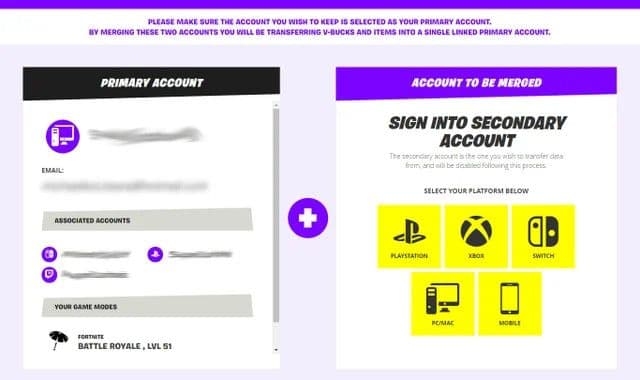
Sadly those days are done. Yes, it's true, as of May 6, 2019, there really is no way to merge your Fortnite accounts anymore.
In the words of Epic Games…
“There is no way to merge two Epic Games accounts. Player Support is unable to assist with requests for merging accounts.”
So unless you're a time traveler visiting 2023, and you're on your way back to 2018 at 88mph in a flying DeLorean, that's the end of that… unless, of course, you want to know why this tragic turn of events has befallen us all?
Why won’t Epic Games let you merge Fortnite accounts?
Basically, it's all your fault.
Okay maybe not your fault directly, but our fault in general, as Fortnite fans.
You see, the folks over at Epic Games found out that a small percentage of people had been abusing the merge accounts feature in a way that was forbidden by the EULA. And so, Epic Games took action.
Believe it or not, not letting you merge Fortnite accounts anymore is actually to keep the players safe (but it still makes us cry a little tear of mourning now and then).
Okay, but are there any workaround ways to link two Fortnite accounts?
Ah, we admire your moxy, but sadly the answer is another big, honkin’ no. You can’t merge, combine, blend, link, amalgamate, fuse, or coalesce Fortnite accounts on any platform, in any way.
You have only two choices if you’re absolutely hell-bent on merging accounts: time travel, or journey to the fabled realm of the Epic Games developers and beseech them to grant you an exception to this no account merging rule.
Or you could free a genie from his lamp, but that might be more trouble than it’s worth…
FAQs
How do I merge two Fortnite accounts?
You can’t. Epic Games no longer allows merging of two accounts, and support cannot combine progress, cosmetics, V-Bucks, or purchases from separate accounts into one. Each Epic account remains isolated in terms of inventory and history.
Can I transfer Fortnite skins to another account?
No. Skins, V-Bucks, and other cosmetics are permanently tied to the Epic account where they were earned or bought. There is no manual transfer or migration path between accounts.
Why did Fortnite remove merging accounts?
The feature was removed because it was being abused for buying, selling, and consolidating accounts in ways that violated the intended use. That created fraud and ownership disputes, so Epic disabled merging to protect account integrity and enforce their rules.
Can I link Fortnite accounts?
You can link external platform accounts (like PlayStation, Xbox, Nintendo, Steam, Twitch, etc.) to a single Epic Games account so progress and cosmetics carried on that Epic account sync across those platforms. You cannot link two separate Epic/Fortnite accounts together to share items. Linking is done via the Epic account’s connections/settings page.
Can you own two Fortnite accounts?
Yes. You can create and possess multiple Epic Games/Fortnite accounts. You can only be logged into one at a time on a given session, and some events or competitive rules may restrict multi-account usage. Abuse (such as using multiple accounts to evade bans or manipulate systems) can lead to action against all associated accounts.
All Related Guides
 How to link LEGO account to FortniteLearn how to link LEGO account to Fortnite for exclusive rewards like LEGO Style outfits, badges, and more. ...
 How to enable 2FA on FortniteLearn how to enable 2FA on Fortnite. It’s not just a safety protocol, enabling two-factor authentication on Fo...
 How to change Fortnite nameAre you tired of your gamertag in Fortnite and think it is time for a change? Check out this guide about how t...
 How much is Fortnite Battle Pass, and why do you need to get itLearn how much is Fortnite Battle Pass and unlock exclusive skins, emotes, and more. Dive into a world of in-g...
 Is Fortnite free?Is Fortnite Free? Discover how this popular game stays accessible. Explore optional purchases, gameplay, and r...
 What are Account Levels in Fortnite?Account Levels are how Fortnite tracks the way you level up across all seasons and chapters. Think of it like ...
 How to switch Fortnite accounts on PS4Play Fortnite with all your friends! Learn how to switch accounts on PS4 and join the fun....
 How to delete a Fortnite accountMaybe you need a break, maybe you’re addicted. Maybe you’re spending too much, or maybe you’ve got to cram in ...
- 1
- 2