Minecraft compass recipe (+recovery) explained
A compass is an extremely useful tool in Minecraft so make sure to learn how to craft and use it!
Looking for the Minecraft compass recipe to find your original spawn point? This guide will explain how to craft a compass step by step, including the exact materials needed and the correct crafting pattern. This tool definitely belongs on the list of one of the most important recipes in Minecraft.
5 reasons to get a compass in Minecraft
A compass in Minecraft is a helpful tool for navigation, especially in large worlds where it’s easy to get lost. Here’s why you might want to craft and use a compass in the game:
- Finding your spawn point: A compass always points to your world spawn point—the location where you first appeared when you created the world. If you move far away and want to return, a compass helps you find your way back.
- Useful for exploration: If you're exploring and don’t want to lose track of where you started, keeping a compass in your inventory makes it easy to return. This is especially helpful if you haven’t set up a bed or a clear path back home.
- Works in the Overworld: Unlike maps, which only show explored areas, a compass always provides direction no matter where you are in the Overworld. However, it does not work in the Nether or the End, where the needle spins randomly.
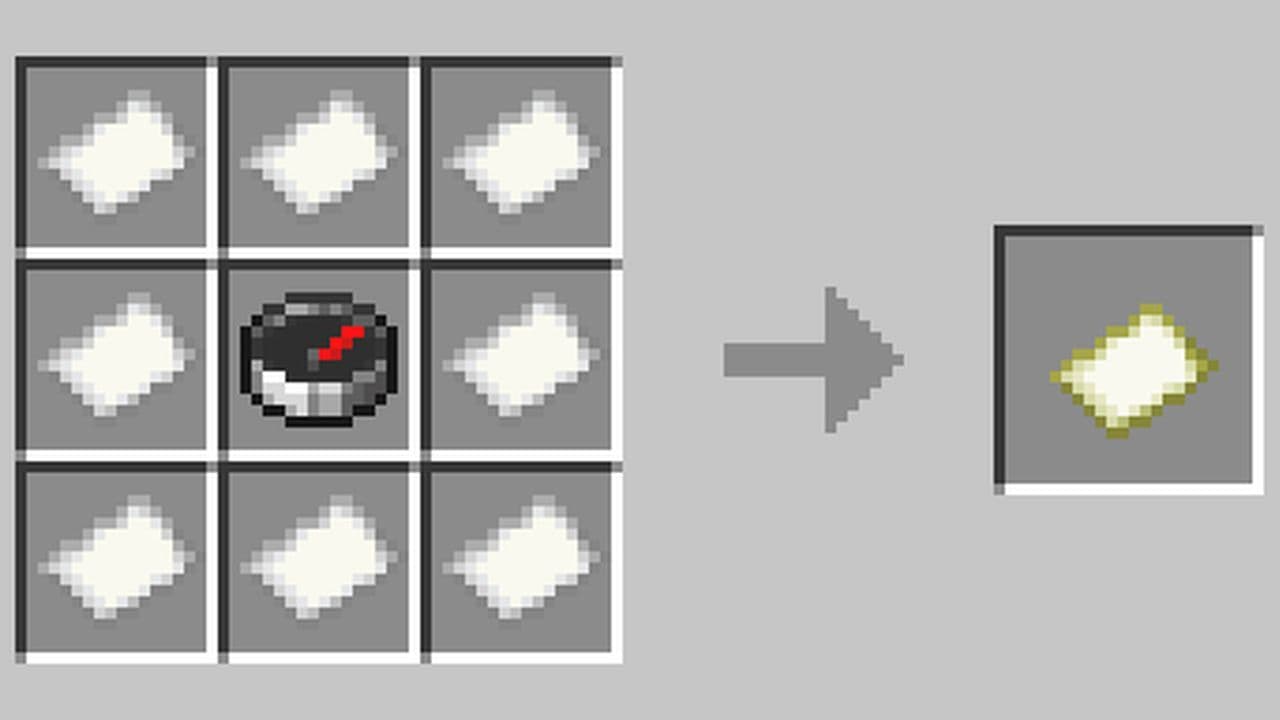
- Crafting maps: A compass is a key ingredient in making locator maps. By combining a compass with 8 pieces of paper in a crafting table, you can create a map that shows your location and movement. This is useful for marking important locations and tracking your position.
- Lodestone Compass for custom navigation: If you want a compass to point to a specific location instead of the world spawn, you can link it to a Lodestone. This lets you create waypoints anywhere in the world.
Minecraft compass recipe: How to make a compass in Minecraft
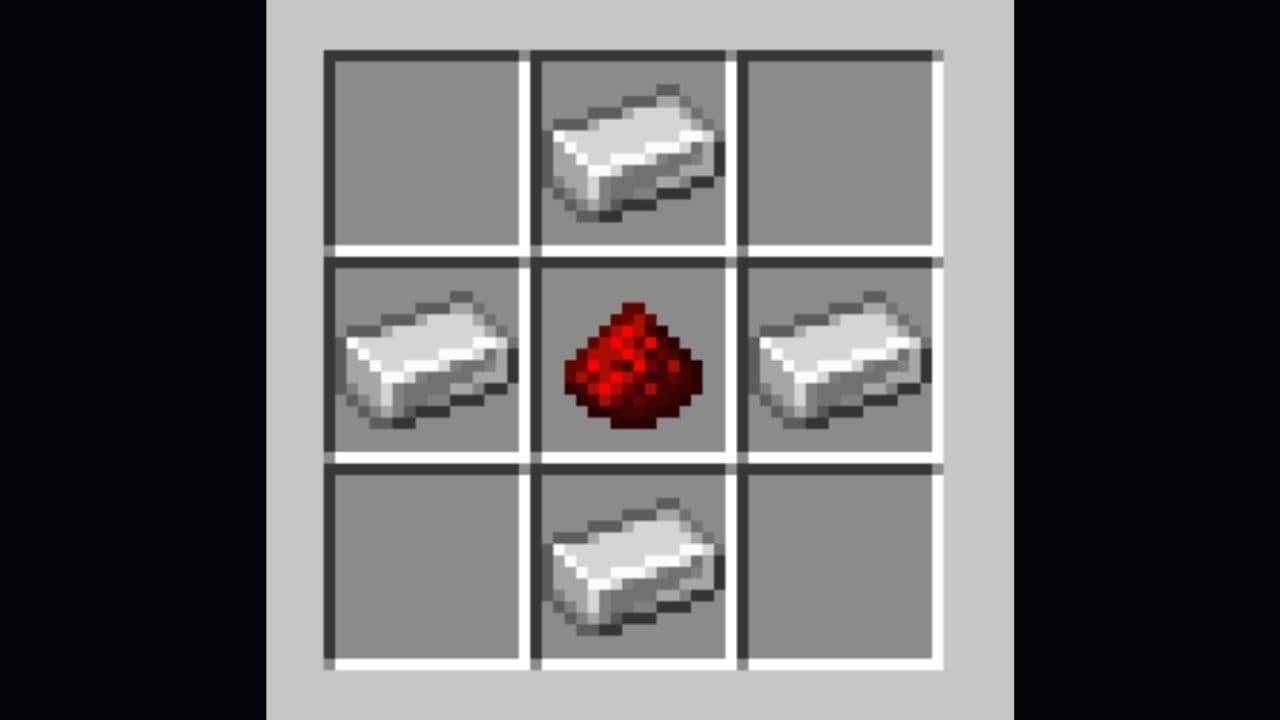
To craft a compass, you need to open a crafting table. Right-click (Java Edition) or use the corresponding button on your device to open the crafting menu. You should now see a 3x3 crafting grid. Here is the Minecraft compass recipe you need:
- 4 Iron Ingots: These can be obtained by smelting iron ore in a furnace.
- 1 Redstone Dust: This is mined from redstone ore, usually found deep underground.
How to craft a compass in Minecraft
In the 3x3 crafting grid, place the items in the following pattern:
- First row: Leave the first and third boxes empty. Place 1 iron ingot in the middle box.
- Second row: Place 1 iron ingot in the first box, 1 redstone dust in the center, and 1 iron ingot in the third box.
- Third row: Leave the first and third boxes empty. Place 1 iron ingot in the middle box.
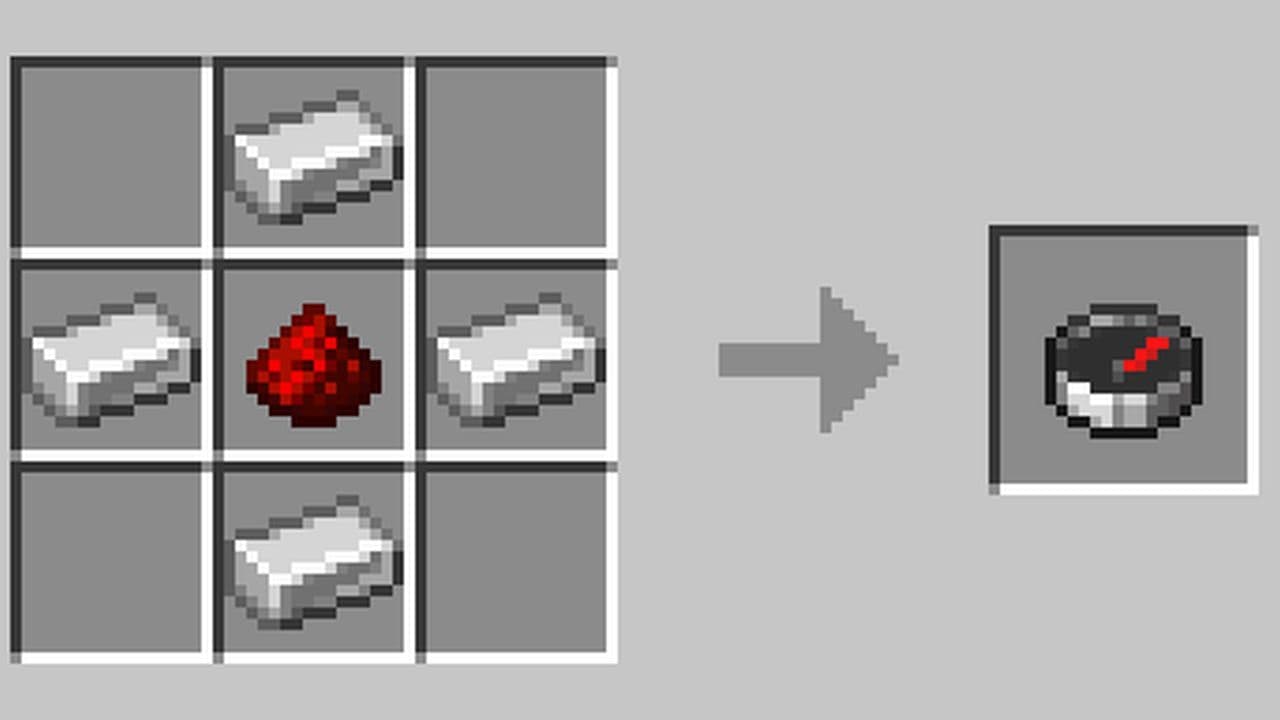
If the materials are placed correctly, a compass will appear in the result box on the right side of the crafting menu.
After crafting the compass, you must move it to your inventory to use it. Simply click (or tap) on the compass in the crafting result box and place it into your inventory.
Now, you have a working compass in Minecraft.
Recipe for recovery compass in Minecraft
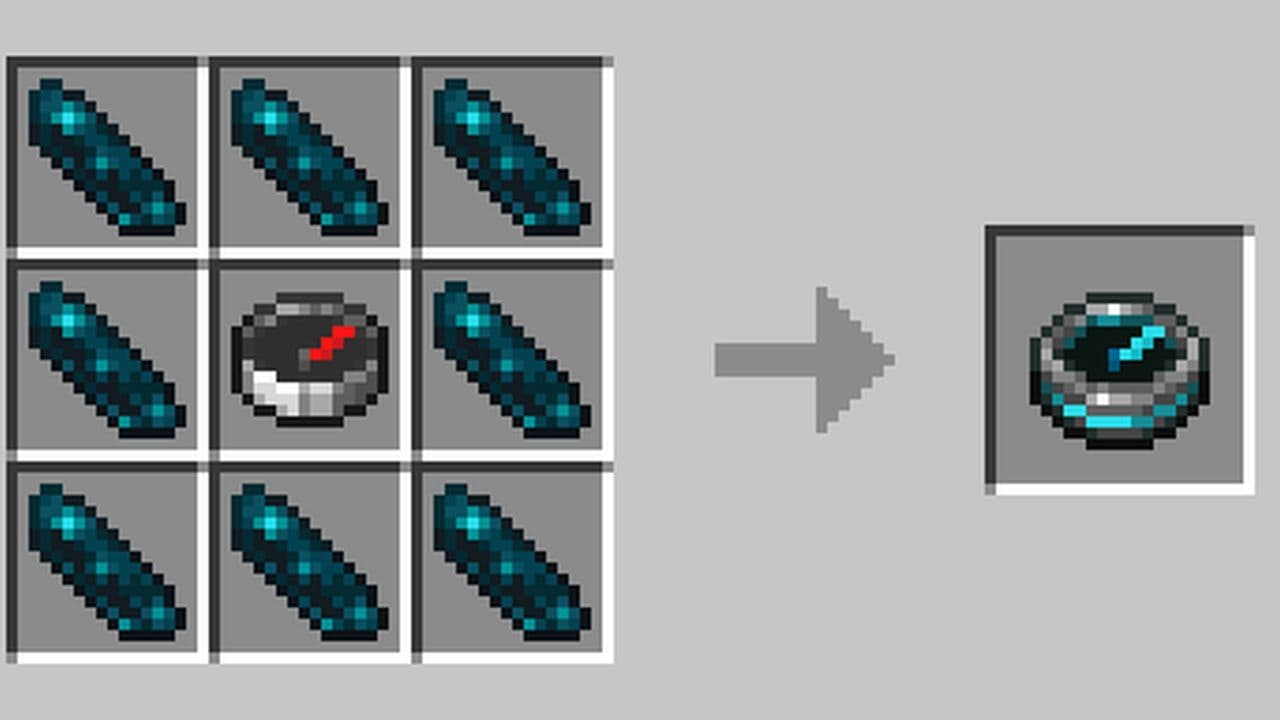
Once you have a compass, you can complete the recovery compass recipe in Minecraft. The Recovery Compass points to your last death location but spins randomly if you haven't died or are in a different dimension. To craft a Recovery Compass, place:
- 1 Compass in the center: 4 iron ingots + 1 redstone dust
- 8 Echo Shards around it: Can be found in Ancient City chests (Deep Dark biome)
How do I make my compass point to my bed?
A normal compass in Minecraft does not point to your bed. It always points to the world spawn point. If you want it to guide you back to your bed, you need a Lodestone. First, craft a Lodestone using 1 Netherite Ingot and 8 Chiseled Stone Bricks. Then place the Lodestone near your bed. Take a compass and right-click the Lodestone. Your compass will now point to that Lodestone.
This is called a Lodestone Compass. It remembers the location of the Lodestone and helps you return to it. You can do this in any dimension. But you must use a different Lodestone and compass for each dimension. If the Lodestone gets destroyed, the compass will stop working.
Why is my compass not pointing to my bed in Minecraft?
Here are the main reasons:
- Regular compass rules: A normal compass points to the world spawn, not your bed. Sleeping in a bed does not change this.
- Wrong dimension: Compasses do not work in the Nether or the End. They spin randomly there.
- Lodestone not linked: If you use a Lodestone but do not right-click it with a compass, the compass stays unlinked. You must link it manually.
Looking for more Minecraft recipes? Check out the Minecraft anvil recipe & 5 reasons it's worth the iron!
All Related Guides
 How to craft rails in Minecraft: Regular, Powered, Detector, ActivatorLearn how to craft rails in Minecraft, use minecarts, and build better tracks with a simple recipe and clear s...
 Minecraft Splash Potion of Weakness recipe: Complete brewing guideMinecraft Splash Potion of Weakness recipe guide: ingredients, brewing steps, villager curing, and common mist...
 How to craft a bookshelf in MinecraftLearn how to craft a bookshelf in Minecraft, place it around an enchanting table, and reach stronger enchants ...
 Smelting in Minecraft: A complete guide to furnaces, fuels, and efficiency tips for 2025Master Minecraft smelting in 2025: best furnaces, fuels, and pro tips to boost speed, save resources, and auto...
 Minecraft enchanting table recipe, setup, language and moreMaster Minecraft enchanting! Learn the Minecraft enchanting table recipe, setup for max levels, the secret lan...
 Minecraft blast furnace recipe: How to make a blast furnace in MinecraftWant to smelt ores faster? Here's the blast furnace Minecraft recipe and a step-by-step guide on how to craft ...
 Minecraft beacon guide: How to make a beacon in MinecraftBeacon Minecraft guide: Learn how to craft, activate & optimize a beacon for max power, buffs & effects in Min...
 Minecraft piston recipe & sticky piston guideLearn how to craft and use pistons in Minecraft! Master sticky pistons & get secret doors, traps, flying machi...
- 1
- 2
- 3
- 4
- 5