Can you change your Roblox name color?

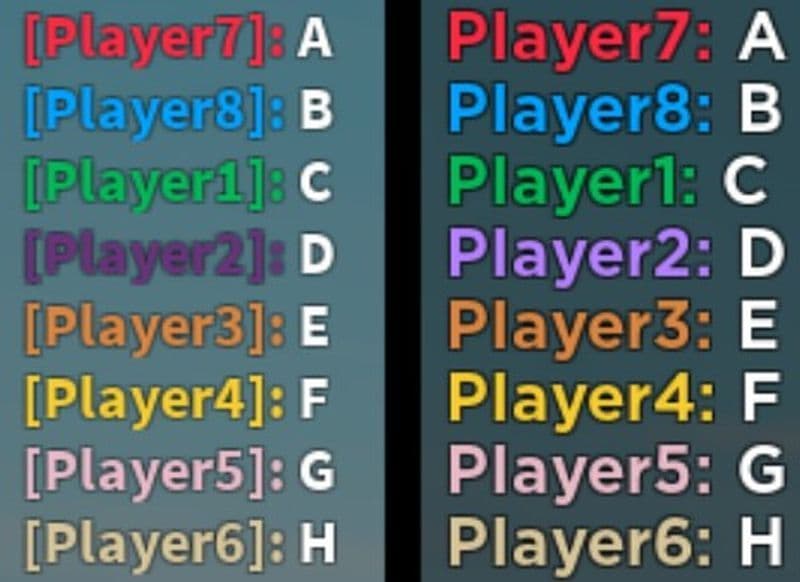
Many Roblox players notice that their name in chat or above their avatar appears in a certain color. Some names show up in blue, others in pink or green. It may seem random, but there is a reason behind it. Roblox automatically assigns these colors, and the system decides them based on your username. Here is everything you need to know about Roblox name colors!
Can you change your Roblox name color?
No, you cannot manually change your Roblox name color, even in the creator tools or if you have Roblox Premium. Roblox assigns it automatically based on your username. The system picks a color from a preset list using an internal formula. You can change your display name whenever you want, but that does not affect the color. Only your actual username determines the color you get.
If you change your username, Roblox recalculates the color. That is why players sometimes see a new color after creating a new account or updating their name. However, there is no official setting or tool to select a specific shade. Roblox’s help pages confirm that name colors are automatic and cannot be adjusted by users.
Is Roblox name color random?
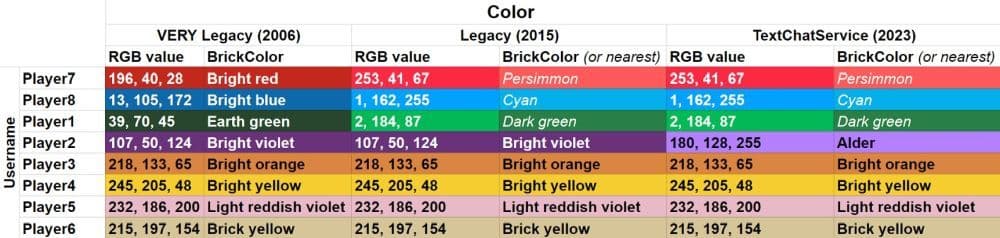
The colors may look random, but they are not. Roblox uses an algorithm that reads the letters in your username and assigns a color based on them. The system adds the character codes in your name and links the total to one of the available color options. That is why every username has a consistent color across games.
If two people use the same username (which is impossible since usernames are unique), they would have the same color. The algorithm gives a random appearance because users do not know the formula, but the logic behind it stays consistent.
In short, your color depends on your username. If you like the color you already have, you should not change your username, since doing that will likely assign a new one.
Why is my name pink in Roblox?
A pink name is simply one of the preset colors Roblox uses. It does not mean anything special. The system picked it automatically when it processed your username. The color options include shades of pink, blue, green, orange, and other tones. Each color helps players stand out in chat and gameplay.
If you see pink next to your name, that is just your username’s assigned color. Changing your display name will not affect it, but creating a new username might result in a different color. Many players keep their pink color since it makes their name visible in crowded servers.
Is my Roblox username unique?
Yes, every Roblox username must be unique. When you create or change your username, Roblox checks if it is already taken. If it is, you must choose a different one. Your display name, however, is different. Many people can have the same display name, but only you have your specific username.
Your username affects your name color, while your display name affects how others see you in-game. You can change your display name once every seven days without paying Robux. But changing your username costs Robux and may result in a new color.
Benefits of keeping your username:
- It helps you maintain your current name color.
- It keeps your profile identity stable.
- It prevents confusion among other players.
How to change color text in Roblox
Even though you cannot change your Roblox name color, you can add colored text inside games. Roblox Studio allows developers to use color codes in their scripts. If you are creating your own game, you can use the “TextChatService” function to display colored text for messages or roles.
Here are a few ways to do it:
- Use HTML color codes: Insert “<font color="#RRGGBB">Your Text</font>” in your script to display custom colors in messages.
- Team colors: You can assign team colors in your game. Players on those teams will have matching name tag colors above their characters.
- Developer control: You can control text color only within your game. These settings do not affect the main Roblox chat or global username colors.
Avoid using third-party tools or browser extensions that promise to “unlock” color customization. They can be unsafe or violate Roblox’s rules. The only official way to use colored text is through Roblox Studio or in-game scripts.
For more Roblox guides:
- Latest Roblox Elemental Dungeons codes & how to redeem them
- Make winner Met Gala Dress to Impress outfits in 4 easy steps
- Is there a way to get free Robux in Roblox?
- The ultimate guide to Roblox PS4: Best games, tips, and more
- Best Decal IDs in Roblox with Guides & Codes
Featured Image Credit: Roblox
All Related Guides
 How to create a player whitelist in RobloxNeed to limit Roblox game access? Learn how to create a player whitelist in Roblox using UserIds and a server-...
 How to start a hunt in Demonology (Roblox)Learn how to start a hunt in Demonology using cursed objects, Energy management, and hunt triggers to identify...
 Roblox playtime check: How to see how many hours you have on RobloxLearn how to check Roblox playtime, view weekly hours, track game activity, and estimate total time spent on R...
 How to make gamepasses in RobloxA simple guide to Roblox gamepasses, covering what they do, how to make one, and how to sell it the right way....
 Universal Tower Defense X tier list (2026): Best units & moreUniversal Tower Defense X tier list for 2026: best units, Infinite Mode picks, beginner recommendations, and c...
 How to get Dark Ring in Roblox Sailor Piece fastLearn how to get Dark Rings fast in Sailor Piece, including Jinwoo boss location, drop rate, respawn timer, an...
 Opera GX Forsaken rewards guide (2026)Opera GX Forsaken rewards guide: unlock exclusive skins, XP Boosters, Killer Chance Tokens, and daily event re...
 All Roblox color codes list & how to use themComplete Roblox color codes guide: BrickColors, RGB values, Color3, HEX conversion, and how to use colors in R...
- 1
- 2
- 3
- 4
- 5
- 6
- 7
- 8
- 9
- 10
- 11