How to check Roblox play time: How many hours have I played

Roblox makes it easy to lose track of time. A quick “one more round” can turn into a long session, especially on weekends or during school breaks. So it helps to know where Roblox actually shows play time, and what “play time” means inside the platform.
In practice, Roblox tracks screen time on the platform and also highlights your most played experiences for the last week. In this Roblox guide, we explain how to check Roblox play time, so that players can understand how many hours they have played the game
How to check Roblox play time
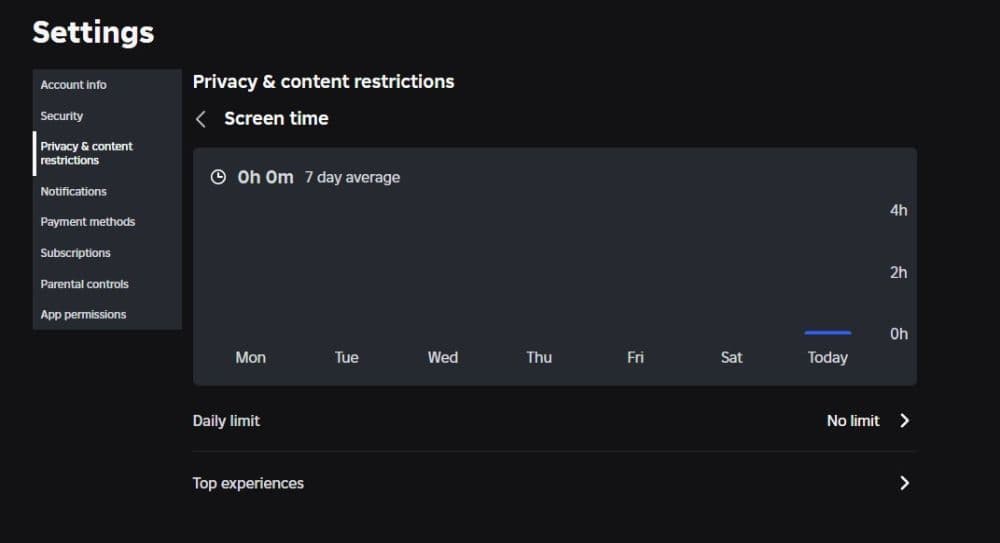
Roblox shows play time through Screen Time insights. You can view a seven-day average and you can also open a list of your top experiences from the last week, with time spent in each.
On desktop
- Open Roblox and log in.
- Select the gear icon (Settings) at the top right.
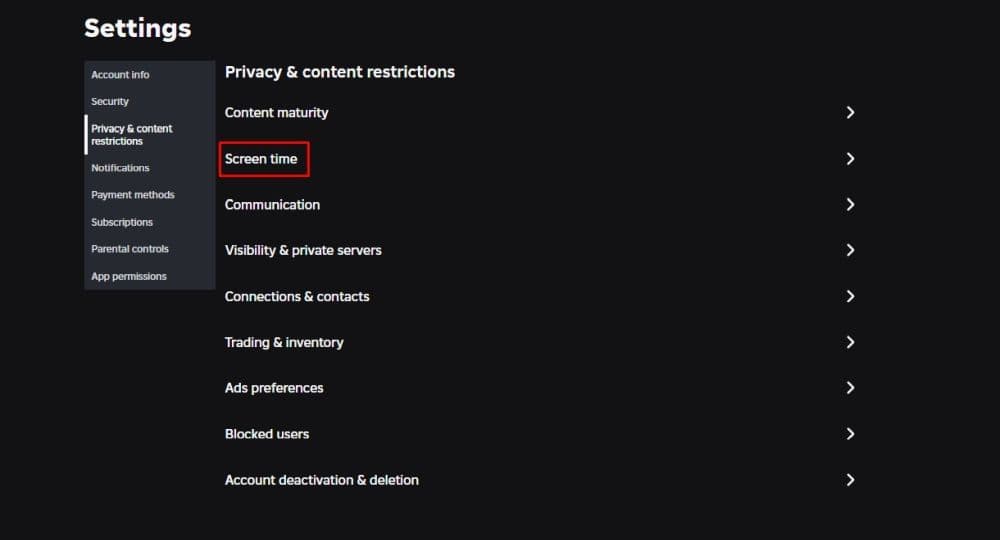
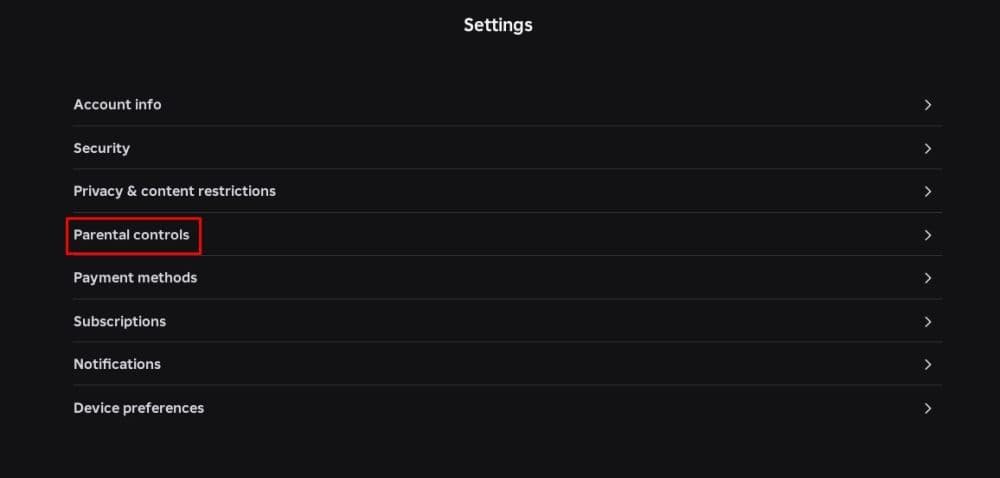
- Open Parental Controls (for linked child accounts) or Privacy & content restrictions (for teens 13+).
- Find Screen time.
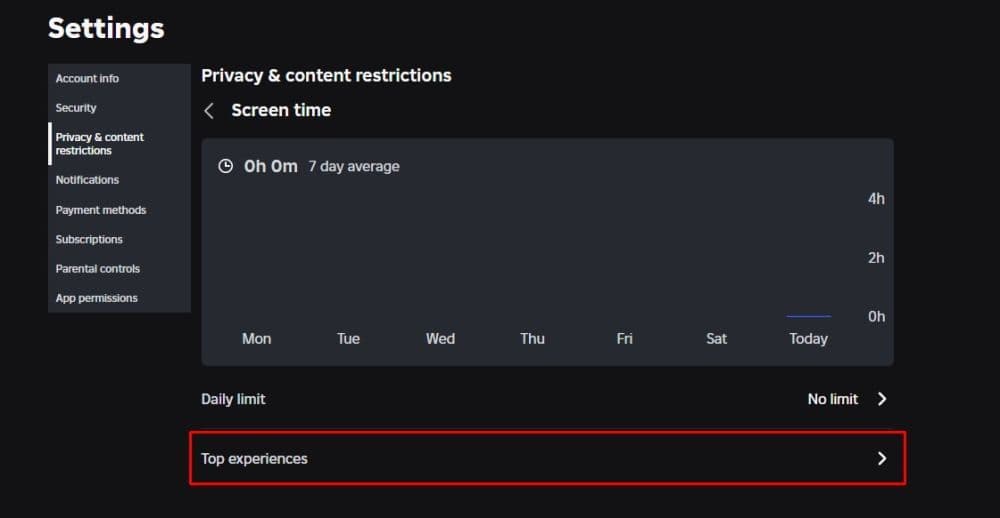
- Select Manage to view the chart and options like Top experiences.
On mobile
- Open Roblox and log in.
- Tap More.
- Tap Settings (gear icon).
- Open Parental Controls or Privacy & content restrictions.
- Go to Screen time, then open Manage and Top experiences.
What you see
- Weekly screen time reflects time spent on the Roblox platform overall.
- Top experiences shows your top 20 experiences from the last week and includes play time per experience.
Manage and track Roblox play time with parental controls
This section covers two needs at once. You want a clear view of play time, and you want control tools that reduce daily overuse.
Can you track your Roblox play time?
Yes. Roblox lets you track screen time trends and your top experiences from the last week. This view gives you a reliable snapshot, even if you want more detail than a single session timer.
For parents: set a daily Roblox screen time limit
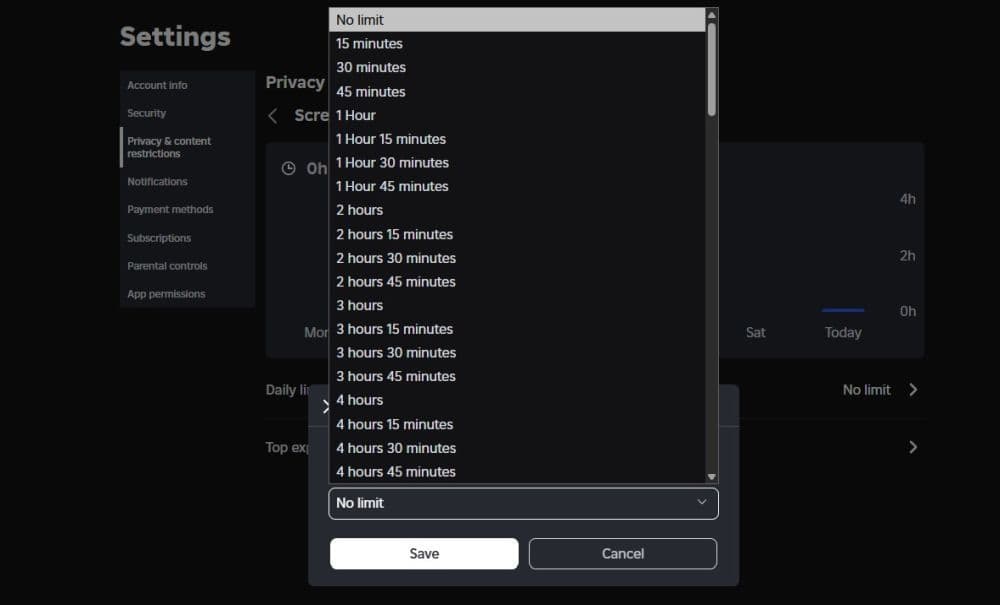
Roblox lets you set a daily limit for a child account, but you need a linked parent account first. When a child hits the limit, Roblox blocks access for the rest of the day and shows a message. Plus, parental controls are also useful if you want to keep your child away from certain features and games, such as dating games.
Steps:
- Open Settings.
- Go to Parental Controls.
- Scroll to Screen time and select Manage.
- Find Screen time limit.
- Choose a limit in the Daily limit dropdown.
Use Top Experiences as a “time leak” detector
Top Experiences helps you manage play time by game, not only by total hours. It shows:
- The experience name
- Play time
- Other experience details Roblox lists in that view
A simple parent plan that works in real life:
- Set a weekday daily limit.
- Set a longer weekend limit.
- Review Top Experiences once a week and agree on 1–2 “main” games for school nights.
Roblox also offers several account activity views for parents who monitor a child account, such as messaging and transaction history. These checks support safer and more balanced play habits.
How do I check how long I’ve been in a Roblox game?
Roblox does not always show a live “session timer” for every experience in one universal place. But you still have practical options that work well.
Use these steps:
- Open Screen time → Top experiences and find the experience (for last-week totals).
- Track the current session yourself by noting your start time on your device clock.
- Compare your routine against Top Experiences after a few days to confirm whether the game drives most of your weekly time.
If you mainly want “what did I play recently,” Roblox also shows a recent experiences list for account activity views, which helps you confirm what you opened and when.
How do you check your stats on Roblox?
“Stats” can mean two different things on Roblox, so it helps to separate them.
Account-level stats
- Roblox shows some account information on your profile, such as your join date in the Statistics area.
Game-level stats
- Each experience can track its own stats. Many games show them on a scoreboard, a profile panel, or a menu button inside the experience.
- If you cannot find them, open the experience menu and look for sections like Stats, Profile, Inventory, Progress, or Leaderboard.
Tip: If the game does not show stats, the developer may not track them publicly.
How do I check how old I am on Roblox?
Most players mean “How old is my Roblox account?” Roblox answers that with your join date. Roblox shows this on your profile in the Statistics box.
Steps:
- Open Profile.
- Scroll down to the Statistics section.
- Find your join date.
If you want the account age in years, count from the join date to today.
How do I check my Roblox game history?
Roblox offers “recent” views and weekly insights, not a perfect lifetime log for every user in one clean list. So you should use the two most useful options, based on what you need.
Use these two checks:
- Recently played experiences helps you confirm what you played recently as part of account activity views.
- Top experiences shows your top 20 experiences from the last week and how long you spent in each.
If you want a stronger routine, review Top Experiences weekly and keep a short note of your “main games” for the month. This method gives you a clear picture without extra tools.
Check out more of our guides:
- How to unblock someone on Roblox
- How to Enable Voice Chat on Roblox After the Update (2026)
- How to redo Roblox age check after the latest update
- How to wall hop in Roblox and how to use it better
- Latest Roblox Elemental Dungeons codes (February 2026)
Featured Image Credit: Epic Games
All Related Guides
 Roblox Robux codes (October 2026): Gift cards, free items & moreFind Roblox Robux codes & redeem gift cards, claim free avatar items, convert Roblox Credit, and fix codes tha...
 How to see Roblox purchase historyLearn how to see your Roblox purchase history, check Robux transactions and find real-money receipts on deskto...
 How to find the Monochrome Roblox code and escapeFind the Monochrome Roblox code, collect all four keys, survive the basement maze and open the elevator to com...
 How to connect Claude to Roblox StudioConnect Claude to Roblox Studio with the current MCP method and see how Claude can work with your scripts and ...
 How to fight in Gakuran RobloxLearn how to fight in Gakuran Roblox, from basic attacks to blocking, parrying, posture, and fighting styles....
 How to get a free avatar in RobloxFind out how to get a free Roblox avatar without spending Robux, from free character bundles to Marketplace it...
 How to reduce lag in Roblox: Comprehensive guideRoblox feeling slow or choppy? Find out how to reduce lag in Roblox and improve your game with a few simple ch...
 How to check Roblox player countHow many people play Roblox in 2026? Check the latest Roblox player count and learn what the numbers actually ...
- 1
- 2
- 3
- 4
- 5
- 6
- 7
- 8
- 9
- 10
- 11
- 12
- 13