How to make gamepasses in Roblox
If you are a creator in Robloc, you should know how to create a gamepass, because it will give you a paid perk. Roblox gamepass lets players buy a special benefit once and keep it inside that experience. This can include VIP access, special tools, extra speed, bonus powers, or cosmetic rewards. It is very simple, but you should still know the steps. In this guide, we explain everything you need to know about gampasses and how to create your own!
What is a gamepass in Roblox?
A gamepass in Roblox is a one-time purchase that gives players a special perk inside an experience. Players pay Robux for the pass, and the creator decides what the pass gives them.
Gamepasses work best for permanent benefits. For example, a player may buy a VIP pass once and keep access to a VIP room. Another pass may give them a special item, a speed boost, or a custom title.
Here are common Roblox gamepass ideas:
- VIP room access
- Special tools or weapons
- Extra walk speed
- Permanent power-ups
- Cosmetic effects
- Donor passes
- Extra storage or inventory space
- Special chat tags
A gamepass is different from a repeat purchase. If you want players to buy the same item many times, such as coins, potions, or temporary boosts, a developer product usually fits better. A gamepass suits rewards that stay with the player after one purchase.
How to make a gamepass
You can make a gamepass through the Roblox Creator Hub. The experience must be published first, because the pass needs to connect to a real Roblox experience.
Follow these steps:
- Go to the Roblox Creator Hub.
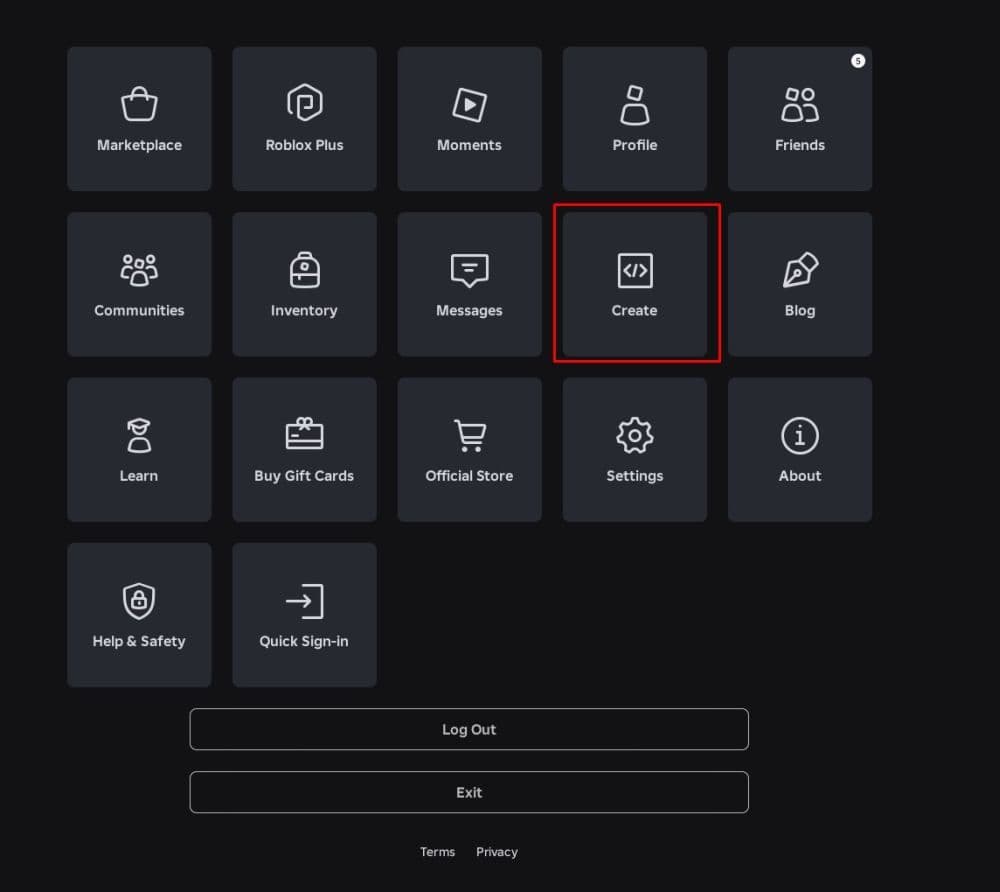
- Open the Creations section.
- Select the experience where you want to add the pass.
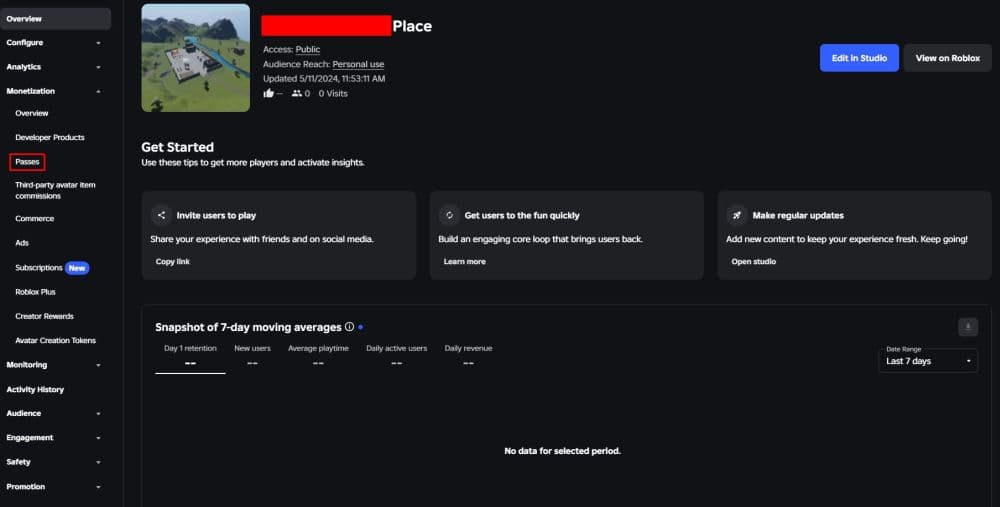
- Open the Monetization section.
- Choose Passes.
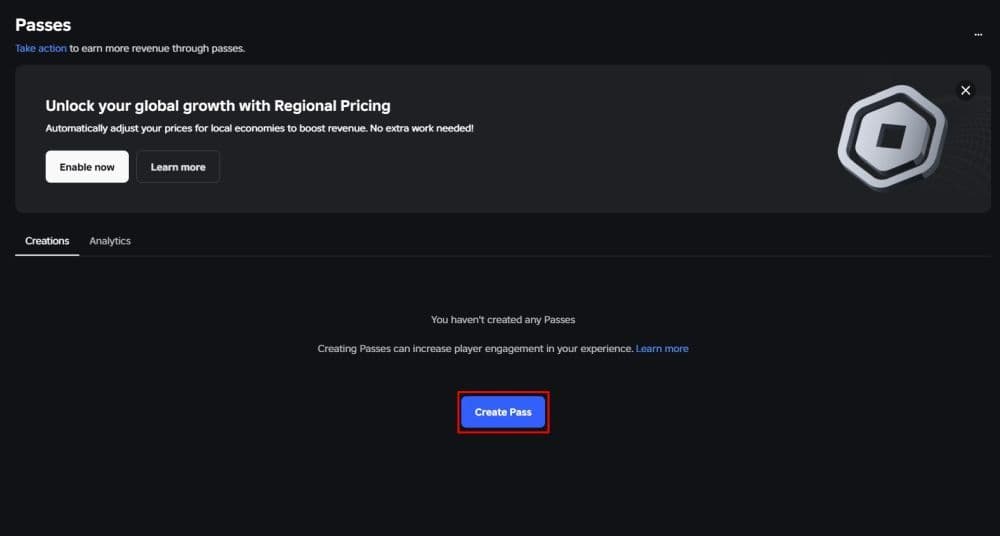
- Click Create a Pass.
- Upload a gamepass icon.
- Add a clear name and description.
- Create the pass.
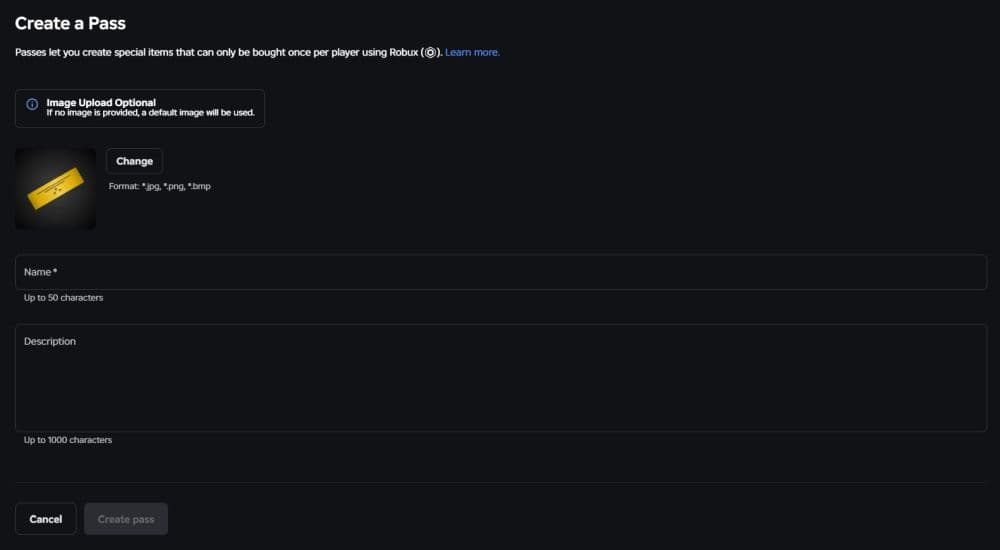
- Open the pass settings and put it on sale.
The icon matters more than many beginners think. Players often decide quickly when they see a shop item. Use a clean image that shows what the pass gives. Avoid tiny text, crowded images, or unclear symbols.
A good gamepass name should also explain the perk. “VIP Pass” works better than a vague name like “Special Pack.” The description should tell players what they get and where they can use it.
- Related: How to make a Roblox game
Is making a gamepass in Roblox free?
Yes, you can create a gamepass for free in Roblox. You do not need to spend Robux to create the pass.
You can choose how much Robux the pass costs when you put it on sale. Roblox takes a transaction fee from sales, so the creator does not receive the full amount paid by the player. This means a 100 Robux pass does not give the creator 100 Robux.
How to put a Roblox gamepass on sale
Creating the pass and selling the pass are separate steps. Many new creators make the pass but forget to activate sales.
After you create the pass, open its settings. Find the sales option, turn it on, and enter the Robux price. Save the changes before you leave the page.
Use a price that matches the value of the perk. A small cosmetic bonus should not cost as much as a strong VIP package. If the price feels fair, players are more likely to trust the purchase.
Best Roblox gamepass ideas for beginners
The best gamepasses are easy to understand and fair to use. Players should know what they are buying before they spend Robux.
Beginner-friendly gamepass ideas include VIP access, donation passes, cosmetic effects, speed boosts, special tools, and private areas. These perks are simple to explain and easy for players to notice.
Try not to make the game too unfair for free players. If a paid pass gives too much power, new players may leave quickly. A strong gamepass should feel useful, but it should not ruin the experience for everyone else.
Common mistakes to avoid when making a Roblox gamepass
New creators often make the same mistakes when they create their first Roblox gamepass.
Avoid these common problems:
- Creating a pass before the experience is ready
- Forgetting to put the pass on sale
- Using a confusing icon
- Writing a vague description
- Setting the price too high
- Forgetting to add the in-game benefit
- Not testing the pass before launch
The most serious mistake is selling a pass that does not work. Players expect paid perks to activate without confusion. If the gamepass has issues, fix them before you promote it.
More Roblox guides:
- How to link your Medal account to Roblox: Step-by-step explained
- How to check Roblox play time: How many hours have I played
- What is the Roblox memory dump error and how to fix it
- Latest Roblox One Touch codes
- How to get multiple hairs on Roblox and layer hairstyles properly
Featured Image Credit: Roblox
All Related Guides
 What is shift lock in Roblox nad how to use itUse Shift Lock on Roblox PC with this simple guide to setup, controls, common problems, and reasons the option...
 How to do a blood test in Charisma Hospital (Roblox)Learn how to do a blood test in Charisma Hospital, unlock the feature, collect samples, send them to the lab, ...
 How to get the Good Ending in Verity (Roblox)Learn how to get the Good Ending in Verity on Roblox by finding all six books, unlocking hidden badges, and av...
 How to create a player whitelist in RobloxNeed to limit Roblox game access? Learn how to create a player whitelist in Roblox using UserIds and a server-...
 How to start a hunt in Demonology (Roblox)Learn how to start a hunt in Demonology using cursed objects, Energy management, and hunt triggers to identify...
 Roblox playtime check: How to see how many hours you have on RobloxLearn how to check Roblox playtime, view weekly hours, track game activity, and estimate total time spent on R...
 Universal Tower Defense X tier list (2026): Best units & moreUniversal Tower Defense X tier list for 2026: best units, Infinite Mode picks, beginner recommendations, and c...
 How to get Dark Ring in Roblox Sailor Piece fastLearn how to get Dark Rings fast in Sailor Piece, including Jinwoo boss location, drop rate, respawn timer, an...
- 1
- 2
- 3
- 4
- 5
- 6
- 7
- 8
- 9
- 10
- 11