Is Rocket League on Steam?
Rocket League is the quintessential vehicular football game, but can players on Steam get in on the action? Yes and no. Let us explain.
Is Rocket League on Steam? Rocket League, everyone’s favorite vehicular football game, is almost a decade old but is still as popular as ever, attracting hundreds of thousands of players the world over. After initially releasing just on PlayStation 4 and Windows in 2015, Rocket League has been released on a half-dozen platforms over the years. But is Steam, Valve’s incredibly popular publishing platform one of them?
Is Rocket League on Steam?
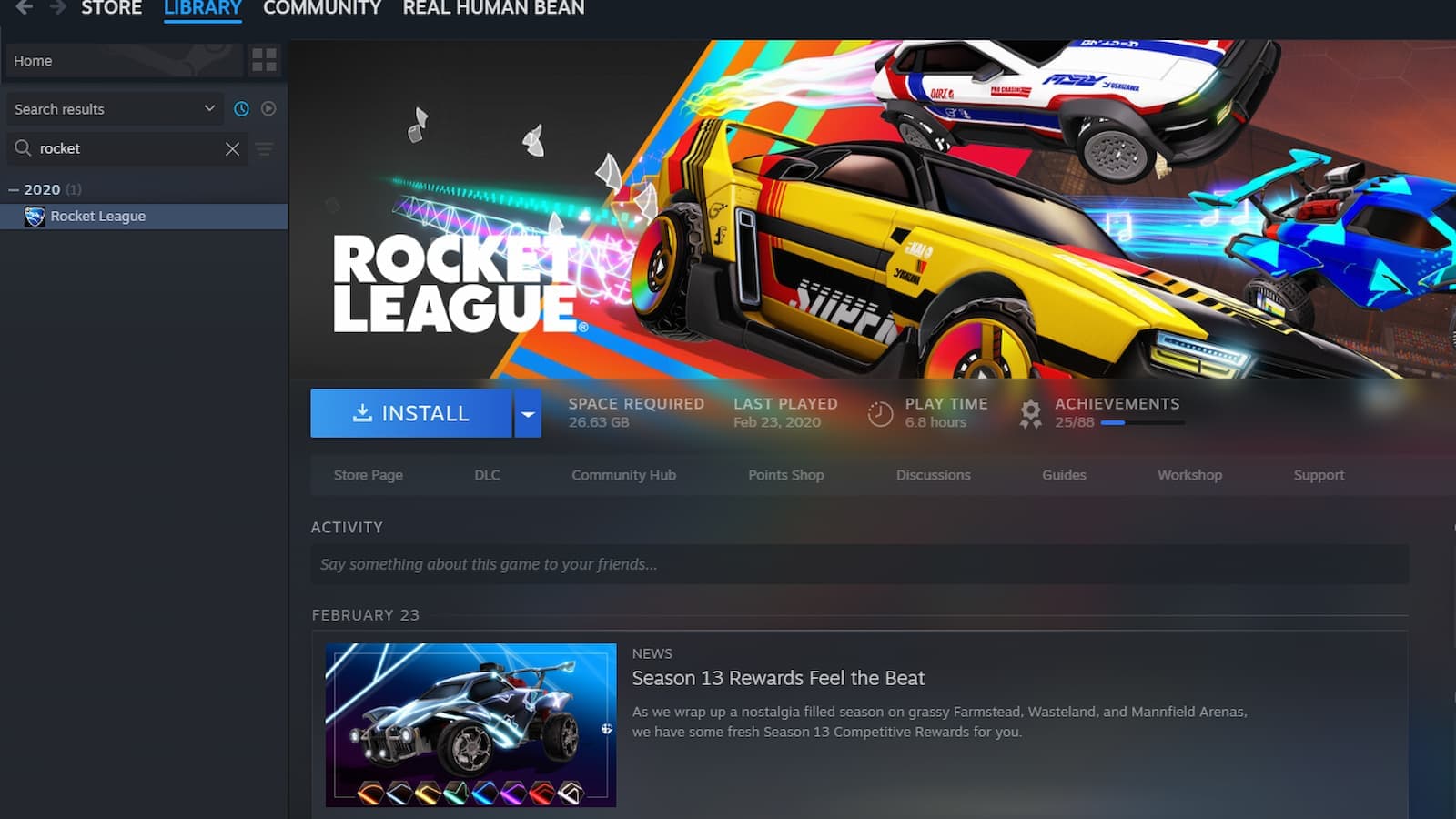
The short answer to "Is Rocket League on Steam?" is unfortunately, not anymore. If you’re looking to download and play Rocket League on Steam today for the first time, that’s not possible. The game went free-to-play in 2020, and with it, was moved wholly and fully to the Epic Games Launcher, thanks to new owners Epic Games.
Why is Rocket League not on Steam?
Today, Rocket League is an Epic Games Store exclusive, and you’ll have to download it through there to play the game on PC.

However, if you previously owned Rocket League on Steam prior to its 2020 removal, you’ll still be able to download and enjoy the game on Steam. This means if you’ve ever owned Rocket League on Steam, there’s nothing to worry about.
Additionally, you can still add, launch, and play Rocket League through Steam by adding it manually to your Steam Library.
Is it possible to get Rocket League on Steam?
To add Rocket League to Steam post its removal in 2020, all you have to do is open up your Steam, and navigate to the “Games” tab at the top left. Scroll to the “Add a Non-Steam game to My Library” and select it. From the new tab, brown to your Epic Games Launcher games folder, and select Rocket League. This will allow you to launch the game through Steam, however, you’ll still need the Epic Games Launcher installed and running to do so.
Can you transfer Rocket League from Epic to Steam?
No, you cannot transfer your Rocket League game purchase from Epic Games to Steam. The game is free-to-play on the Epic Games Launcher, and new purchases are only available there. However, you can link your Epic Games account with your Steam account to share your progress, inventory, ranks, and Rocket Pass tiers between the two platforms. This way, your progress and items carry over even though the game itself isn’t transferred.
Where can I get Rocket League on PC?
You can download Rocket League for free on PC through the Epic Games Store. Just install the Epic Games Launcher, log in or create an account, and search for "Rocket League" in the store. Click "Get" to add it to your library, then install it from your Library tab.
Note: Rocket League is no longer available for new players on Steam. However, if you owned it there before it became free-to-play, you can still access it through your Steam library.
Is Rocket League free?
Yes, Rocket League is completely free to play. You can download and enjoy the game at no cost on PC, PlayStation, Xbox, and Nintendo Switch.
While the base game is free, there are optional in-game purchases for cosmetic items, Rocket Passes, and DLC. These are entirely optional and don’t impact gameplay.
Guide Categories
All Related Guides
 How to change MPH to KPH in Rocket LeagueLearn how to change MPH to KPH in Rocket League through the Metric setting, switch back to MPH, and learn what...
 How to rank up in Rocket League and what is a good rank?Trying to climb in Rocket League? Learn how ranking works, which skills matter most, and how to make steady pr...
 How to get the JUNKO title in Rocket LeagueTrying to get the Junko title in Rocket League? Here is how the title works, who can earn it, and where BALRIG...
 How to get Rocket League on mobileFind out how to play Rocket League on mobile, where to download Rocket League Sideswipe, and whether it suppor...
 Did Rocket League get stuck on “Press any button to start”? Here is how to fix it on PCRocket League stuck on press any button to start? Try these PC fixes for cache, files, login issues, controlle...
 Rocket League codes (July 2026): All active redeem codes & free rewardsLooking for Rocket League codes? Redeem all active Rocket League redeem codes to unlock free Player Titles, th...
 How to get Jynxzi Rocket League skin & moreLearn how to get the Jynxzi Rocket League decal, title, and exclusive rewards through the Season 23 community ...
 How to fix latency variation in Rocket LeagueLearn how to fix Rocket League latency variation with Ethernet, CSTS input buffer, correct server region, and ...
- 1
- 2
- 3
- 4
- 5
- 6
- 7
- 8
- 9