How to change MPH to KPH in Rocket League
Find Rocket League's Metric setting
You can change MPH to KPH in Rocket League by enabling the Metric setting in the Interface menu. This changes speed measurements from miles per hour to kilometers per hour and only takes a few seconds.
The setting affects displayed speed measurements, including the ball speed shown after goals. It doesn't make your car or the ball move any faster.
Here's where to find it.
How to change MPH to KPH in Rocket League
To switch Rocket League from MPH to KPH:
- Launch Rocket League.
- Open Settings.
- Select the Interface tab.
- Find Metric.
- Check the box to enable it.
- Return to the game.
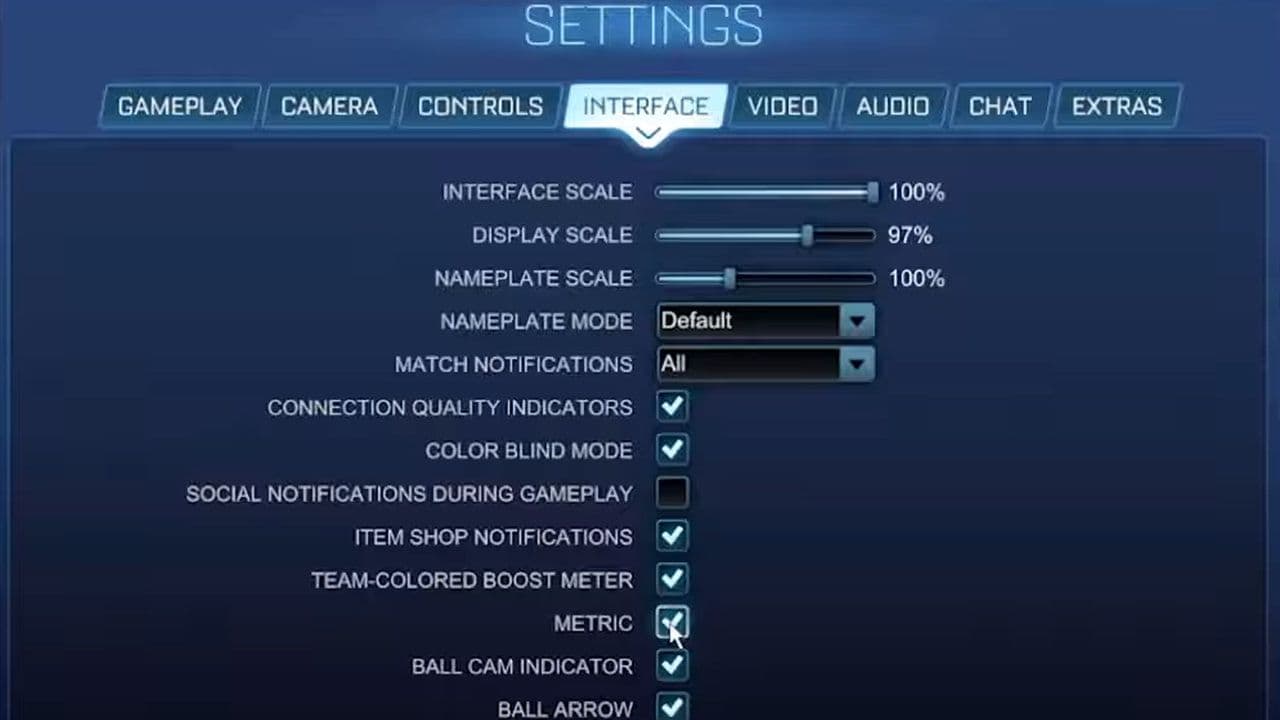
With Metric enabled, Rocket League displays applicable speed measurements in KPH (km/h) instead of MPH.
You don't need to change your console region, game language, or any configuration files.
How to change KPH back to MPH in Rocket League
Switching back is just as easy:
Settings > Interface > Metric > Off
Unchecking Metric changes the displayed speed measurements back to MPH.
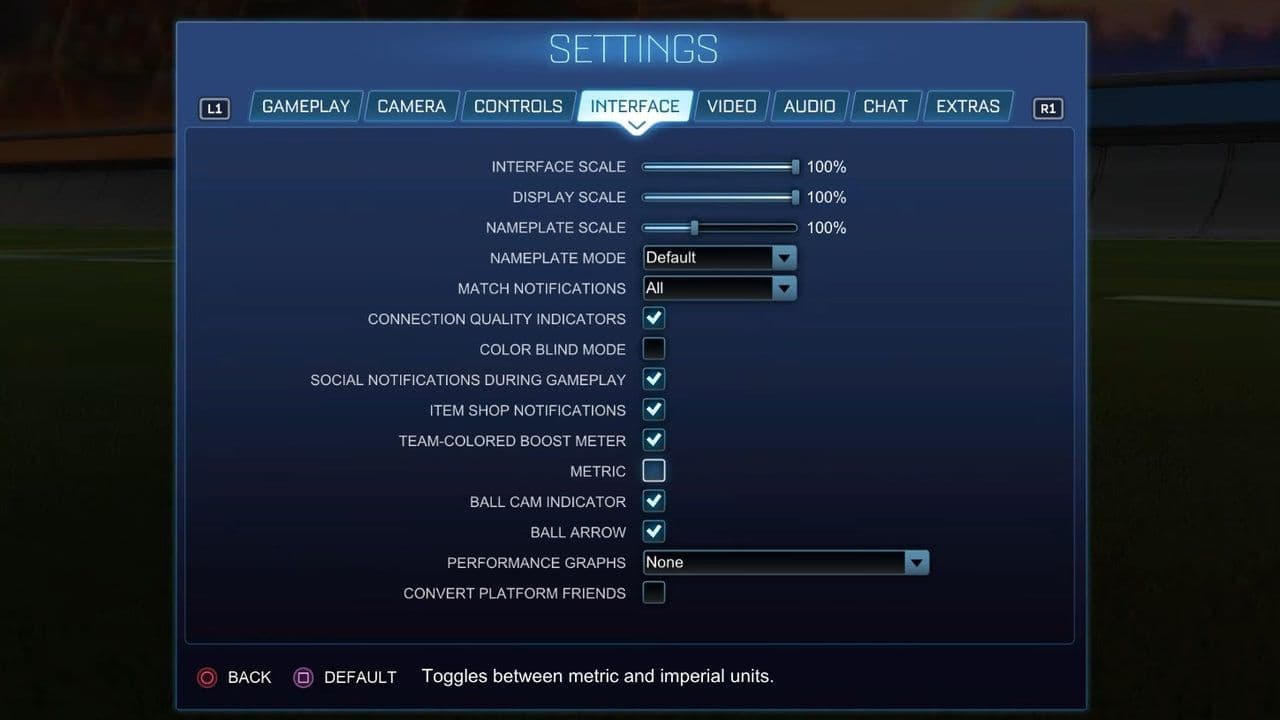
You can switch between the two whenever you want.
Does changing MPH to KPH affect Rocket League gameplay?
No. MPH and KPH are only different ways of displaying the same speed.
For example, 100 KPH is about 62 MPH. The actual speed hasn't changed; Rocket League is simply displaying it using a different unit.
Why is Rocket League still showing MPH?
If Rocket League continues displaying MPH, return to:
Settings > Interface > Metric
and make sure Metric is checked.
The location of this option has caused some confusion because much older Rocket League guides place Metric in different settings tabs.
You also don't need BakkesMod or another third-party tool just to change the game's built-in MPH/KPH setting.
Can you show your car speed in KPH?
There's an important distinction here.
Rocket League's Metric setting changes the speed measurements the game already displays, such as the ball speed shown after a goal. It doesn't add a permanent car speedometer to the normal HUD.
If you've seen someone playing Rocket League with a live car-speed display, they may be using an additional PC tool or overlay. The standard Metric option itself doesn't create that HUD element.
Is KPH or MPH better in Rocket League?
Neither gives you an advantage.
KPH is useful if you're used to the metric system or regularly compare your shots with players who discuss Rocket League speeds in kilometers per hour. MPH may feel more natural if that's the unit you use normally.
The conversion is:
1 MPH = approximately 1.609 KPH
So a 60 MPH goal is roughly 97 KPH, while a 100 KPH shot is around 62 MPH.
You don't need to calculate this manually while playing. Just enable Settings > Interface > Metric and Rocket League will display speeds in KPH for you.
Find more Rocket League guides below:
Guide Categories
All Related Guides
 How to rank up in Rocket League and what is a good rank?Trying to climb in Rocket League? Learn how ranking works, which skills matter most, and how to make steady pr...
 How to get the JUNKO title in Rocket LeagueTrying to get the Junko title in Rocket League? Here is how the title works, who can earn it, and where BALRIG...
 How to get Rocket League on mobileFind out how to play Rocket League on mobile, where to download Rocket League Sideswipe, and whether it suppor...
 Did Rocket League get stuck on “Press any button to start”? Here is how to fix it on PCRocket League stuck on press any button to start? Try these PC fixes for cache, files, login issues, controlle...
 Rocket League codes (July 2026): All active redeem codes & free rewardsLooking for Rocket League codes? Redeem all active Rocket League redeem codes to unlock free Player Titles, th...
 How to get Jynxzi Rocket League skin & moreLearn how to get the Jynxzi Rocket League decal, title, and exclusive rewards through the Season 23 community ...
 How to fix latency variation in Rocket LeagueLearn how to fix Rocket League latency variation with Ethernet, CSTS input buffer, correct server region, and ...
 Rocket League TikTok Drops guide: How to get free rewardsRocket League TikTok Drops guide: earn free cosmetics, reward codes, RLCS drops, and learn how to redeem TikTo...
- 1
- 2
- 3
- 4
- 5
- 6
- 7
- 8
- 9