Best audio settings for Warzone 2
Being unprepared for enemies in Warzone 2 is a mighty fine way to get yourself killed. Without the best audio settings, you won't hear enemy footsteps, sound cues, or gunshots, and dead is exactly where you’ll be head… ed.
If you want to start playing Warzone 2 like a pro, you'll need the best audio settings, whether you're playing on a PC or console. Warzone 2 is a hyper-competitive battle royale, and you'll never get an edge over your opponents without audio settings that give you hearing so sharp it’d make Daredevil jealous.
So no, this guide isn't just here to get you the best audio settings for Warzone 2 – it's here to increase your chance of winning consistently. So buckle up and get ready to boost your kill-to-death ratio to superhuman levels.
Why do you need the best audio settings for Warzone 2?
Finely tuned audio settings are all the more important when you don't have eyes on the enemy in any shooter, but especially in COD’s Warzone 2.
Since many players use the Dead Silence field upgrade to mute their footsteps, fully optimized audio settings are all the more crucial in Call of Duty’s battle royale. If you're ready to have the best enemy intel and reach the winner's circle time and again, then read on, configure these audio settings, and keep your ears sharp and your gun loaded at all times.
Players who lose in battle royales are the players who only think about their loadout – trust us when we say in games like Warzone 2, your audio settings are just as important.
What is the best audio setting for Call of Duty Warzone 2?
The best audio settings make the most important sounds loud and easier to hear. That said, most pros would agree that it’s also super important to have settings you’re comfortable with.
The audio settings you’ll find below are designed to minimize distractions and make sure you don't miss any important sound cues. We've chosen these settings to amplify key cues like enemy footsteps, that will help you identify enemy locations, stay alive, and get kills in the fast-paced short TTK world of Warzone 2.
Whether you're playing Warzone 2 on a console like Xbox X Series or PS5, these audio settings will work just as well on any console as on PC.
But always remember – comfort is key. Use these audio settings as a starting point and don't be afraid to tweak any if you feel like they need changing to better suit your preferences.
When tweaking these audio settings, your goal should be to be able to hear someone's footsteps from the other side of the area you’re in.
Volume settings
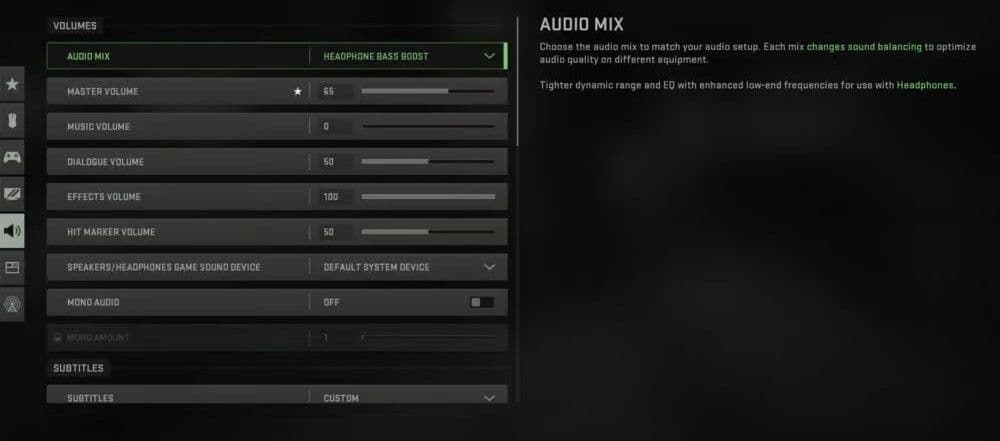
You've got a few variables with these volume settings. Most players prefer to keep music volume low to avoid distractions, and dialogue and effects volumes high to make sure they don't miss any important audio cues (like when enemies drop a claymore).
The best audio mix setting will depend on what feels right for you, but we've given the three best options for you to choose from.
Play around until you find the best settings for you.
Subtitles settings
Voice chat settings
Microphone settings
Advanced audio settings
Ready to fine-tune the rest of your Warzone 2 settings? Here's some other guides you should check out then…
FAQs
How to hear footsteps better in Warzone?
Use the Headphones Bass Boost or Boost High audio mix in settings, and turn Effects Volume to 100%. Lower Music and Dialogue Volume to focus on sound cues. Avoid Mono Audio, use a good stereo headset, and keep background sounds minimal. This setup enhances directional awareness and makes footsteps clearer.
Is 7.1 surround sound good for Warzone?
7.1 can help, but it’s not always better. Many players find stereo or headphone mode gives more accurate positional audio. Virtual surround may blur sounds, so it’s best used only with headsets that support true 7.1 audio.
Is bass boost better for footsteps?
Not always. Bass boost amplifies explosions and gunfire but can drown out footsteps. Instead, focus on increasing mid and high frequencies in your EQ for clearer step sounds. Keep bass moderate for balance.
How to fix COD audio?
Set Master Volume high, Effects to max, and lower Music Volume to zero. In console or PC audio settings, use the correct output (Headphones or Stereo). Disable extra sound processing if it makes audio muddy. If sounds are still unclear, adjust your headset’s EQ to emphasize treble and reduce heavy bass.
Guide Categories
All Related Guides
 Warzone 2 controller settingsBest Warzone 2 controller settings here! For Controller players looking to make the best out of Warzone 2, her...
 Best settings for Warzone 2.0 XboxKit yourself out with the best Xbox settings for Warzone 2.0. Whether you want to master your movement or take...
 Best graphics settings for Warzone 2Don’t waste another second trying to figure out Warzone 2's best graphics settings from scratch, we’ve done th...
 Best settings for Warzone on PlaystationThere are a lot of minor tweaks you can introduce in Warzone's settings to adjust your gameplay experience. TH...
 Is Warzone 2 split screen?Do you wonder if you can play Warzone 2 split screen? Here is your answer!...
 How to Slide Cancel in Warzone Slide cancelling is back in Call of Duty so read our guide on how to effectively slide cancel in Warzone to ou...
 How to turn on proximity chat in Warzone 2In this guide, we will show you How to turn on proximity chat in Warzone 2 and use the feature in your games!...
 Best Warzone 2 settings PCThis guide will walk you through the best PC settings to optimize your gameplay for maximum performance and vi...