Best graphics settings for Warzone 2
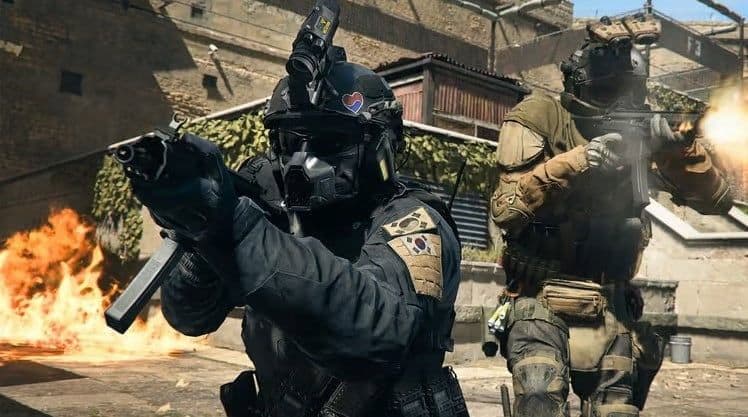
If you want that competitive edge over your opponents in Call of Duty’s battle royale, Warzone 2, you’ll need the best graphics settings for the job.
COD can be pretty demanding on computers and consoles alike, but we’re here to make sure that no matter what you’re playing Warzone 2 on, you’ll have the best graphics settings possible to guarantee high FPS and low latency.
Don’t waste another second trying to figure out the best graphics settings from scratch, we’ve done that legwork so you don’t have to! With this guide on your side, all you’ve got to do is a spot of fine-tuning.
Stick with us and you’ll be racking up a demonic kill count in no time (without being forced to fork out for the latest hardware to crank up that FPS).
Can’t you just use Warzone 2’s graphic presets?
You can… but we wouldn’t advise it!
COD’s graphic preset settings tend to lean towards creating the prettiest gameplay experience, rather than the most functional one. Sure, we all want our gaming to look so real it makes you question reality… but we’re here to play a game, first and foremost, right?
So if you want the best gaming experience while playing Warzone 2… don’t use the presets. Use the settings we’ve laid out below for PC or console as a base, then tinker with them until your graphics and FPS are perfectly balanced for an excellent time hunting headshots in this battle royale extravaganza!

Best PC graphics settings
Before we jump into the best Warzone 2 graphics settings PC, here are the kind of computer specs we’re considering low-end…
- OS – Windows 10
- CPU – Intel Core i3-6100 or Core i5-2500K, AMD Ryzen 3 1200
- RAM – 8GB
- GPU – NVIDIA GTX 960, AMD Radeon RX 470
- VRAM – 2GB
And here are the kind of computer specs we’re considering high-end…
- OS – Windows 10 or 11
- CPU – Intel Core i5-6600K, Core i7-4770K, Core i7-8700K, AMD Ryzen 5 1400, or AMD Ryzen 7 1800X
- RAM – 12–16GB
- GPU – NVIDIA GTX 1060 or RTX 3060ti, AMD Radeon RX 580 or RX 5700XT
- VRAM – 4–8GB
Once you’ve figured out where your PC sits on the low to high-end scale, then just walk down the list and configure the best graphics settings for your computer to run Warzone 2.
If you’re using a low-end PC and still getting any lag, try lowering your resolution to 720p or 1280 x 720 – it might be just the trick to getting a better FPS.

Best console graphics settings
There isn’t much difference between the best graphics settings for Warzone 2 on different consoles. Whether you’re rocking the PS4 or PS5, or a diehard Xbox One or Series S fan, use these graphics settings as your baseline… then get fine-tuning to fit your personal preferences!

Best pro graphics settings
Before you jump to emulate these graphics settings, keep in mind that a lot of pro Warzone 2 players have absolutely beastly machines. They’re usually playing on a godlike PC with insane processing power and the latest graphics cards, which allows them to play with a high FPS and the silkiest, smoothest visuals this side of Avatar.
You might not be able to match these settings… that’s all we’re saying! But if you can play Warzone in 1080p with 144 FPS, go nuts!
FAQs
How to get 240 FPS in Warzone?
To reach 240 FPS, you need a high-end PC: top CPU, powerful GPU, fast RAM, and SSD. Use Fullscreen Exclusive mode, turn off VSync, and lower graphics settings like shadows, reflections, and textures. Also use upscaling tools (DLSS, FSR) and enable low-latency or GPU optimization features.
Because 240 FPS is very demanding, many builds aim for it at 1080p or 1440p with settings dialed down.
How to make Warzone 2 run better?
Lower heavy effects (shadows, ambient occlusion, volumetric lighting). Keep VRAM use below ~ 80% of your GPU’s capacity. Update your graphics drivers and Windows, use a proper power plan, and disable unnecessary background tasks. You can also reinstall the game cleanly if configs or files are corrupted. Some users have found fixes by clearing out old game config folders.
Is 60 FPS good for Warzone?
Yes, 60 FPS is playable and adequate for many players, especially if your monitor is 60 Hz. It gives smooth motion in most scenarios. But in competitive settings or with high-refresh monitors, higher FPS gives you faster reaction times and a smoother experience.
Why is Warzone 2 so laggy?
Lag can come from several sources: exceeding VRAM capacity, outdated drivers, background processes, a weak CPU/GPU, or network issues like high ping or packet loss. Also, some game bugs (e.g. voice chat settings) have been reported to lower FPS in certain seasons.
How to fix Warzone stuttering?
- Keep VRAM usage under ~80%.
- Use Fullscreen Exclusive mode instead of borderless.
- Update or rollback your GPU drivers.
- Change your power plan to maximize performance.
- Disable “GPUUploadHeaps” in the game’s config file to reduce micro-stutters.
- Lower in-game graphics settings — especially texture, shadow, and reflection settings.
- If all else fails, reinstall the game and clear out old config files.
Guide Categories
All Related Guides
 Warzone 2 controller settingsBest Warzone 2 controller settings here! For Controller players looking to make the best out of Warzone 2, her...
 Best audio settings for Warzone 2Without the best audio settings for Warzone 2, you’ll miss crucial sounds like footsteps or gunfire—and that’s...
 Best settings for Warzone 2.0 XboxKit yourself out with the best Xbox settings for Warzone 2.0. Whether you want to master your movement or take...
 Best settings for Warzone on PlaystationThere are a lot of minor tweaks you can introduce in Warzone's settings to adjust your gameplay experience. TH...
 Is Warzone 2 split screen?Do you wonder if you can play Warzone 2 split screen? Here is your answer!...
 How to Slide Cancel in Warzone Slide cancelling is back in Call of Duty so read our guide on how to effectively slide cancel in Warzone to ou...
 How to turn on proximity chat in Warzone 2In this guide, we will show you How to turn on proximity chat in Warzone 2 and use the feature in your games!...
 Best Warzone 2 settings PCThis guide will walk you through the best PC settings to optimize your gameplay for maximum performance and vi...