How to turn off parental controls on Fortnite
Here's what you need to know about parental controls in the game of Fortnite.
With this article, you can learn how to turn off parental controls on Fortnite in 7 easy steps.
What if you want a little more freedom to explore? That's where disabling parental controls comes in. In this guide, we'll show you how to take control of your Fortnite experience by turning off those pesky parental controls. Plus, we'll explore why you might want to make this change in the first place.
How to turn off parental controls on Fortnite
If you're looking to disable parental controls on Fortnite, whether for yourself or someone else, it's a straightforward process. Here's a step-by-step guide in simple terms:
- Open Fortnite settings: Launch Fortnite and head to the settings menu. You can find this by clicking on the gear icon in the top right corner of the screen.
- Access parental controls: Look for the "Parental Controls" option in the settings menu.
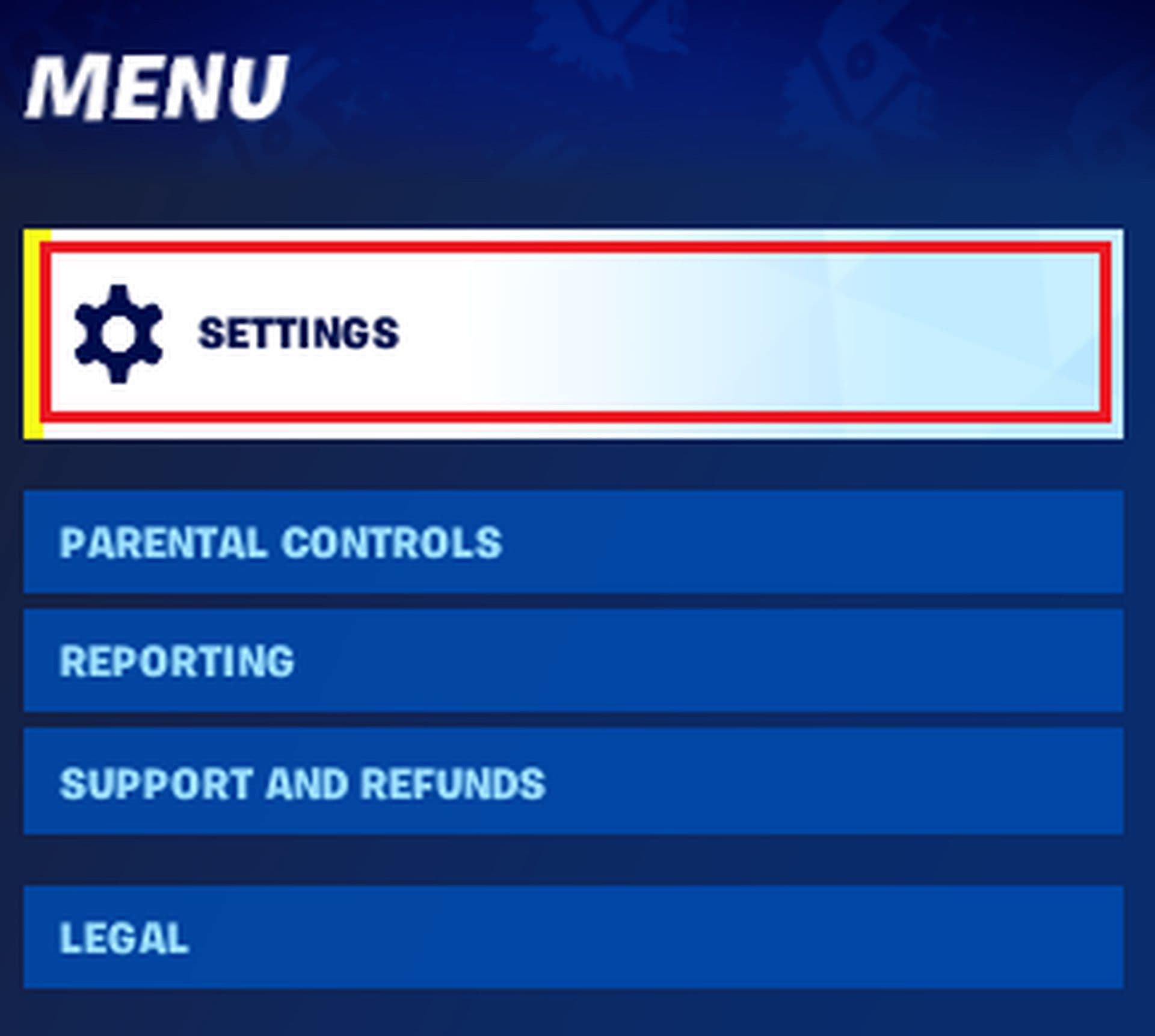
- Enter your PIN: You'll need to enter your six-digit PIN to make any changes. This is to ensure that only authorized users can adjust the settings.
- Find the control you want to turn off: Scroll down the list of parental control options until you find the one you want to disable. This could be content restrictions, communication controls, purchase limits, or playtime management.
- Turn off the control: There's a toggle switch next to each control. Simply click it to turn off the control setting. The switch will change to show it's off.
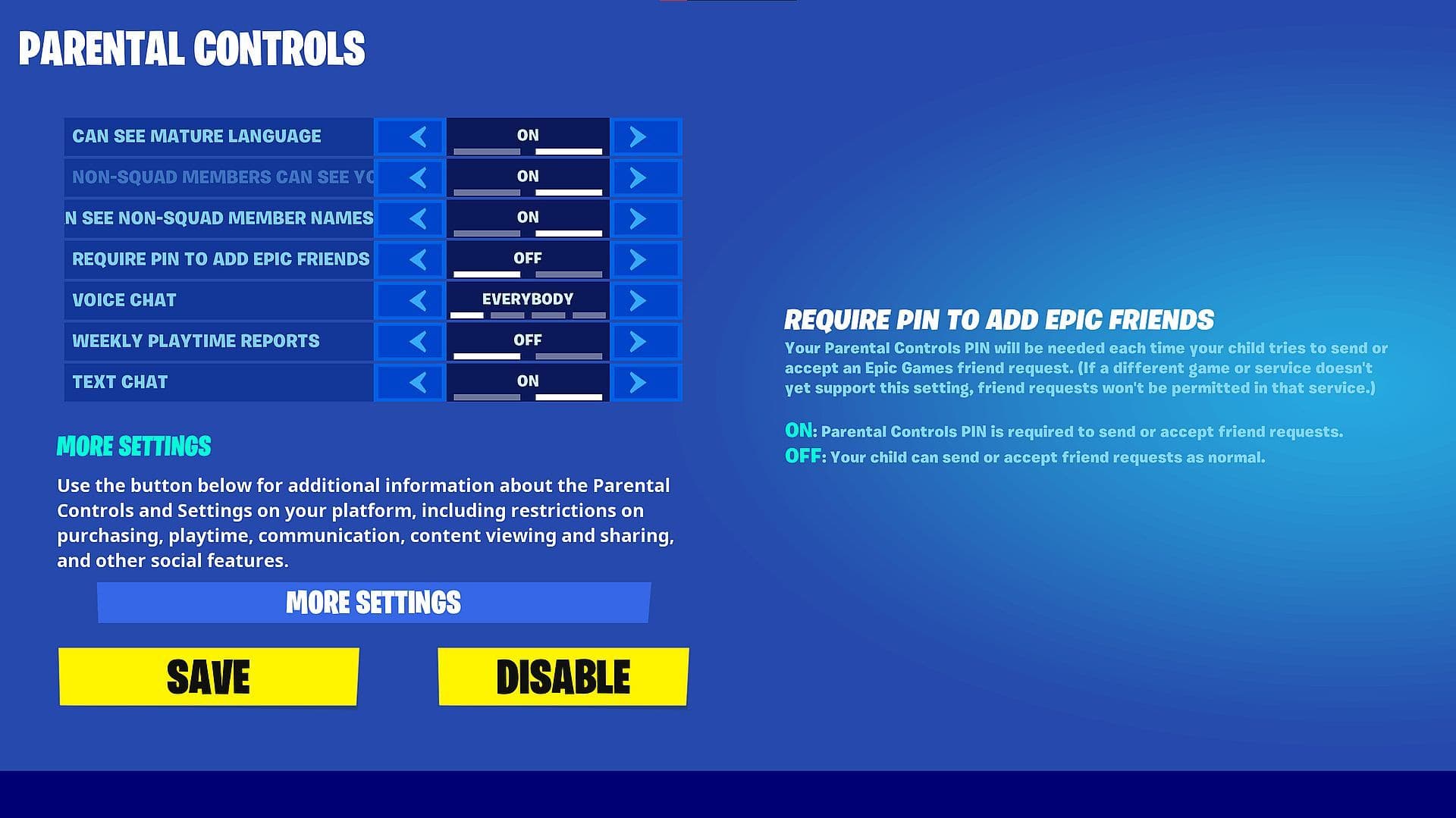
- Double-check and save: Before you're done, quickly review your changes to ensure everything's as you want. Once you're sure, hit the "Save" button to confirm your changes.
- Exit settings: Close the settings menu, and you're all set. Your changes are saved automatically, and parental controls will no longer restrict your Fortnite experience.
By following these easy steps, you can quickly disable parental controls in Fortnite and enjoy your gaming without any restrictions. It's a simple process that gives you more control over your gaming experience.
Why to turn off parental controls on Fortnite?
Disabling parental controls in Fortnite is a choice that players or their parents might make for a few reasons.
One reason is wanting to access more content as players grow older. Parental controls often limit what content can be seen based on age ratings. But as players mature, they might want to see more of what the game offers.
Another reason is wanting more freedom while playing. As players get older, they might feel ready to make their own decisions about things like talking to other players, buying things in the game, and managing their playtime.
Some players also want to talk freely with others while playing, which parental controls might restrict. They might feel more comfortable turning off these restrictions.
Additionally, players should turn off controls that limit how much they can spend in the game. Once they're confident they can manage their spending, they might choose to disable these limits.
Turning off parental controls can also show trust between parents and children. It shows that the player has proven they can make good choices while playing.
Overall, it's important to think carefully about turning off parental controls. It should be based on the player's maturity level, gaming habits, and what the player and parents feel comfortable with. Finding the right balance between safety and freedom can help everyone enjoy Fortnite in the best way possible.
FAQs
Why do I suddenly have parental controls on Fortnite?
If your account indicated you're under the age of 13 (or your region’s age of consent), Fortnite may have automatically applied restrictions known as Cabined Accounts. This limits features like chat and in-game purchases until a parent verifies your age or provides consent.
How to give parental permission in Fortnite?
Parents or guardians can unlock restricted features by entering their email and setting up a 6-digit PIN via the Epic Account Portal or the in-game Parental Controls menu. Once verified, communication options, purchase approvals, and other settings become available.
How old do you have to be to remove parental controls in Fortnite?
Once the account holder turns 13 (or reaches the local digital consent age), many communication and interaction restrictions lift—provided there’s parental approval via the Epic account settings.
Is it illegal for under-13s to play Fortnite?
No. It’s not illegal for children under 13 to play Fortnite. However, certain features—like purchasing or chatting with strangers—are restricted without parental consent. Tournament participation may still require age verification.
Why does Fortnite think I'm a child?
Your age may have been set to under 13 during account creation or incorrectly flagged. To correct this, a parent can update the age in account settings or contact Epic Support to adjust the date of birth and remove restrictions.
All Related Guides
 Best Fortnite settings on PCOptimizing your FPS in Fortnite can be the key to your success, especially for PC gamers. These Fortnite PC se...
 How to Turn on Ping in FortniteDon't let your connection let you down! Turn on this indicator and check your ping in Fortnite....
 How to turn on footsteps in FortniteLearn in easy steps how to turn on footsteps in Fortnite settings...
 How do I find the best sens for Fortnite? (Updated 2025)Need help building faster and winning more gunfights? Learn how to find the best PC and controller sensitivity...
 How to turn on Aim Assist in FortniteAim assist is a must in Fortnite to improve your aim against other players. Here is how to turn it on!...
 Does Fortnite have proximity chat?Does Fortnite have proximity chat? Explore how this feature works in Creative mode, how to enable it, and more...
 How to sit out in Fortnite: A gamer's guide to taking a break in the heat of battleLearn how to sit out in Fortnite's intense battles with our step-by-step guide to sitting out in the game. Cat...
 How to play split screen on Fortnite in 5 stepsLearn How to play split screen on Fortnite on Xbox or PlayStation, dominate Duos or Squads, and troubleshoot a...
- 1
- 2