Transforming into Werewolves in Minecraft: A Complete Mod Guide
This mod gives an extra spice to your Minecraft playthroughs.ON THIS PAGE:
- How does the Werewolf mod work in Minecraft?
- How to download the mod
- How to play the Werewolf mode in Minecraft
- How to become a Werewolf in Minecraft
- How the Ritual System works for leveling up as a Werewolf
- Werewolf level requirements and skill trees
- All Werewolf skills and abilities
- Werewolf minions and biomes

While the base game offers endless sandbox creativity, mods often take the experience to a new level. The Minecraft Werewolves mod gives players a new way to play. This mod works as an add-on to the popular Vampirism mod and the experience is very different from normal Minecraft. Here is a comprehensive guide on what you need to know about this guide!
Make sure to check out our beginner's guides to Minecraft.
How does the Werewolf mod work in Minecraft?
The Werewolves mod is not a standalone mod. You need to install the Vampirism mod first because it adds factions like vampires and hunters. The Werewolves mod adds werewolves as a new playable faction.
As a werewolf, you live like a normal player during the day. At night, you can transform into different werewolf forms and gain new powers. These powers include:
- Increased speed and strength
- Armor-piercing attacks
- Night vision
- Damage resistance
However, you also become weak to silver weapons. Many abilities work only during the night or in special biomes like Werewolf Heaven. If you experience visual glitches or loading issues after installing the mods, try using this guide on how to reload chunks.
How to download the mod
To download and install the Werewolves mod, follow these steps:
- Download and install Minecraft Forge (version 1.21.1 recommended).
- Go to CurseForge and download the Vampirism mod.
- Download the Werewolves mod. Make sure it matches your Vampirism version.
- Also download GuideAPI_VP if needed.
- Place all mod files into the mods folder in your Minecraft directory.
- Open Minecraft using the Forge profile.
- Start a new world and start playing the game.
The mod is open-source and compatible with multiple Forge versions. However, it may have visual issues with certain mods like Epic Fight.
How to play the Werewolf mode in Minecraft
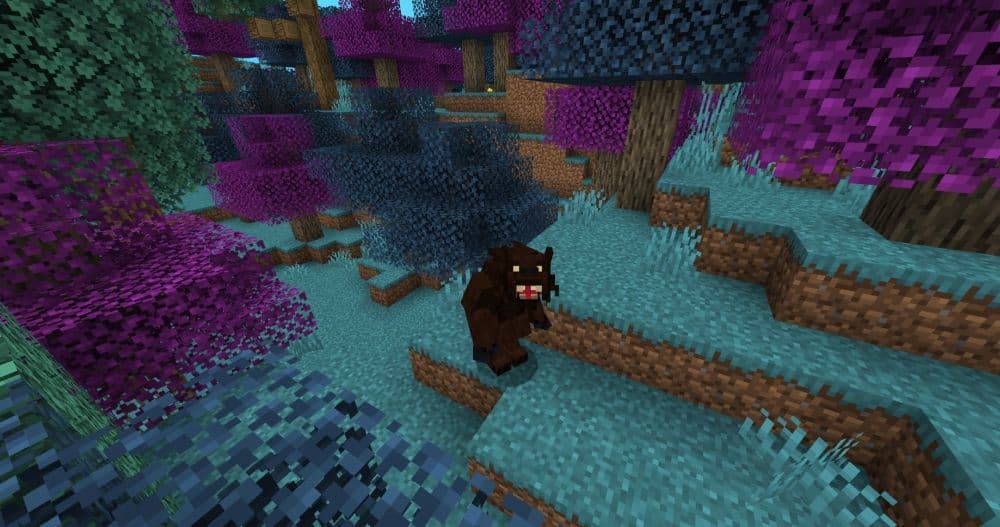
Once installed, the Werewolves mod fully integrates with the game. Players can encounter wild werewolves in certain biomes, fight them, or get infected during combat. Gameplay changes depending on your transformation level. You’ll need to hunt, perform werewolf rituals, and follow quests to grow stronger.
As a werewolf, you level up by doing damage, collecting items, and performing rituals. You can also explore new skills and unlock different werewolf forms. Later, you can become a werewolf lord and recruit minions.
How to become a Werewolf in Minecraft
To become a werewolf, you must first get infected. This usually happens when a wild werewolf attacks and gives you the “Lupus Sanguinem” effect, which lasts indefinitely.
Another way is to right-click a Werewolf Tooth item while holding it. Once infected, go to sleep. When you wake up, you’ll transform into a Level 1 werewolf. From this point, you gain access to werewolf-specific menus and skills.
How the Ritual System works for leveling up as a Werewolf
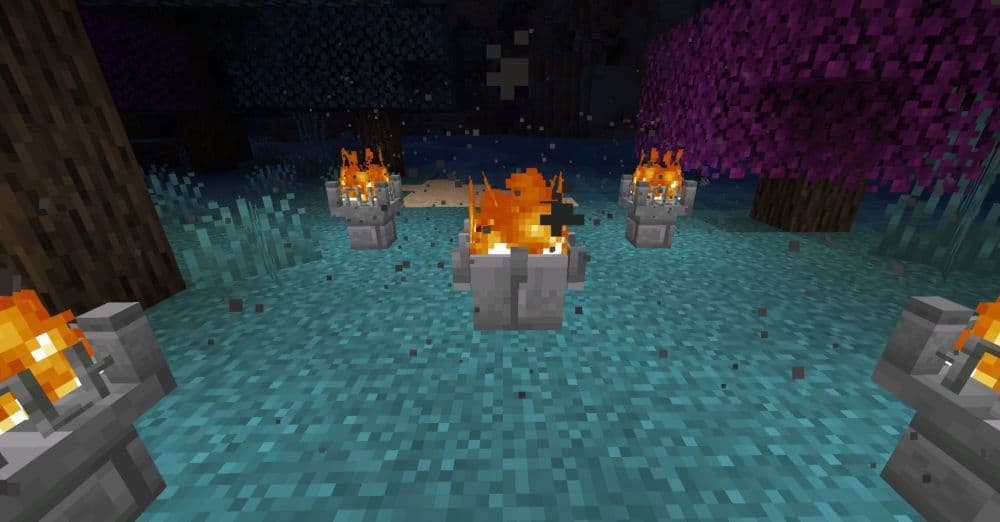
To level up, you must perform werewolf rituals using a Stone Altar. Here is how it works:
- Build a Stone Altar and place 4 Stone Altar Fire Bowls around it.
- Light the fire bowls with a torch or flint and steel.
- Add two items to the altar:
- Cracked Bones (dropped by skeletons and werewolves)
- Livers (dropped by villagers and werewolves)
- Deal enough total damage to enemies (tracked as "prey snatched").
- Right-click the altar with flint and steel to start the ritual.
Each level requires more items and damage. You can see the full requirements in the table below. Also, you can build your base around the Stone Altar for easy access to rituals, and even use some of these cute Minecraft house ideas to decorate your werewolf sanctuary.
Werewolf level requirements
Here are the level-up requirements for performing werewolf rituals in the Minecraft Werewolves mod:
Werewolf skill trees: Beast, survivalist, and utility paths
The Werewolves mod offers three skill trees. Each path gives different benefits.
Beast Path
- Increases your melee damage
- Adds skills like Bleeding Bite, Rage, and Throat Seeker
- Good for direct combat
Survivalist Path
- Boosts speed and mobility
- Adds skills like Sixth Sense, Climber, and Survivalist Form
- Good for fast movement and dodging
Utility Path
- Supports your allies or tribe
- Adds skills like Howling, Wolf Pack, and Hide Name
- Good for team play and strategy

All Werewolf skills and abilities you can unlock in Minecraft mods
Werewolves have access to a wide variety of skills. Early on, players unlock Partial Turn and Night Vision. As they level up, more abilities become available:
- Bleeding Bite causes damage over time.
- Stun Bite immobilizes enemies for a short period.
- Throat Seeker offers a chance to instantly kill targets under 25% health.
- Frightening causes mobs to flee.
- Leap, Climber, and Movement Tactics improve agility.
- Wolf Pack summons wolves to help in battle.
- Improved Resistance and Regeneration enhance survivability.
- Free Will and Silver Blooded reduce transformation limitations and weaken silver damage.
Players earn skill points over time and use them to build out their abilities according to their preferred playstyle.
How to recruit and manage Werewolf minions in Minecraft
Once you reach Level 14, you can become a werewolf lord. To do this, visit a village controlled by werewolves and complete the “Are you worthy?” task. After that, you can start building a tribe.
To recruit minions:
- Offer a Moon Charm to a wild werewolf.
- If accepted, the werewolf joins your tribe.
- Your lord level controls how many minions you can have.
Minions can perform tasks like:
- Following and protecting you
- Defending a location
- Collecting special items (e.g. Liver, Cracked Bone)
You can also level them up using Moon Charm upgrades and increase their strength, health, and inventory.
Werewolf Forest and Werewolf Heaven biomes
The mod adds one new biome, just like Vampire Forest in the previous version of this mod, named Werewolf Heaven with teh attributes listed below:
- Safe zone for werewolves during daytime
- Similar to Vampire Forest in the Vampirism mod
- Lets you use full power without sunlight limits

How to cure the Werewolf Curse in Minecraft mods
If you want to stop being a werewolf, you can use a Strange Injection.
Follow these steps:
- Craft an Empty Syringe using glass and a glass pane.
- Right-click a werewolf to collect a sample.
- Place an Injection Table in your base.
- Inject yourself with the strange effect.
- Wait 100 seconds for the cure to take effect.
You will return to normal and leave the werewolf faction.
Looking for more Minecraft guides? Check out the ones below:
- Minecraft Serene Seasons Mod: A deep dive into seasonal dynamics and gameplay
- Here is a closer look at the free Japanese government Minecraft map
- Minecraft Movie's Post-Credits Scene: Implications for the Minecraft Universe
- Minecraft blast furnace recipe: How to make a blast furnace in Minecraft
Featured Image Credit: Cheaterpaul on CurseForge
All Related Guides
 Top 5 Minecraft 26.1 seeds you must try todayFind the best Minecraft 26.1 seeds for villages, rare biomes, island survival, and creative builds, with seed ...
 How to turn on keep inventory in MinecraftUse the correct Keep Inventory command in Minecraft and learn how it works across Java, Bedrock, servers, and ...
 How to breed tropical fish in MinecraftCan you breed tropical fish in Minecraft? Here is the clear answer, plus how to catch, move, and use tropical ...
 Minecraft Chaos Cubed guide: Everything new in the 2026 updateExplore everything new in Minecraft Chaos Cubed, including Sulfur Caves, Sulfur Cubes, geysers, new blocks, co...
 How to change render distance in MinecraftChange render distance in Minecraft with simple steps for Java and Bedrock, plus tips to balance better visibi...
 How to grow mangrove trees in MinecraftFind out how to grow mangrove trees in Minecraft with simple steps, growth requirements, farming tips, and com...
 How to craft a name tag in MinecraftLearn how to craft a name tag in Minecraft, how to use it with an anvil, and why it matters for pets, mobs, an...
 Here is how to make a water elevator in MinecraftHere’s how to make a water elevator in Minecraft, including the materials you need and why your bubble column ...
- 1
- 2
- 3
- 4
- 5
- 6
- 7
- 8