Observer recipe in Minecraft and what you need to know about the item
For advanced builds that use redstone, an observer is a must-use block.ON THIS PAGE:
- What is an observer in Minecraft?
- Observer recipe materials in Minecraft
- How to craft a Minecraft Observer
- How to use an observer in Minecraft
- How to activate an observer in Minecraft
- How to place an Observer to face a direction
- Why can't I craft an observer in Minecraft?
- How to make an observer and piston work together?

Many Minecraft players use the Observer block to build redstone devices. The block sends a redstone pulse when it sees a change in the block in front and this makes many things much easier in the game by adding automation. The Observer is an important tool that makes your redstone creations work better and more reliably. In this piece, you will find everything you need to know about this Minecraft item, including the Observer recipe, how to use it and more!
What is an observer in Minecraft?
An Observer is a block that sends a redstone signal when a change occurs in the block it faces. It watches one block closely. When that block changes, the Observer gives a quick signal that lasts for two game ticks. The signal is strong and can power other redstone components.
The Observer works in both Java and Bedrock editions. In Java Edition, it watches for changes in the block’s state. In Bedrock Edition, it detects block updates. It helps players set off traps, run automatic farms, and build flying machines.
Observer recipe materials in Minecraft
You need a few items to make an Observer, like the other Minecraft item recipes in the game. Gather these materials before you start:
- 6 Cobblestone blocks: You can get these by mining stone with any pickaxe. They are common in the overworld.
- 2 Redstone dust pieces: Mine redstone ore with an iron pickaxe to collect these.
- 1 Nether quartz: Find this ore in the Nether or trade with a stone mason villager.
- A Crafting Table: You need this to combine the items.
Make sure you have all these supplies. They are easy to find if you explore the right areas. Use this list as a checklist before you craft.
How to craft a Minecraft Observer
Follow these steps to craft an Observer:
Prepare Your Materials:
- Collect 6 cobblestone blocks.
- Get 2 redstone dust pieces.
- Obtain 1 Nether quartz
Arrange the Items on the Crafting Table:
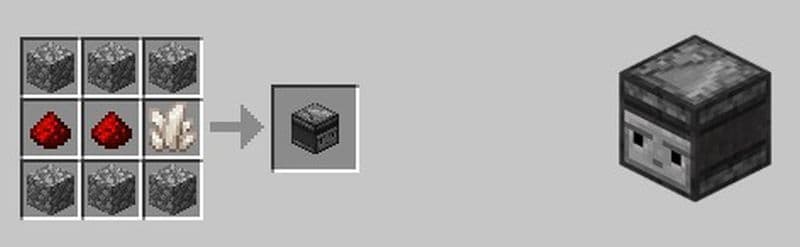
- Place the 6 cobblestone blocks in the top and bottom rows of the grid.
- Put the 2 redstone dust pieces in the left and center slots of the middle row.
- Set the Nether quartz in the middle right slot.
Complete the Craft:
- Check that the items are in the correct positions.
- A single Observer appears in the result box.
- Move the Observer to your inventory.
This recipe is unique and the Observer cannot be found in any other way. When you mine for redstone, try to search between y-levels -64 and -34. Look for Nether quartz around y-level 114 in the Nether.
How to use an observer in Minecraft
The Observer block finds many uses in Minecraft. It makes many builds simpler and more effective. Here are some ways to use the Observer:
Automated Farming
The Observer can check when a plant grows. When it sees a change, it sends a redstone signal. This signal can push a piston. The piston breaks the plant at the right moment. A hopper or chest collects the broken items. This method helps you run a farm without constant attention.
Redstone Clocks and Timers
When you place two Observers facing each other, they send fast pulses. These pulses create a redstone clock. The clock drives other redstone devices and circuits. This setup is simple and produces reliable signals for complex builds.

Traps and Secret Doors
Place the Observer near pressure plates or daylight sensors. When these devices change, the Observer sends a signal. Use this signal to open a secret door or trigger a trap. This adds an extra layer of security to your builds.
Flying Machines and Other Contraptions
The Observer detects movements and block changes. This function is useful in flying machines. It helps the machine work in the right direction and with good timing. Many players use the Observer in advanced redstone builds. It works well with repeaters, comparators, and pistons. The result is a precise and fast system.
How to activate an observer in Minecraft
First, place the Observer in the world. Make sure its face looks at the block you want to monitor. Connect the back of the Observer to a redstone wire or other redstone devices.
When the block in front changes, the Observer sends a redstone signal. The signal flows through the connected wires and activates any device on its path. This process works with many redstone mechanisms. Use it in farms, traps, or machines to get fast and reliable action.

How to place an Observer to face a direction
It is very important to place the Observer facing the right way if you are trying to build a clock or a timer. Some players are finding it hard to make their Observers face the right direction but it is actually pretty easy to do so. Here is how to do it on Java and Bedrock Editions:
For Java Edition:
- Stand where you want to place the Observer.
- If you want the Observer to face upward, stand below the spot.
- Look at the edge or corner of a block. This helps set the Observer in the correct direction.
- Place the Observer. Its face will point away from you.
For Bedrock Edition:
- Place a slab block near your build area.
- Move back so that the slab is in front of you.
- Place the Observer next to the slab.
- The Observer will face toward the slab.
These steps help you control the Observer’s orientation. They make it easier to build redstone devices that work as planned. Use these tips to set up traps, clocks, or automated machines.
Why can't I craft an observer in Minecraft?
Many players can't craft an observer because of a few common mistakes. Here are the main reasons:
- Wrong recipe: You need 6 cobblestones, 2 redstone dust, and 1 nether quartz. The cobblestones go on the sides and bottom. The quartz goes in the center. The redstone dust goes on top and in the middle row. If you place the items in the wrong slots, the game won’t show the result.
- Missing nether quartz: You can only find nether quartz in the Nether. If you haven’t gone to the Nether yet, you won’t have this material. Without it, you can’t craft an observer.
- Wrong game version or mode: The observer doesn’t exist in older versions like Minecraft Classic. You also won’t need to craft it in Creative mode because you can take it from the inventory menu.
Check your recipe first. Make sure your game is up to date. Go to the Nether to collect quartz if you don’t have any. Fixing one of these problems usually solves the issue.
How to make an observer and piston work together?
An observer watches a block in front of it. When that block changes, the observer sends a short redstone signal from its back. If you place a piston behind the observer, the signal will activate the piston.
To build it, face the observer toward the block you want to watch. Put the piston directly behind the observer. The piston will move every time the block changes. You can use it to harvest crops, break blocks, or trigger other devices.
If you need certain automations in the game, you will have to make an Observer at some point. For example, automated farming is a great feature that you can benefit from with this item. It sends a signal when it detects a change in a block and leaves the rest to you.
Are you looking for more Minecraft guides? Check out the ones below:
- Saddle recipe in Minecraft: Is it craftable?
- Get your Minecraft shield recipe before heading into danger
- Minecraft barrel recipe: A better storage option than chests?
- Minecraft anvil recipe & 5 reasons it's worth the iron
- Cake recipe in Minecraft: How to make and all other details
Featured Image Credit: Minecraft
All Related Guides
 How to craft rails in Minecraft: Regular, Powered, Detector, ActivatorLearn how to craft rails in Minecraft, use minecarts, and build better tracks with a simple recipe and clear s...
 Minecraft Splash Potion of Weakness recipe: Complete brewing guideMinecraft Splash Potion of Weakness recipe guide: ingredients, brewing steps, villager curing, and common mist...
 How to craft a bookshelf in MinecraftLearn how to craft a bookshelf in Minecraft, place it around an enchanting table, and reach stronger enchants ...
 Smelting in Minecraft: A complete guide to furnaces, fuels, and efficiency tips for 2025Master Minecraft smelting in 2025: best furnaces, fuels, and pro tips to boost speed, save resources, and auto...
 Minecraft enchanting table recipe, setup, language and moreMaster Minecraft enchanting! Learn the Minecraft enchanting table recipe, setup for max levels, the secret lan...
 Minecraft blast furnace recipe: How to make a blast furnace in MinecraftWant to smelt ores faster? Here's the blast furnace Minecraft recipe and a step-by-step guide on how to craft ...
 Minecraft beacon guide: How to make a beacon in MinecraftBeacon Minecraft guide: Learn how to craft, activate & optimize a beacon for max power, buffs & effects in Min...
 Minecraft piston recipe & sticky piston guideLearn how to craft and use pistons in Minecraft! Master sticky pistons & get secret doors, traps, flying machi...
- 1
- 2
- 3
- 4
- 5