How to refund Fortnite account

We've all been there. A dazzling new skin catches your eye in the Fortnite Item Shop, tempting you with its vibrant colors and sleek design. In a moment of impulsive excitement, you hit "purchase" without a second thought. But buyer's remorse can be a powerful force, leaving you staring at your dwindling V-Buck balance and wondering what you've done.
Fortunately, Epic Games understands the fickle nature of desire and offers a generous refund system for unwanted purchases. This guide will equip you with the knowledge you need to navigate the process and reclaim your precious V-Bucks.
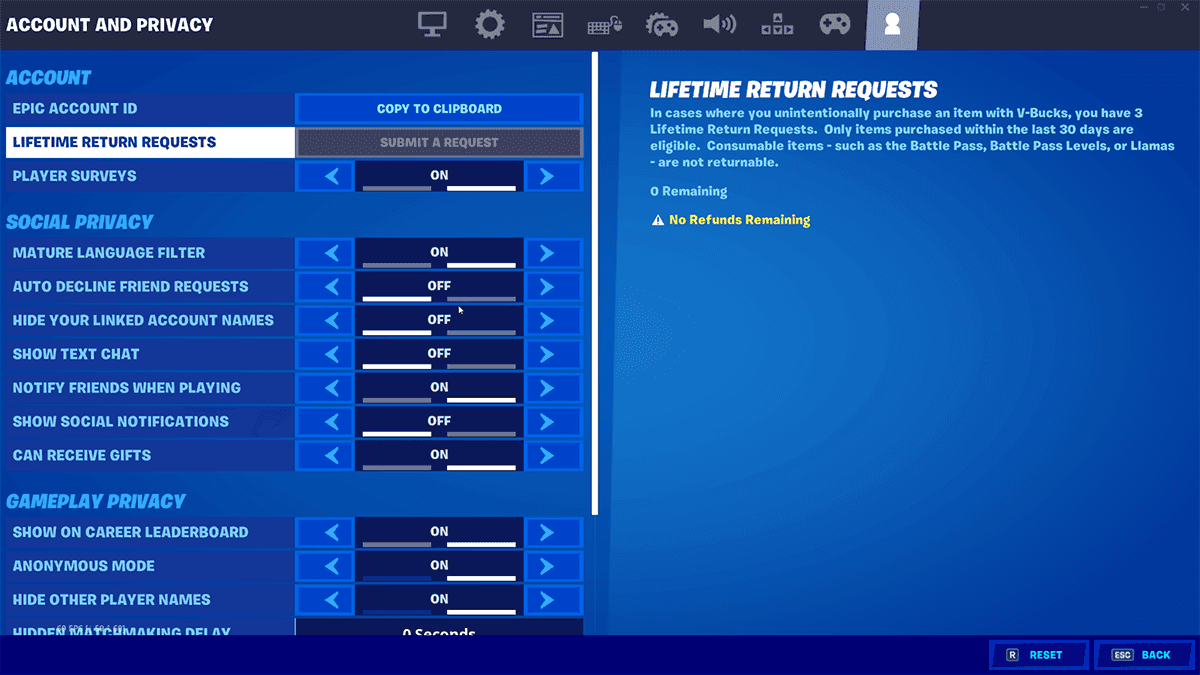
How to refund Fortnite account
- Launch Fortnite and enter the vibrant world of the Lobby.
- Access the main menu, nestled discreetly in the top left corner.
- Click the Settings icon, represented by a gear, and prepare to delve into the options.
- Navigate the menu with precision, selecting "Support & Refunds" to find your solution.
- Click on "Return or Cancel Purchase," the gateway to reclaiming your V-Bucks.
- A list of your past purchases will appear, each item a potential candidate for return.
- Remember, the window for a refund is finite. Only items purchased within the last 30 days are eligible.
- Once you've identified the unwanted item, hover over it and click "Use Return Ticket."
- A final confirmation screen will appear, acting as your last chance to reconsider.
- If you're certain about your decision, click "Yes" and watch as your V-Bucks return to your account.
- A confirmation message will greet you, notifying you of the refunded V-Bucks.
- Click "OK" to return to the previous page and continue exploring the Fortnite landscape.
Understanding the rules:
Your arsenal of Return Tickets is limited, with a maximum of 3 available at any given time.
Epic Games recognizes the potential for depletion and rewards you with an additional Return Ticket annually if you fall short of the 3-ticket limit.
However, there is no infinite supply. Once you reach 3 tickets, the annual bonus ceases.
By following these steps and adhering to the rules, you can ensure a smooth and successful refund experience. So, next time you find yourself tempted by a flashy skin or an alluring emote, remember that you have the power to change your mind and reclaim your V-Bucks.
With this knowledge in hand, venture forth into the Fortnite world with confidence, knowing that your V-Bucks are safe and your purchases are never irreversible. Enjoy the ever-evolving landscape of Fortnite without fear of buyer's remorse!
FAQs
How long do Fortnite refunds take?
For in-game cosmetic items refunded via Return Tickets, you typically receive your V-Bucks back within 24 to 48 hours. For games or other purchases processed through Epic Store support, refunds can take 3 to 14 business days, depending on the payment method.
Can you reverse a refund on Fortnite?
Once a refund is processed, it's final. If you used a Return Ticket or canceled a purchase, the refund cannot be reversed. If you’re looking to re-obtain the item, you’d need to repurchase it using V-Bucks again.
How many times can I refund on Fortnite?
Each account receives up to 3 Return Tickets per year, meaning you can process up to three refunds. You’ll regain one ticket per year if you have fewer than three. Refunds don't stack beyond that, and additional requests are not granted—unless in exceptional cases through support.
All Related Guides
 Fortnite Droid Tycoon Chips guide: Best ways to farm chips fastFortnite Droid Tycoon Chips guide: best farming methods, upgrades, Rebirth tips, and how to use Chips wisely....
 5 best Fortnite Star Wars games you can play right now Best Fortnite Star Wars games: Galactic Siege, Escape Vader, Droid Tycoon, creator islands, and how to play th...
 How to ride on a player's shoulders in FortniteHow to ride on a player's shoulders in Fortnite: steps, controls, quest completion tips, and how Shoulder Ride...
 All Garden vs. Brainrot codes in Fortnite: Updated listLooking for Fortnite Garden vs Brainrot codes? Get every working code, learn how to redeem them, and boost you...
 Latest Fortnite Steal the Brainrot codes (May 2026)Find all active Fortnite Steal the Brainrot codes to summon Brainrot Gods and boost rewards fast....
 Fortnite Karaoke mode explained: How to play?Discover Fortnite Karaoke mode in Fortnite Festival, including Pro Vocals, Mic Vocals setup, supported songs, ...
 How to get a refund for D4VD Fortnite cosmeticsThis guide explains the D4VD Fortnite cosmetics refund, including refund steps, eligible items, Locker Bundle ...
 Veno’s Fortnite settings: Who is he and what is his setupFind Veno Fortnite settings for mouse, keyboard, video, gear, DPI, sensitivity, and competitive setup....
- 1
- 2
- 3
- 4
- 5
- 6
- 7
- 8
- 9
- 10
- 11
- 12
- 13
- 14
- 15
- 16
- 17
- 18
- 19
- 20