How to mark enemies in Fortnite?
Marking enemies in Fortnite is a very useful part of the game and can help your team out while in combat. Here's how to do it efficiently.
Since its launch in 2017, Fortnite has undergone numerous updates, introducing major narratives and gameplay features. However, amidst these grand changes, it's the subtle yet impactful features that often surface during actual gameplay.
One such feature is the ability to mark enemies, which can turn the tides in your favor in team games be it Duos, Trios, or Squads. This feature proves to be an essential game-changer, especially when voice chat is not an option or when you're enjoying Split Screen mode, another underappreciated aspect of the game.
In this guide, we have focused on the most commonly used method to mark enemies in Fortnite, which proves to be effective in most situations. However, newer updates to the game often introduce new, but relatively temporary methods of locating and pinpointing enemies to grant competitive advantage and also specific to completing your challenges introduced as part of the season.
Using the Waypoint button to mark enemies in Fortnite
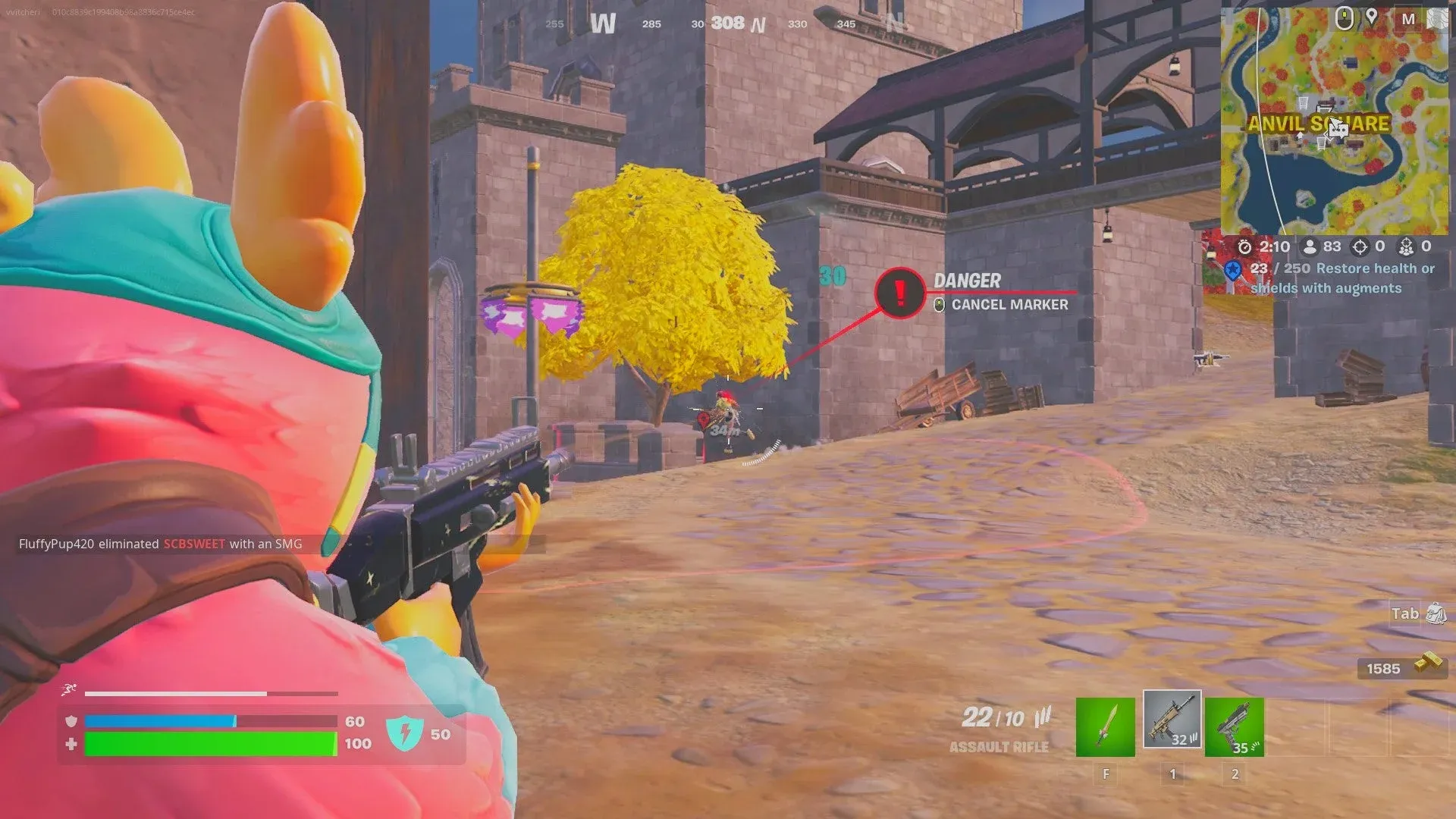
If you drop into a game, and encounter enemies while looting or heading towards the storm, you might find yourself needing backup before engaging in a 1v4 firefight where your odds of coming out alive are less. In such cases, especially if all other methods of communicating are unavailable, a quick and effective way to mark enemies is by pressing the waypoint button twice, resulting in a Red Marker appearing in the distance with an exclamation point that alerts your teammates.
Depending on the keybinds you have set, the waypoint button could differ widely but by default it is the Left arrow on the D-Pad on Controllers and Middle Mouse Button on PC. To mark enemies in Fortnite, you will need to target the location where you noticed the enemy by moving your crosshair, so it is directly over it. Once you've done that, press the Waypoint button. This will mark the item so your teammates can see where exactly they will need to go to retrieve it.
FAQs
How to ping enemies in Fortnite
To ping enemies, aim at the enemy or the location you want to mark and press the ping button. On PC, this is usually the middle mouse button, and on consoles, it’s typically the left D-pad. This places a marker visible to your teammates, alerting them to enemy positions.
How to highlight enemies in Fortnite
You can highlight enemies by enabling the "Visualize Sound Effects" option in settings, which shows visual cues for enemy movements like footsteps or gunfire. Also, when you aim at an enemy, pressing the ping button will mark them as a threat for your team to see.
How to spot enemies in Fortnite
To spot enemies effectively, use the "Mark Danger When Targeting" feature to automatically ping enemies when aiming at them. Additionally, enabling visual sound cues and optimizing your graphics settings can help you detect enemies more easily by making them stand out in the environment.
How to spawn enemies in Fortnite
In Creative mode, you can spawn enemies using the NPC Spawner device. Place the NPC Spawner from the Devices tab, then customize the NPC’s behavior and attributes in its settings. This lets you create custom enemy encounters for practice or gameplay.
Top Related Guides


All Related Guides
 Best Fortnite settings on PCOptimizing your FPS in Fortnite can be the key to your success, especially for PC gamers. These Fortnite PC se...
 How to Turn on Ping in FortniteDon't let your connection let you down! Turn on this indicator and check your ping in Fortnite....
 How to turn on footsteps in FortniteLearn in easy steps how to turn on footsteps in Fortnite settings...
 How do I find the best sens for Fortnite? (Updated 2025)Need help building faster and winning more gunfights? Learn how to find the best PC and controller sensitivity...
 How to turn off parental controls on FortniteHow to turn off parental controls on Fortnite Learn to disable Fortnite parental controls in 7 easy steps. Exp...
 How to turn on Aim Assist in FortniteAim assist is a must in Fortnite to improve your aim against other players. Here is how to turn it on!...
 Does Fortnite have proximity chat?Does Fortnite have proximity chat? Explore how this feature works in Creative mode, how to enable it, and more...
 How to sit out in Fortnite: A gamer's guide to taking a break in the heat of battleLearn how to sit out in Fortnite's intense battles with our step-by-step guide to sitting out in the game. Cat...
- 1
- 2