Fixing the Hytale NAT type restricted error: How to change NAT type
Fix Hytale NAT issues fast.
If you are trying to play multiplayer and see Hytale NAT type restricted, you are not alone. This is one of the most common network issues in Hytale, and it can stop friends from joining your world or cause constant connection failures.
This Hytale guide explains what Hytale NAT type restricted means, why it happens, and how to change your NAT type step by step so multiplayer works properly.
What does “Hytale NAT type restricted” mean?
NAT stands for Network Address Translation. It is a system used by your router to control how devices inside your home network communicate with the internet.
In Hytale, the NAT type shows how easy it is for other players to connect to you.
- Standard NAT: Your network allows incoming game connections. Hosting works normally.
- Restricted NAT: Incoming connections are blocked or limited. Friends may not be able to join your world.
When Hytale shows NAT type restricted, it usually means your router or internet provider is blocking the game’s required UDP traffic, which Hytale uses for multiplayer connections.
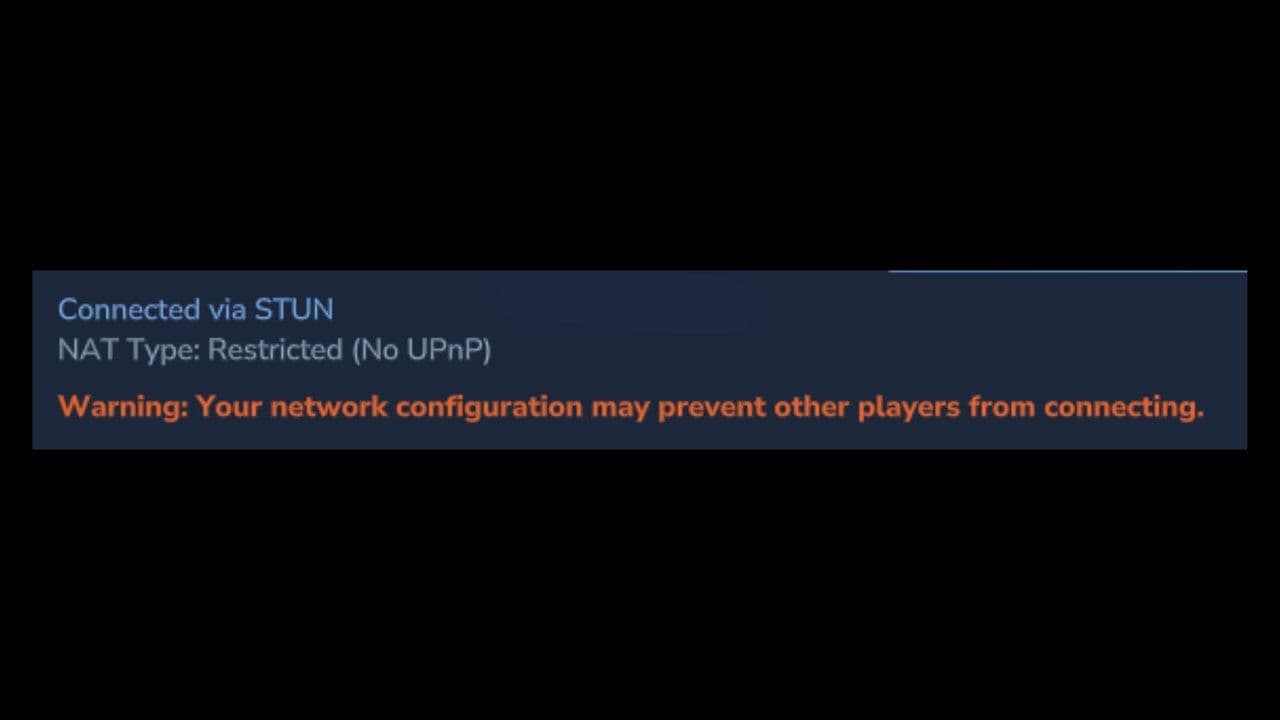
Why does Hytale NAT type become restricted
There is no single cause. In most cases, one or more of the following issues is responsible.
- UPnP is disabled: Hytale relies on UPnP (Universal Plug and Play) to automatically open network ports. If UPnP is turned off in your router settings, Hytale cannot receive incoming connections.
- Ports are not forwarded: If UPnP fails, your router does not know where to send Hytale’s network traffic. Without manual port forwarding, your NAT type remains restricted.
- Double NAT: Double NAT happens when:
- You use a modem + router combo, and
- Another router or Wi-Fi extender is also acting as a router
- This creates two layers of NAT, blocking incoming connections even if UPnP is enabled.
- Firewall blocking UDP: Windows or router firewalls may block UDP traffic, which Hytale uses instead of TCP.
- ISP Carrier-Grade NAT (CGNAT): Some internet providers do not give you a real public IP address. If you are behind CGNAT, incoming connections are blocked before they reach your router. In this case, local fixes may not work.
How to fix the Hytale NAT type restricted error
Follow these steps in order. After each step, restart Hytale and check if the NAT type changes.
Step 1: Enable UPnP (Recommended First Fix)
- Open a web browser.
- Go to your router’s address (commonly 192.168.1.1 or 192.168.0.1).
- Log in using your router credentials.
- Find UPnP under Advanced, LAN, or NAT settings.
- Enable UPnP.
- Save settings and restart your router.
UPnP allows Hytale to automatically open the UDP port it needs for multiplayer.

Step 2: Manually port forward Hytale
If Hytale NAT type is still restricted, use manual port forwarding.
What you need
- Your PC’s local IP address (example: 192.168.1.100)
- Router access
Port forwarding settings
- Protocol: UDP
- Port: UDP 5520 (default Hytale port)
- Forward to: Your PC’s local IP
Steps
- Go to Port Forwarding / Virtual Server in your router.
- Add a new rule using the settings above.
- Save changes.
- Restart the router and PC.
Important: Set a static local IP for your PC so the forwarding rule does not break after a reboot.
Step 3: Check for Double NAT
You may have double NAT if your modem has Wi-Fi enabled or if you are using multiple routers. Here is how to fix it:
- Put your modem into bridge mode, or
- Enable UPnP on all routers, or
- Use only one router for NAT
This is a very common reason for Hytale NAT type restricted not changing even after port forwarding.

Step 4: Allow Hytale through your firewall
Your firewall may be blocking Hytale.
On Windows:
- Open Windows Defender Firewall.
- Go to Allow an app through the firewall.
- Allow Hytale for Private and Public networks.
- If needed, manually allow UDP traffic on port 5520.
Step 5: ISP NAT or CGNAT solutions
If none of the above works, your ISP may be the issue.
- Contact your ISP and ask for a public IPv4 address
- Use a gaming VPN or tunnel network
- Host on a dedicated server or VPS
CGNAT cannot be fixed from your router alone.

Don’t forget to…
- Always restart your router after changes
- Use wired Ethernet if possible
- Test with one friend at a time
- NAT type depends on both players’ networks
If you follow this guide carefully, you can fix the Hytale NAT type restricted error in most home networks and enjoy smooth multiplayer without connection errors.
That’s all for today! Looking for more? Check out these:
All Related Guides
 Best Hytale plugins and how to create yoursExplore the best Hytale plugins for servers, from permissions and shops to NPCs, kits, performance tools, and ...
 Meet the Hytale Pokemon mod Pokefind: Release date, gameplay and moreGet the latest details on the Hytale Pokemon mod Pokefind, including gameplay plans, server support, release s...
 Can you create an infinite water source in Hytale?Learn if a Hytale infinite water source is possible, why the 2x2 trick fails, and which mods can help you get ...
 Who is The Hedera in Hytale Endgame & QoL mod and how to defeat itFind out how to reach and defeat The Hedera in Hytale Endgame & QoL mod, including boss phases, best prep, and...
 How to heal in Hytale (Food, potions, totem & more)How to heal in Hytale: food, potions, totem, regen buffs, best methods, and full survival guide explained....
 Hytale Update 4 (Part 5): What’s new?Hytale Update 4 Part 5 adds 500+ new blocks, system upgrades, bug fixes, and major improvements before full re...
 All Hytale signs & how to craft themDiscover all 29 Hytale signs, their crafting recipes, and how to use them. Learn sign mechanics, placement tip...
 When will Hytale fully release? (2026 update)When will Hytale fully release? Learn the expected 2026–2027 timeline, Early Access plans, and what must happe...
- 1
- 2
- 3
- 4
- 5
- 6
- 7
- 8