How to refund Hytale in 4 steps
Refund Hytale before the deadline
If you're looking for how to refund Hytale, the process is simple — but only if you meet the official requirements. Unlike Steam, there is no automatic refund button, so you’ll need to submit a support request through the official Hytale system operated by Hypixel Studios.
In this guide, we’ll walk you through the 4 exact steps to refund Hytale, the key eligibility rules you must meet, and what happens after you submit your request.
3 things you have to know before you refund Hytale
Before you request a refund, you must confirm that you qualify. The most important part of learning how to refund Hytale is understanding the eligibility rules.
1. 14-day refund window
You must request your refund within 14 days of the purchase date.
If more than 14 days have passed, your request will likely be denied. The countdown starts from the moment the transaction is completed — not from your first time launching the game.
2. Less than 4 Hours of playtime
Your total playtime must be under 4 hours.
If you exceed this limit, the refund request may not be approved. This is similar to refund systems used by other major publishers but with slightly different thresholds.
3. Payment method must support refunds
Refunds are issued back to the original payment method. However, some third-party payment providers may not support refunds. If you used a prepaid system or certain regional payment processors, eligibility may vary.

If you are unsure, check your payment confirmation email or contact support for clarification.
Information you must prepare before requesting a refund
To successfully process your request, you need specific details. Having everything ready will speed up the process.
Prepare the following:
- The email address used to purchase Hytale
- Your transaction ID (often shown in your purchase receipt)
- The purchase date and time
- The payment method used (credit card, PayPal, etc.)
- A short explanation for your refund request (optional but recommended)
Your transaction ID is the most important detail. It is usually included in the confirmation email sent immediately after purchase.
How to refund Hytale fast
Now let’s walk through exactly how to refund Hytale.
- Go to the official Hytale Support page. Make sure you are using the legitimate website connected to Hytale, Hypixel Studios, or Riot Games. Avoid third-party sites claiming to offer refunds.
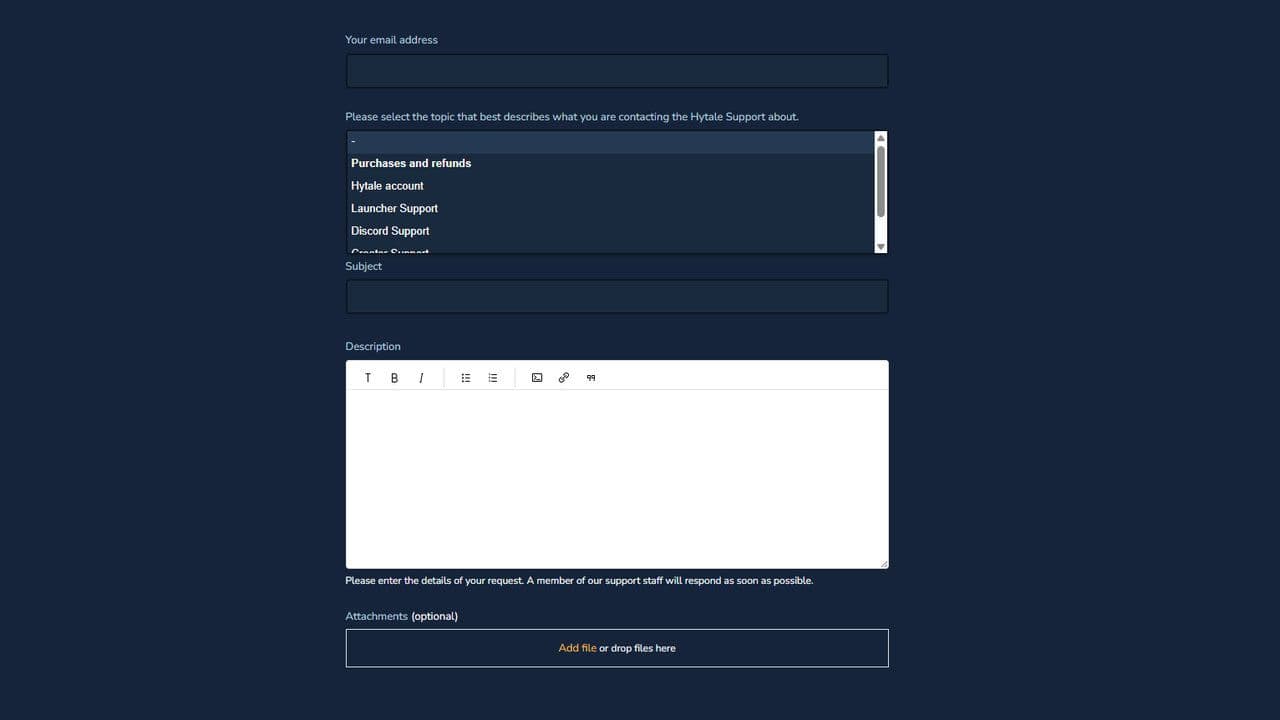
- Submit a Support Ticket. There is no automatic refund button. You must:
- Select the category related to Payments or Refunds
- Open a new support request
- Fill out the refund form with:
- Your account email
- Transaction ID
- Purchase date
- Payment method
- Reason for refund (keep it clear and short)
- After submission, you should receive an automatic confirmation email stating that your request was received. If you do not receive this email, check your spam folder.
What happens after you submit your Hytale refund request?
Understanding the post-submission process is an important part of knowing how to refund Hytale successfully.
Review process
The support team will verify:
- The purchase date (within 14 days)
- Total playtime (under 4 hours)
- Valid payment method
- Account ownership
If everything meets the policy requirements, your refund will be approved.
Refund processing time
If approved, the refund is sent back to your original payment method.
Processing times depend on your bank or provider:
- Credit/debit cards: typically 3–10 business days
- PayPal: often faster
- Some regional methods may take longer
Hytale Support cannot speed up bank processing times once the refund is issued.

If you follow the official refund policy and provide accurate details, the process is straightforward. The key to successfully learning how to refund Hytale is acting quickly and ensuring you meet the time and playtime requirements.
Always use the official Hytale support system operated by Hypixel Studios.
If you meet the criteria, your Hytale refund should be processed without major issues.
That’s all for today! Looking for more? Check out these:
All Related Guides
 Best Hytale plugins and how to create yoursExplore the best Hytale plugins for servers, from permissions and shops to NPCs, kits, performance tools, and ...
 Meet the Hytale Pokemon mod Pokefind: Release date, gameplay and moreGet the latest details on the Hytale Pokemon mod Pokefind, including gameplay plans, server support, release s...
 Can you create an infinite water source in Hytale?Learn if a Hytale infinite water source is possible, why the 2x2 trick fails, and which mods can help you get ...
 Who is The Hedera in Hytale Endgame & QoL mod and how to defeat itFind out how to reach and defeat The Hedera in Hytale Endgame & QoL mod, including boss phases, best prep, and...
 How to heal in Hytale (Food, potions, totem & more)How to heal in Hytale: food, potions, totem, regen buffs, best methods, and full survival guide explained....
 Hytale Update 4 (Part 5): What’s new?Hytale Update 4 Part 5 adds 500+ new blocks, system upgrades, bug fixes, and major improvements before full re...
 All Hytale signs & how to craft themDiscover all 29 Hytale signs, their crafting recipes, and how to use them. Learn sign mechanics, placement tip...
 When will Hytale fully release? (2026 update)When will Hytale fully release? Learn the expected 2026–2027 timeline, Early Access plans, and what must happe...
- 1
- 2
- 3
- 4
- 5
- 6
- 7
- 8