How to repair in Hytale: Repair Kits, item durability & more
Repair smarter. Make gear last.
Knowing how to repair in Hytale is essential if you want to survive longer, save resources, and keep your best gear in good condition. Weapons, tools, and armor lose durability as you use them, and without repairs, they eventually become useless.
This guide explains everything you need to know about repairing items in Hytale, including Repair Kits, materials, durability rules, and smart repair strategies.
Understanding durability in Hytale
Every weapon, tool, and armor piece in Hytale has durability. Each action—mining, fighting, or blocking—slowly reduces that durability. When an item reaches zero durability, it does not vanish, but it becomes very weak and unreliable.

To fix damaged gear, Hytale uses a special item called a Repair Kit. Repair Kits restore durability, but they also introduce an important mechanic:
- Every repair reduces the item’s maximum durability by 10%
- This reduction is permanent
- Items can only be repaired a limited number of times
Because of this, repairs should be planned carefully.
What is a Hytale Repair Kit?
A Repair Kit is a consumable item used to restore durability to damaged gear. When used, it fully repairs the selected item but lowers its future durability cap.
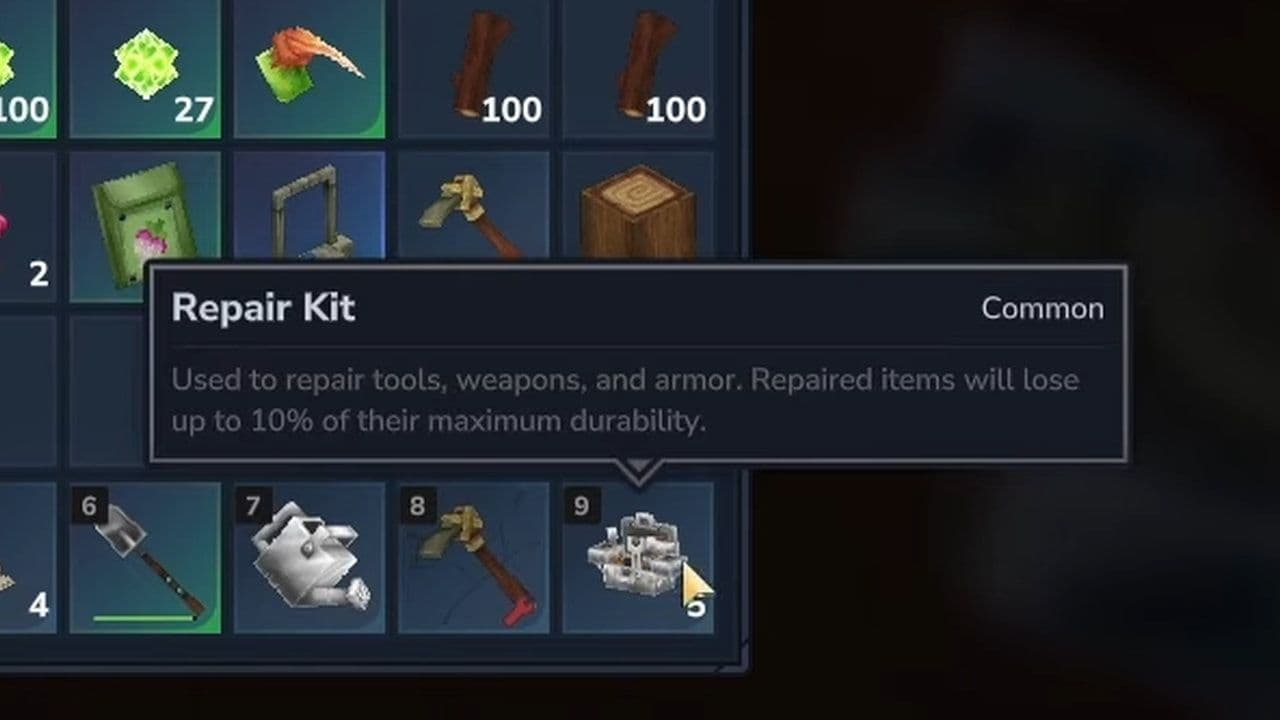
Repair Kits can be used on:
- Weapons
- Tools
- Armor
They cannot be reused and are consumed after one repair.
How to get a Repair Kit in Hytale
To understand how to repair in Hytale, you first need to know how to craft a Repair Kit.
Repair Kit recipe
To craft one Repair Kit, you need:
- 2 Linen Scraps: Dropped by humanoid enemies such as skeletons and goblins.
- 1 Iron Ingot: Created by smelting iron ore in a furnace.
- 1 Light Leather: Made by processing Light Hide at a Tanning Rack.
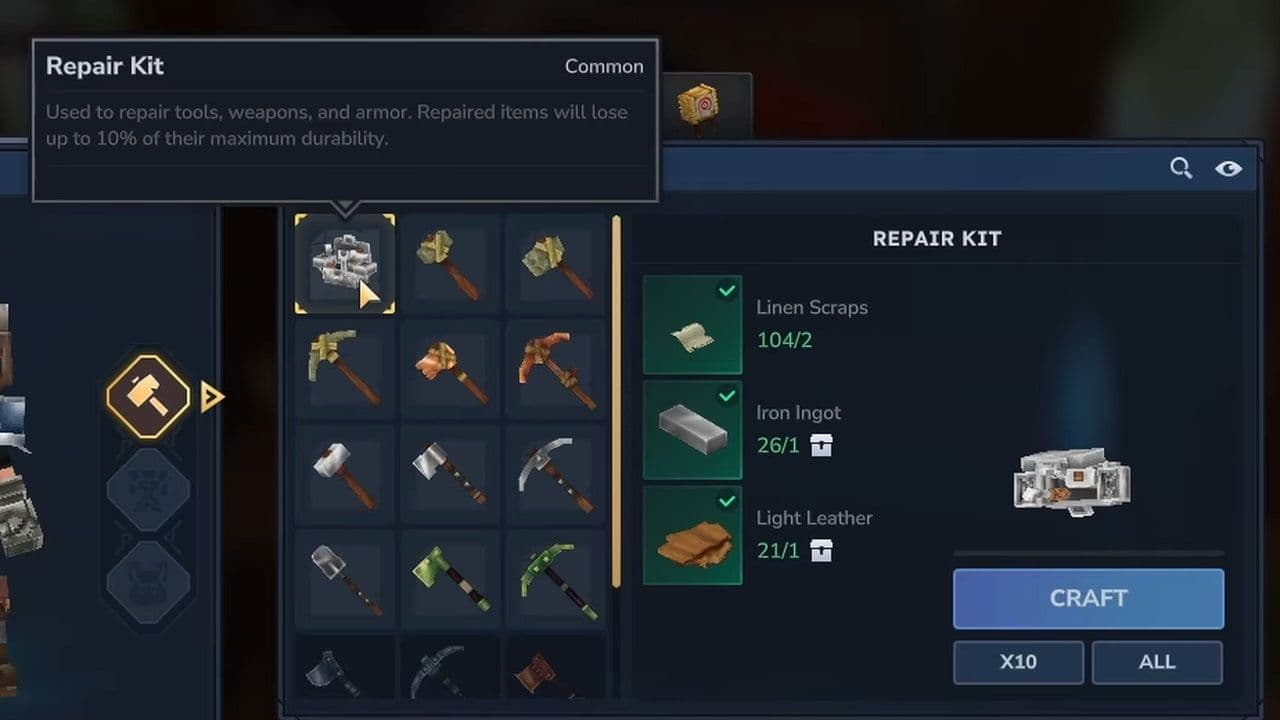
Crafting steps
- Craft or place a Workbench
- Open the Workbench crafting menu
- Go to the Tools section
- Select the Repair Kit recipe
- Insert all required materials
- Craft the Repair Kit
Once crafted, the Repair Kit will appear in your inventory and is ready to use.
How to repair in Hytale
Now, let’s go through the exact process of how to repair in Hytale using a Repair Kit:
- Place the Repair Kit in your hotbar
- Select it so your character is holding it

- Use the repair action (right-click or assigned use key)
- A menu will open showing repairable items in your inventory
- Select the item you want to repair

The selected item will return to full durability, but its maximum durability will be slightly lower than before.
Tips for your Hytale repairs
If you want to use Repair Kits efficiently, follow these tips:
When to repair
- Repair rare or high-quality gear
- Repair items that are difficult or expensive to craft
- Repair gear before it reaches very low durability
When not to repair
- Avoid repairing early-game or low-tier items
- Do not repair items that already lost much of their max durability
- Replace heavily repaired items instead of fixing them again

Understanding how to repair in Hytale is a key survival skill. Repair Kits allow you to extend the life of your gear, but repairs come with long-term costs. Each repair weakens the item slightly, making smart decision-making essential.
Use Repair Kits on valuable gear, avoid wasting them on disposable items, and balance repairs with crafting new equipment. By doing this, you will always be prepared for exploration, combat, and long adventures.
That’s all for today! Looking for more? Check out these:
All Related Guides
 Best Hytale plugins and how to create yoursExplore the best Hytale plugins for servers, from permissions and shops to NPCs, kits, performance tools, and ...
 Meet the Hytale Pokemon mod Pokefind: Release date, gameplay and moreGet the latest details on the Hytale Pokemon mod Pokefind, including gameplay plans, server support, release s...
 Can you create an infinite water source in Hytale?Learn if a Hytale infinite water source is possible, why the 2x2 trick fails, and which mods can help you get ...
 Who is The Hedera in Hytale Endgame & QoL mod and how to defeat itFind out how to reach and defeat The Hedera in Hytale Endgame & QoL mod, including boss phases, best prep, and...
 How to heal in Hytale (Food, potions, totem & more)How to heal in Hytale: food, potions, totem, regen buffs, best methods, and full survival guide explained....
 Hytale Update 4 (Part 5): What’s new?Hytale Update 4 Part 5 adds 500+ new blocks, system upgrades, bug fixes, and major improvements before full re...
 All Hytale signs & how to craft themDiscover all 29 Hytale signs, their crafting recipes, and how to use them. Learn sign mechanics, placement tip...
 When will Hytale fully release? (2026 update)When will Hytale fully release? Learn the expected 2026–2027 timeline, Early Access plans, and what must happe...
- 1
- 2
- 3
- 4
- 5
- 6
- 7
- 8