What is the League of Legends metal graphics and how to activate them in-game
League of Legends Mac players just got a visual upgrade.
League of Legends runs on both Windows and Mac systems. However, it now runs even better on Macs thanks to the Metal Graphics update. It brings faster frame rates, better visuals, and longer battery life for MacBook users. Riot Games has begun rolling out this update and will fully remove OpenGL support in future patches. If you are wondering what it is and how it will affect you, read on below!
What does metal graphics mean in League of Legends?
Metal is Apple’s graphics system that replaces OpenGL for Mac users. It helps League of Legends run faster and look better. By using Metal, the game can access the GPU directly and reduce the load on the CPU. This leads to more stable frame rates and improved rendering during matches.
League of Legends on Metal runs more smoothly compared to the older OpenGL version. Riot says Mac users may see up to twice the frame rate with Metal. This makes a big difference during late-game team fights. If you are an enthusiastic LoL player, you may have noticed how the game's performance decreased over time. Metal graphics will not fix all the performance issues, but it will surely help you have a better time, especially in chaotic moments.
The update also improves battery life, especially on MacBooks, because the system does not need to work as hard.
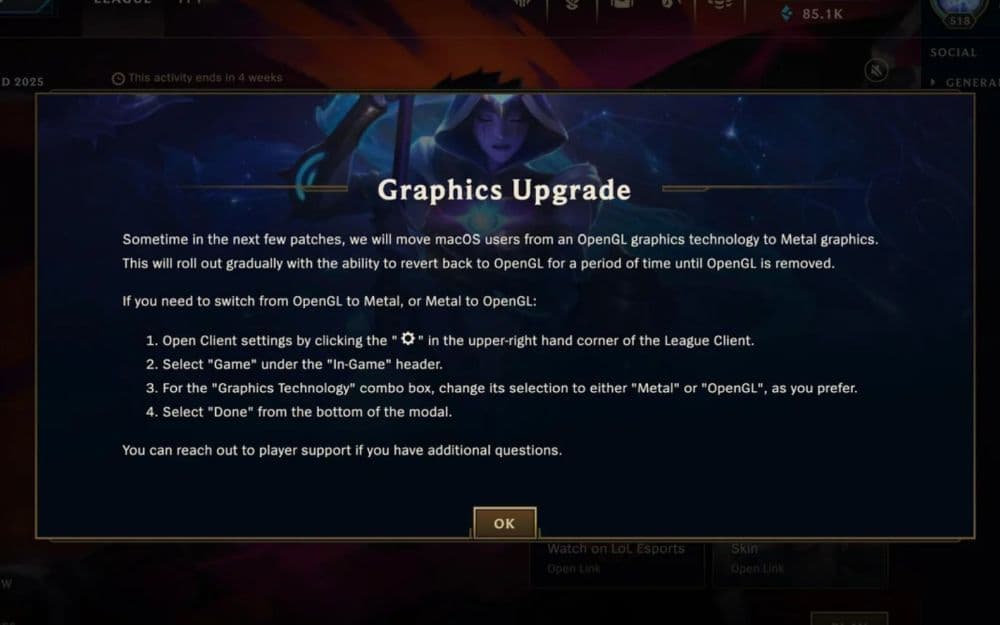
Riot is rolling out this upgrade gradually. You can still switch back to OpenGL for now, but this option will not stay available. Once OpenGL is removed, all Mac users must use Metal to run the game. If your Mac cannot support Metal, you will need to upgrade your hardware.
How to activate League of Legends Metal Graphics
Most players do not need to change any settings. If your Mac supports Metal, the League client will switch to it automatically. Riot designed this process to be simple, so the game chooses the best graphics system for your device.
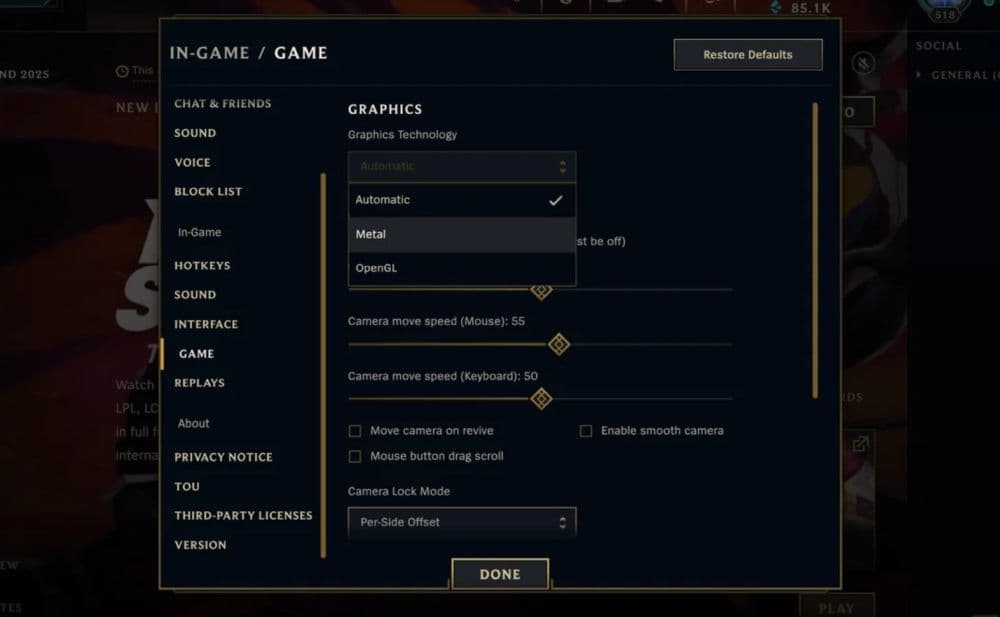
If you want to activate Metal manually:
- Open League of Legends and go to the in-game settings.
- Find the graphics options section.
- Look for the rendering mode or graphics API option.
- Choose “Metal” from the dropdown menu.
- Apply changes.
- Restart the game if needed.
You may not see the Metal option if your Mac does not support it. Also, once Riot removes OpenGL support, the game will automatically switch to Metal with no option to change it back.
Can Windows players use Metal Graphics in League of Legends?
No, Metal is only for macOS. Apple created Metal for its own devices, and it does not work on Windows. Windows users continue to use DirectX, which is Microsoft’s graphics system.
When the Metal Graphics dropped for Macs, Riot has also updated DirectX for Windows players. If your graphics card supports DirectX 11 feature level 11_0, the game will update automatically. But if your system only supports DirectX 11 feature level 10_0 or lower, you will need to upgrade your hardware. This is important to keep the game running smoothly as Riot moves forward with newer technologies.
League of Legends system requirements for Mac
To use Metal graphics, your Mac must support Apple’s Metal API. Most Macs made after 2012 are compatible. You’ll also need to run macOS version 10.11 or later. If your device is older, you might not be able to use Metal, and eventually won’t be able to run League at all.
Here are the minimum and recommended specs for macOS:
Minimum Specs:
- OS: macOS 10.13.6
- CPU: Intel Core i5-750
- GPU: AMD HD 6570 / Intel HD 4600
- RAM: 2GB
- VRAM: 1GB
- Storage: 12GB HDD
- Graphics setting: Low
- Resolution: 1024x768
Recommended Specs:
- OS: macOS 11
- CPU: Intel Core i5-3300
- GPU: AMD Radeon HD 6950 / Intel UHD 630
- RAM: 4GB
- VRAM: 2GB
- Storage: 16GB SSD
- Graphics setting: High
- Resolution: 1920x1080
Riot notes a known issue with macOS 10.15. Fresh installs on this version may cause problems. If you face crashes or performance issues, rolling back to macOS 10.14 may help.
Is League of Legends GPU-heavy?
League of Legends is not GPU-heavy compared to other modern games. It can run on older hardware and low-end systems. This is because Riot designs the game to be accessible and lightweight. Even devices with integrated graphics can run League at low settings.
However, if you use higher resolutions or maximum settings, you will benefit from a better GPU. With the Metal update, macOS users will notice more efficient GPU use.
This means even average hardware can now deliver smoother gameplay. But players who want to play on high settings at 1080p or higher may still need a system with more GPU power.
Plus, many players agree that League of Legends is not one of those games you would want to play in full graphics. Since esports and competition are priorities for many players, smoothness plays a bigger role when deciding between quality and performance.
What is the difference between OpenGL and Metal?
OpenGL is a graphics system that works on many platforms. It has been around for a long time and was the standard for many games on Mac. But it does not make full use of modern hardware. It puts more pressure on the CPU and does not allow deep access to GPU features.
Metal is Apple’s own graphics API, built specifically for macOS and iOS. It gives developers more control over how games run on Apple devices. It also reduces CPU load and improves graphics performance. Metal allows better use of the Mac’s GPU, which means games can run faster and look better.
League of Legends is moving forward on Mac by using Metal graphics. It replaces the old OpenGL system and works automatically on supported Macs. If your device can use Metal, you do not need to change anything. But if your Mac is too old, you may need a hardware upgrade to keep playing. Check out more of our LoL guides below:
- Can I see my League of Legends match history?
- How to delete League of Legends
- How to change server in League of Legends
- How to increase bandwidth for League of Legends downloads
Featured Image Credit: Riot Games
All Related Guides
 League of Legends player lookup: How to check an accountCheck a LoL account with a League of Legends player lookup tool and learn what Riot ID, match history, rank, a...
 How to link your Twitch account to League of LegendsWant League of Legends Twitch drops? Learn how to connect your Riot Account, watch eligible streams, and claim...
 What is low priority queue in League of Legends and how to fix itGot a 10-minute low priority queue in League of Legends? Learn how many games it lasts and what resets the pen...
 Guide to League of Legends Partner ProgramLeague of Legends Partner Program guide: benefits, requirements, application dates, Creator Hub access, and ho...
 Client Server version mismatch League of Legends error fix guideHow to fix Client Server version mismatch League of Legends error: causes, quick LoL fixes, repair tool, reins...
 Why am I getting low FPS on high-PC in LoL and how to fix itLeague of Legends low FPS on high end PC can have simple causes. Learn the best fixes for stutter, frame drops...
 How to turn on last hit assist in League of LegendsLast Hit Assist in LoL makes farming easier for new players. Learn how to enable it and which modes support it...
 What is omnivamp in League of Legends and how does it work?Learn how omnivamp works in League of Legends, how it differs from lifesteal, and which items currently give t...
- 1
- 2
- 3
- 4
- 5