Mojang introduces Minecraft Bedrock 1.21.120.23 Beta
We recently had a chance to witness the Minecraft Live 2025 event and now, Mojang is here with another update. Minecraft has released the 1.21.120.23 Beta for Bedrock Edition. This update improves gameplay stability, fixes long-standing bugs, and adds new tools for creators. It is now available on Minecraft Preview for Xbox, PlayStation, Windows, and iOS, and as a beta version on Android through Google Play.
Some Windows players may still use version 1.21.120.20 for a short time while the update rolls out, which may affect Realms and multiplayer connections.
Copper Golem and block fixes
This update makes small but useful changes to Copper-related features.
- The Copper Golem Statue now keeps the custom name of the Copper Golem it came from.
- The Copper Trapdoor recipe now produces the correct number of trapdoors.
For all the details, please check the official update log.

General gameplay improvements
Players on Windows get better file integration. The game now recognizes .mcaddon files and other Minecraft file types correctly. Mojang also fixes two key issues that affected daily play:
- Buttons now respond even when the game window is not active.
- Mouse movement no longer freezes after pausing with the Windows key.
These fixes give smoother gameplay and make long sessions more stable.
Visual and graphics updates
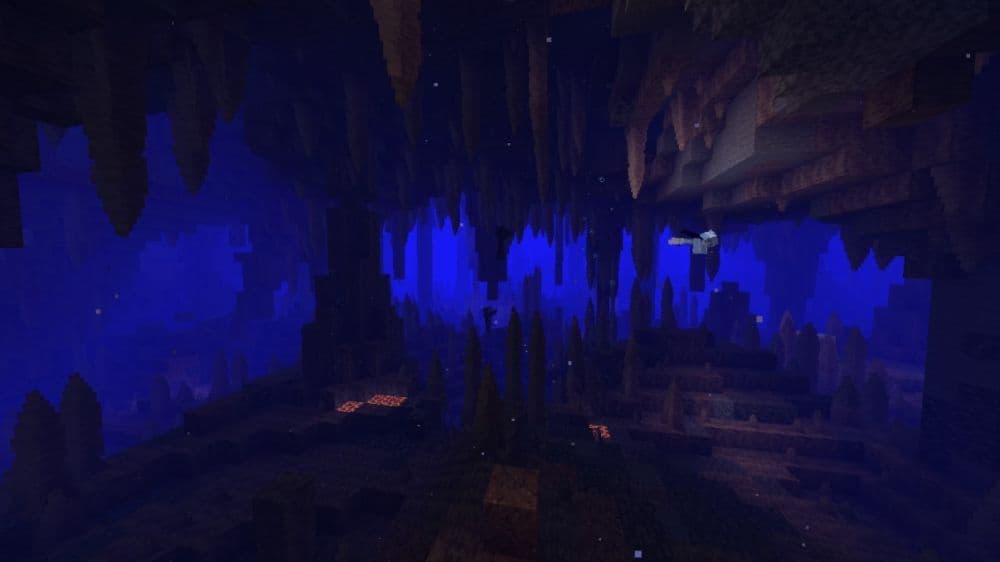
The update focuses on lighting and biome visuals. Underwater lighting in caves now shows natural brightness when using Vibrant Visuals. Biome blending also improves. The game now blends biomes vertically and horizontally, which makes areas like Deep Dark and Lush Caves render as designed.
Some water visuals still require further refinement, but Atmospherics, Color Grading, Lighting, and Tone Mapping are now complete. Additionally, a bug that caused black skies on some Android devices has been resolved, improving graphics on mobile devices.
Inventory and interface changes
Inventory management and the user interface now feel more responsive.
- Players can move items to hotbar slots using number keys.
- A new toggle in the Accessibility menu lets players turn mob dithering on or off.
- The paper doll in the inventory screen now follows the cursor smoothly.
- Sounds no longer play incorrectly after invalid navigation when Text to Speech is off.
These updates make menus easier to use and give players more control over visual effects.
Mobs and AI behavior
Mojang improves how mobs behave and how their sounds work.
- Parrots that copy hostile mob sounds now follow the “Friendly Creatures” volume slider.
- Drowned mobs stop dropping tridents when picking up nautilus shells, which restores correct loot drops.
- A crash caused by the minecraft:behavior.delayed_attack AI goal is fixed.
These changes keep survival worlds more stable and predictable.
Tools and technical updates for creators
Creators and map makers see major improvements. Mojang expands the setDynamicProperties method to entities, containers, and worlds. The isChunkLoaded(location) function now works in version 2.3.0 for better reliability. Mojang also fully releases Data Driven Jigsaw Structures, which were previously experimental, allowing more complex world generation.
New block and item tools give more flexibility:
- The emissive field for block materials allows glowing faces when the Upcoming Creator Features experiment is enabled.
- The emit_vibrations field for item use modifiers lets creators decide whether an item emits vibrations when used.
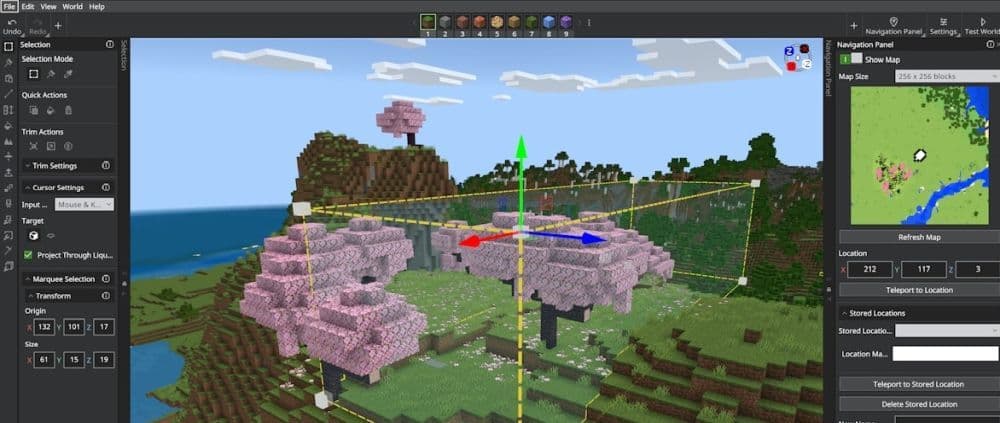
The Editor gets a new Scale Tool. This tool allows scaling along the X, Y, and Z axes, including fractional scaling, and shows a preview before applying changes. It integrates with undo and redo actions, and includes keyboard shortcuts for faster editing. The Pencil tool now erases and draws more smoothly, and settings stay the same across sessions.
Minor Fixes
The update also fixes smaller but important issues:
- Hotbar creation errors no longer appear when the management panel is open.
- Interactive tooltips now dismiss correctly.
- The confirm button in the hotbar dialog turns green immediately when typing begins.
- Item insertion in containers no longer creates gaps after inventory changes.
The Minecraft Bedrock 1.21.120.23 Beta focuses on stability, visuals, and creative tools. Builders and survival players both benefit from smoother gameplay, better graphics, and more reliable systems.
Players can join the beta on Android or access the Preview build on Xbox, PlayStation, Windows, and iOS. Mojang continues to invite feedback and bug reports to help shape the next official release.
We have plenty more Minecraft guides for you to check. Start with these:
- Minecraft Serene Seasons Mod: A deep dive into seasonal dynamics and gameplay
- Here is a closer look at the free Japanese government Minecraft map
- Minecraft Movie's Post-Credits Scene: Implications for the Minecraft Universe
- Minecraft blast furnace recipe: How to make a blast furnace in Minecraft
- How to make a stone cutter in Minecraft: Complete recipe
Featured Image Credit: Minecraft
All Related Guides
 Top 5 Minecraft 26.1 seeds you must try todayFind the best Minecraft 26.1 seeds for villages, rare biomes, island survival, and creative builds, with seed ...
 How to turn on keep inventory in MinecraftUse the correct Keep Inventory command in Minecraft and learn how it works across Java, Bedrock, servers, and ...
 How to breed tropical fish in MinecraftCan you breed tropical fish in Minecraft? Here is the clear answer, plus how to catch, move, and use tropical ...
 Minecraft Chaos Cubed guide: Everything new in the 2026 updateExplore everything new in Minecraft Chaos Cubed, including Sulfur Caves, Sulfur Cubes, geysers, new blocks, co...
 How to change render distance in MinecraftChange render distance in Minecraft with simple steps for Java and Bedrock, plus tips to balance better visibi...
 How to grow mangrove trees in MinecraftFind out how to grow mangrove trees in Minecraft with simple steps, growth requirements, farming tips, and com...
 How to craft a name tag in MinecraftLearn how to craft a name tag in Minecraft, how to use it with an anvil, and why it matters for pets, mobs, an...
 Here is how to make a water elevator in MinecraftHere’s how to make a water elevator in Minecraft, including the materials you need and why your bubble column ...
- 1
- 2
- 3
- 4
- 5
- 6
- 7
- 8