How to make a stone cutter in Minecraft: Complete recipe
A stone cutter in Minecraft is essential for processing blocks so make sure you learn this recipe.
A stone cutter is a Minecraft item that recently received a rework and has a different look now. It helps players turn stone and copper blocks into stairs, slabs, and bricks. The stone cutter offers a clear and direct method to work with raw blocks. Due to the rework, some old players find it hard to recognize or even craft this item. This piece explains the stonecutter recipe in Minecraft and all the other details you need to know about!
What is a stone cutter in Minecraft?
The stone cutter is a block in Minecraft that changes stone and copper into different forms. It helps you create stairs, slabs, and bricks from stone with a simple process. The tool makes it easier to use stone in your building projects. It also plays a role in the lives of villagers. In villages, it acts as the job site block for stone masons.
The stone cutter started in the Pocket Edition of Minecraft. The design had limits in the crafting menu. Developers added the stone cutter to overcome these limits. The tool was not available in the New Nintendo 3DS Edition because that version was based on an older Pocket Edition.
How do you make a stone cutter in Minecraft?
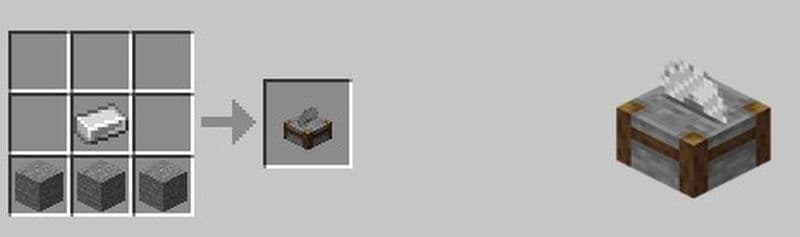
To make a stone cutter, you must use the crafting table. Follow these simple steps. The instructions below show you the exact process:
- Open the Crafting Table: Open your crafting table to see the 3x3 grid. This grid is needed for the recipe.
- Gather Your Materials: You need one iron ingot. You also need three stone blocks. Keep these items in your inventory.
- Place the Items in the Grid:
- In the first row, put the iron ingot in the center box.
- In the second row, place one stone block in each of the three boxes.
- Leave the third row empty.
- The pattern must match these instructions. Follow the layout exactly.
- Craft the Stone Cutter: When the items are in the correct spots, the stone cutter appears in the result box. Check the result box to see the new stone cutter.
- Move the Stone Cutter to Your Inventory: Drag the stone cutter into your inventory. This step makes the tool available for use in your game.
The recipe uses a few items, and the pattern is simple, just like other Minecraft items, such as rail or boat. You can easily craft a stonecutter by following the steps above.
How to use a stone cutter in Minecraft and everything you need to know
The stone cutter helps you change one type of stone into another. You can use it in several ways in the game. Read the steps below to understand how it works:
- Natural Appearance in the World: Stone cutters can appear in villages. They show up in houses where stone masons work. You can also find them in trail ruins.
- Efficient Block Conversion: The stone cutter changes a single block into a new form. For example:
- A stone block can change into chiseled stone bricks with one step.
- When you want to craft stairs, the stone cutter uses one full block to make one stair.
- For copper, one block changes into four cut copper blocks.
- Mining the Stone Cutter: You can break a stone cutter with any pickaxe. Use a pickaxe to get the stone cutter back in your inventory. If you use a tool other than a pickaxe, the stone cutter does not drop any items.
- Using the Interface: The stone cutter has a simple screen. You see an empty block selection menu. Place a stone block in the input slot. The menu then shows the options available.
- Villager Jobs and Sounds: In a village, an unused stone cutter may cause a villager to choose the stone mason job. This change can affect how the village works. You can also put a stone cutter under a note block. This action makes a bass drum sound.
Was the stone cutter removed from Minecraft?
Some game versions do not let you use the stone cutter in survival mode. The game now uses the crafting table to make many items. In these cases, the stone cutter serves only a decorative role. In Pocket Edition, the stone cutter is used for decoration only. In Bedrock Edition, players see two stone cutters in Creative mode. One is the old version and one is new. The new version can be found if experimental gameplay is active.

Is stone cutter better than crafting?
A stonecutter is better than a crafting table for some recipes. It helps you save blocks and craft faster. For example, the crafting table needs six blocks to make four stone stairs. The stonecutter only needs four blocks to make the same amount. You lose fewer materials and save time.
The stonecutter also gives you more block options. You can turn one block into slabs, stairs, or walls directly. It works well with stone, cobblestone, andesite, granite, and diorite. You can also use it with polished versions of these blocks. This makes the stonecutter a smart choice for building.
If you often build with stone-type blocks, the stonecutter is more efficient than crafting.
Can you use deepslate in a stonecutter?
Yes, the stonecutter works with deepslate. You can use it with cobbled deepslate, regular deepslate, and polished deepslate. It helps you turn one block into stairs, slabs, or walls without wasting extra blocks.
The stonecutter gives one-to-one results for most deepslate items. It helps you work faster and save materials. If your build includes deepslate, use the stonecutter instead of crafting.
Players find that the stone cutter makes a big difference in Minecraft. It helps change stone and copper into useful building parts, and it is quite easy to do.
We have got a lot more Minecraft guides for you to check out. Here are some of the ones that you may be interested in:
- Saddle recipe in Minecraft: Is it craftable?
- Get your Minecraft shield recipe before heading into danger
- Minecraft barrel recipe: A better storage option than chests?
- Minecraft anvil recipe & 5 reasons it's worth the iron
- Minecraft book recipe with book and quill, bookshelf, and more
Featured Image Credit: Minecraft
All Related Guides
 How to craft rails in Minecraft: Regular, Powered, Detector, ActivatorLearn how to craft rails in Minecraft, use minecarts, and build better tracks with a simple recipe and clear s...
 Minecraft Splash Potion of Weakness recipe: Complete brewing guideMinecraft Splash Potion of Weakness recipe guide: ingredients, brewing steps, villager curing, and common mist...
 How to craft a bookshelf in MinecraftLearn how to craft a bookshelf in Minecraft, place it around an enchanting table, and reach stronger enchants ...
 Smelting in Minecraft: A complete guide to furnaces, fuels, and efficiency tips for 2025Master Minecraft smelting in 2025: best furnaces, fuels, and pro tips to boost speed, save resources, and auto...
 Minecraft enchanting table recipe, setup, language and moreMaster Minecraft enchanting! Learn the Minecraft enchanting table recipe, setup for max levels, the secret lan...
 Minecraft blast furnace recipe: How to make a blast furnace in MinecraftWant to smelt ores faster? Here's the blast furnace Minecraft recipe and a step-by-step guide on how to craft ...
 Minecraft beacon guide: How to make a beacon in MinecraftBeacon Minecraft guide: Learn how to craft, activate & optimize a beacon for max power, buffs & effects in Min...
 Minecraft piston recipe & sticky piston guideLearn how to craft and use pistons in Minecraft! Master sticky pistons & get secret doors, traps, flying machi...
- 1
- 2
- 3
- 4
- 5