Minecraft ProjectE Mod: A Comprehensive Guide
Yet another fantastic mod to try out in Minecraft.
Minecraft has many mods that change how the game feels, but few are as famous as ProjectE. This mod lets players change items into energy and then back into other items. It is based on the older Equivalent Exchange 2 mod, which many long-time players remember. In this guide, you will learn what ProjectE is, how it works, its main features, and how you can install and play it!
What is ProjectE Mod in Minecraft?
ProjectE is a magic mod that allows you to transmute items. It is a full remake of the Equivalent Exchange 2 mod. The main idea is simple, put items into a system, gain energy called EMC, and then use that energy to create different items.
Almost every vanilla item has an EMC value. Many items from other mods also work with ProjectE. This makes it easy to recycle resources and turn low-value items into something more useful. The mod is included in large modpacks like Tekkit Legends and FTB Infinity Evolved.
The core mechanic: EMC (Energy-Matter Currency)
EMC stands for Energy-Matter Currency. Every item with an EMC value can be changed into energy and stored. Later, you can use that stored energy to make new items. For example, you can burn stacks of cobblestone to get EMC, then use it to make diamonds.
There are two main ways to collect EMC:
- Convert items with EMC values into energy.
- Use machines like Energy Collectors and Relays to generate EMC from light.
This system creates a clear economy. Cheap blocks can turn into fuel, fuel can turn into higher-value resources, and all of it supports progress toward stronger gear.
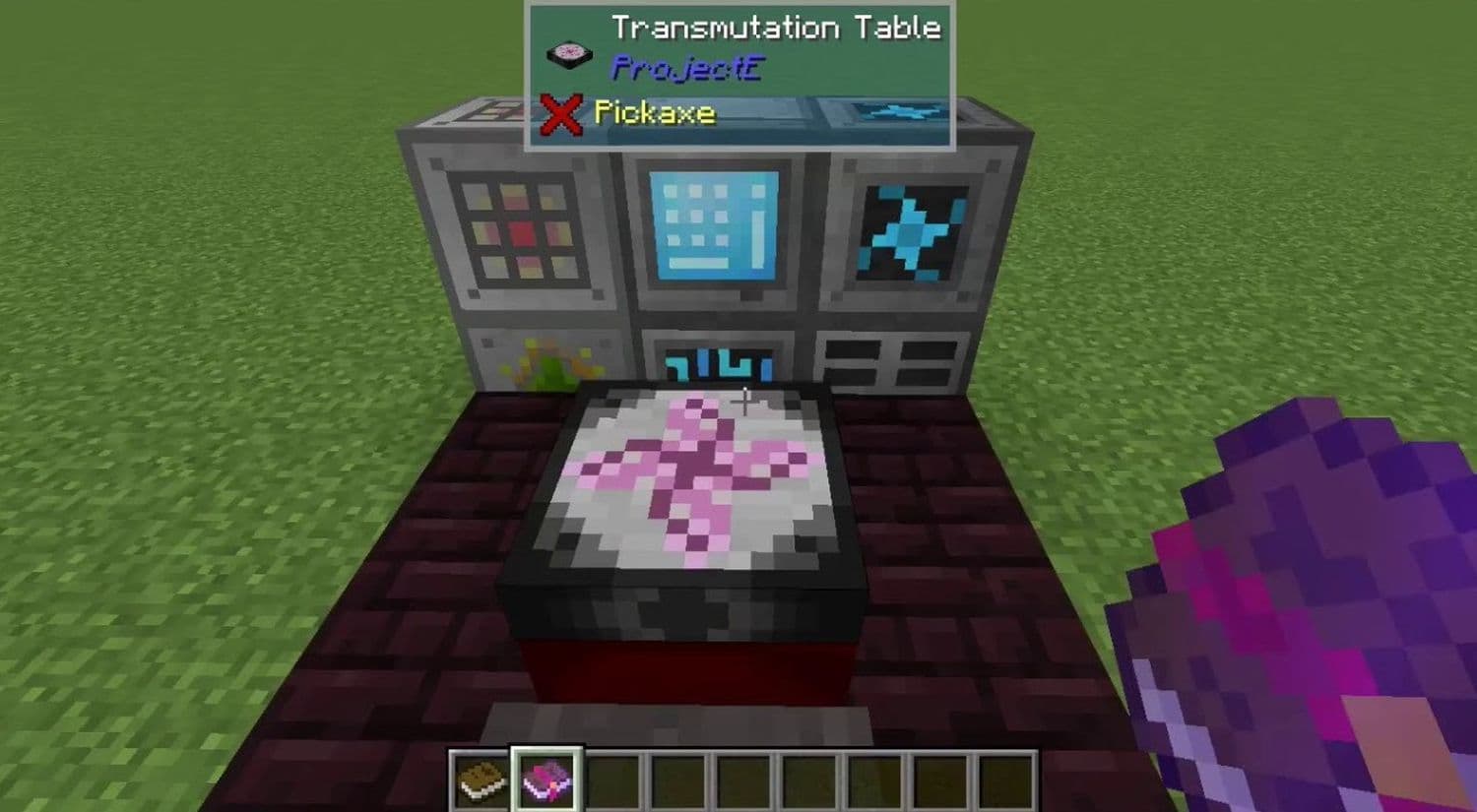
What makes the Minecraft ProjectE Mod different?
ProjectE offers a wide range of tools and machines. Some of the most important are:
- Philosopher’s Stone – A tool that lets you transmute blocks in the world and craft special recipes.
- Transmutation Table – Stores EMC and remembers items you teach it. You can recreate them anytime.
- Transmutation Tablet – A portable version of the table.
- Energy Collectors – Machines that generate EMC from light.
- Anti-Matter Relays – Devices that connect collectors to condensers.
- Energy Condensers (MK1 and MK2) – Turn EMC into specific items automatically.
- Alchemical Chest and Bags – High-capacity storage with useful upgrades.
- Dark Matter and Red Matter – Strong late-game materials for tools, weapons, and armor. These become even stronger when paired with the right sword enchantments.
- Rings, Talismans, and Amulets – Magical items with abilities like flight, fire control, or auto-repair.
Benefits of playing with ProjectE
Players choose ProjectE because it makes Minecraft easier and more interesting. The benefits include:
- Better use of resources since nothing goes to waste.
- Faster access to rare materials without constant grinding.
- Tools and gear that give powers. Some of these work well when combined with axe enchantments.
- A system that balances well with other mods in big modpacks.
- A nostalgic connection to one of the most popular mods in Minecraft history.
How to install ProjectE Mod
Installing ProjectE requires Minecraft Forge or NeoForge. Here are the steps:
- Install Forge or NeoForge for the version of Minecraft you use.
- Download the ProjectE mod file from CurseForge or another trusted site.
- Place the file into the mods folder in your .minecraft directory.
- Open Minecraft with the Forge profile.
- Check the Mods menu to confirm ProjectE is installed.
If you want the easiest method, use the CurseForge launcher. It handles installations and avoids conflicts with other mods.

How to play Minecraft ProjectE
To start, craft a Philosopher’s Stone. Then build a Transmutation Table and feed it items with EMC values. Once the table learns an item, it will stay in your library forever. You can recreate it whenever you have enough EMC stored.
The early game focuses on burning cheap resources into EMC. Later, you can automate EMC production with Energy Collectors and Condensers. Advanced players often build a Power Flower, which is a setup of collectors and relays around a condenser that creates EMC passively.
As you collect more EMC, you can craft Dark Matter and Red Matter tools. These tools are powerful, durable, and often have special effects. Pairing them with the right enchantments makes them even more effective in combat.
ProjectE vs Equivalent Exchange (EE2)
ProjectE is a remake of EE2 with updates for modern Minecraft. Both share the same concept but differ in stability and support.
ProjectE keeps the original style but adds better balance and works with today’s versions of Minecraft.
We have more guides, here are a few of them:
- Minecraft Serene Seasons Mod: A deep dive into seasonal dynamics and gameplay
- Here is a closer look at the free Japanese government Minecraft map
- Minecraft Movie's Post-Credits Scene: Implications for the Minecraft Universe
- Minecraft blast furnace recipe: How to make a blast furnace in Minecraft
- How to make a stone cutter in Minecraft: Complete recipe
Featured Image Credit: GlitchReaper on YouTube
All Related Guides
 Top 5 Minecraft 26.1 seeds you must try todayFind the best Minecraft 26.1 seeds for villages, rare biomes, island survival, and creative builds, with seed ...
 How to turn on keep inventory in MinecraftUse the correct Keep Inventory command in Minecraft and learn how it works across Java, Bedrock, servers, and ...
 How to breed tropical fish in MinecraftCan you breed tropical fish in Minecraft? Here is the clear answer, plus how to catch, move, and use tropical ...
 Minecraft Chaos Cubed guide: Everything new in the 2026 updateExplore everything new in Minecraft Chaos Cubed, including Sulfur Caves, Sulfur Cubes, geysers, new blocks, co...
 How to change render distance in MinecraftChange render distance in Minecraft with simple steps for Java and Bedrock, plus tips to balance better visibi...
 How to grow mangrove trees in MinecraftFind out how to grow mangrove trees in Minecraft with simple steps, growth requirements, farming tips, and com...
 How to craft a name tag in MinecraftLearn how to craft a name tag in Minecraft, how to use it with an anvil, and why it matters for pets, mobs, an...
 Here is how to make a water elevator in MinecraftHere’s how to make a water elevator in Minecraft, including the materials you need and why your bubble column ...
- 1
- 2
- 3
- 4
- 5
- 6
- 7
- 8