How to make a fence in Minecraft: Step-by-step guide
Fences go a long way in Minecraft.ON THIS PAGE:
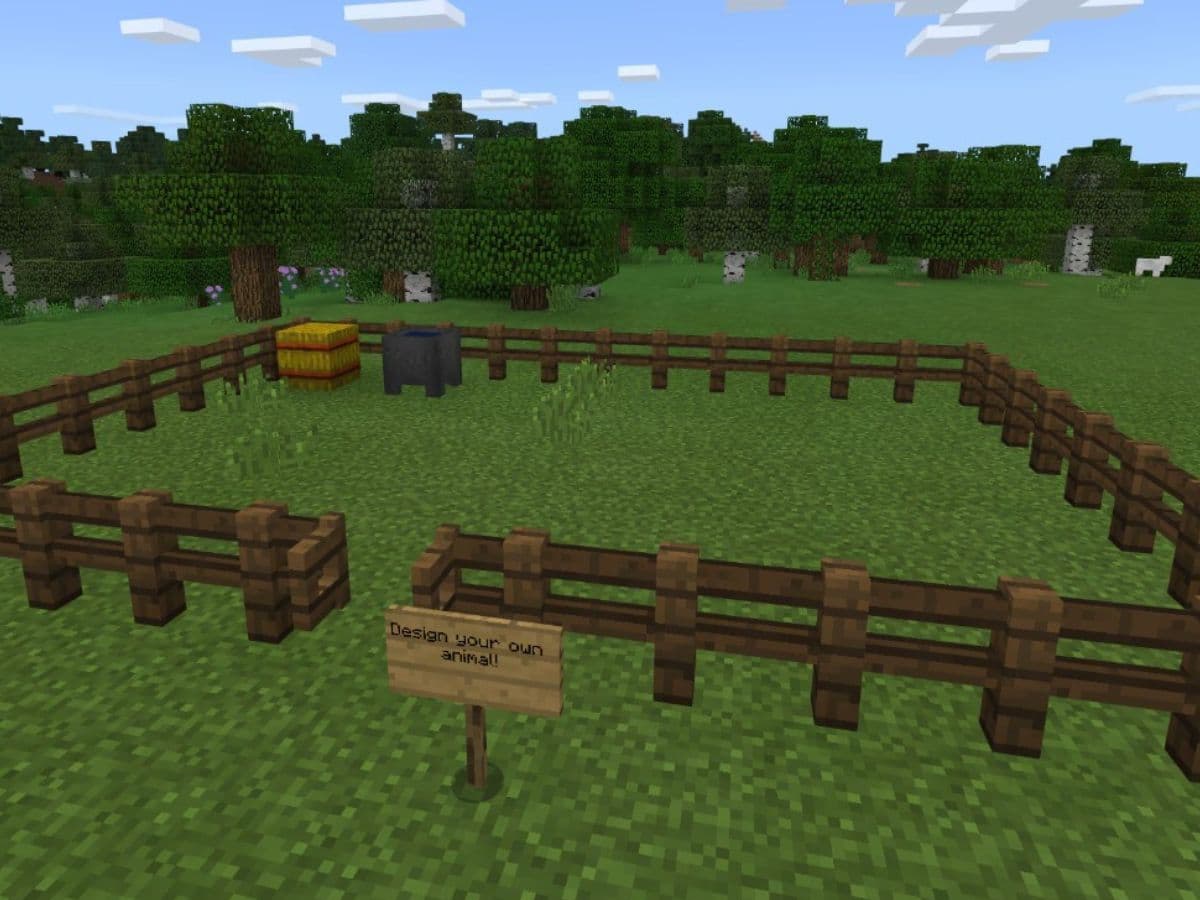
If someone ever asked you a question about the simplest item in Minecraft, there is a strong chance of you saying “fences.” They are one of the most used items and you can use them in any Minecraft house idea you are planning to build. While it is very easy to make fences in Minecraft, beginners may still need some guidance. In this piece, you will find all the information you need about fences in Minecraft!
What is a fence in Minecraft?
A fence is a block that acts as a barrier in Minecraft. It stops most mobs from crossing over while allowing players to see through its gaps. Fences work much like walls but with open spaces.
Fences appear naturally in the game. You see them in mineshafts, villages, woodland mansions, and shipwrecks. Different wood types create different fence styles. Here is a detailed look:
- Oak fences: Common in regular mineshafts and stronghold libraries.
- Spruce fences: Appear in swamp huts and snowy villages.
- Birch fences: Show up in woodland mansions, and jungle fences are part of desert village houses.
- Acacia and dark oak fences: Can be found in savanna villages and badlands.
- Nether brick fences: Appear in Nether fortresses and serve as window bars and balcony railings.
How to craft a fence in Minecraft
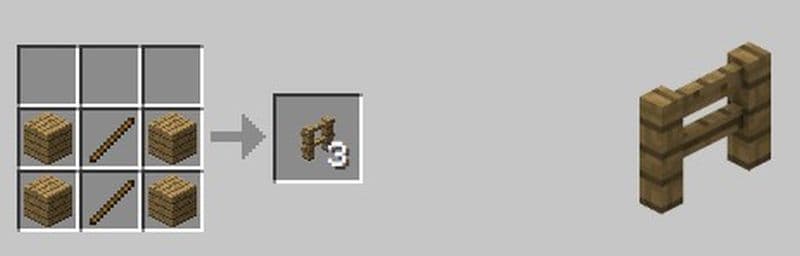
You can make a fence with a simple recipe. Follow these steps to craft an oak fence:
- Open the Crafting Table: Use the crafting table to see a 3x3 grid.
- Place the Materials: You need four oak planks and two sticks. Arrange them in this pattern:
- First row: oak plank in the first box, stick in the second box, oak plank in the third box.
- Second row: oak plank in the first box, stick in the second box, oak plank in the third box.
- Retrieve the Fence: Three oak fences will appear in the result box.
- Store the Fence: Move the fences into your inventory for later use.
How to make a fence corner in Minecraft
The game makes a corner post by itself when you join two fence lines. You do not need to add extra blocks. The design helps you create smooth and continuous enclosures without dealing with a new form of fence.
How to make a spruce fence
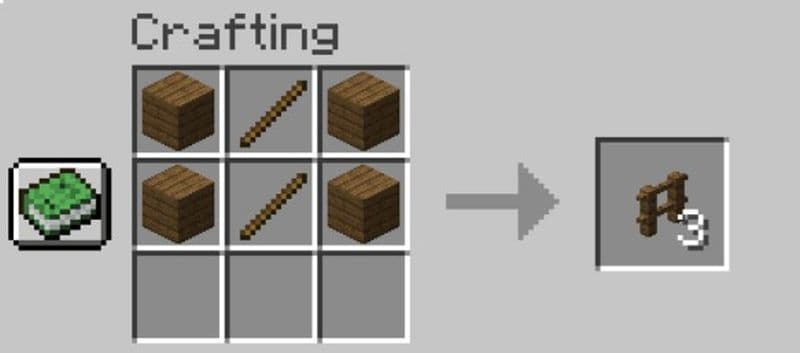
The process for a spruce fence is identical to that for an oak fence. You only change the material. Follow these steps for a spruce fence:
- Gather Materials: You need four spruce planks and two sticks.
- Open Your Crafting Table: Use the 3x3 grid on the table.
- Arrange the Items: Place the items in this order:
- First row: spruce plank, stick, spruce plank.
- Second row: spruce plank, stick, spruce plank.
- Craft the Fence: Three spruce fences will appear in the result box.
- Save Your Fence: Drag the fences into your inventory.
Benefits of using fences in Minecraft
Fences offer many advantages in the game. Some of the best ones are:
Effective Barrier
Fences stop most mobs from jumping over. Their collision height is greater than what you see, which keeps creatures out.
Automatic Connectivity
Fences join with nearby solid blocks. This feature makes it easy to build long boundaries without gaps.
Animal Control
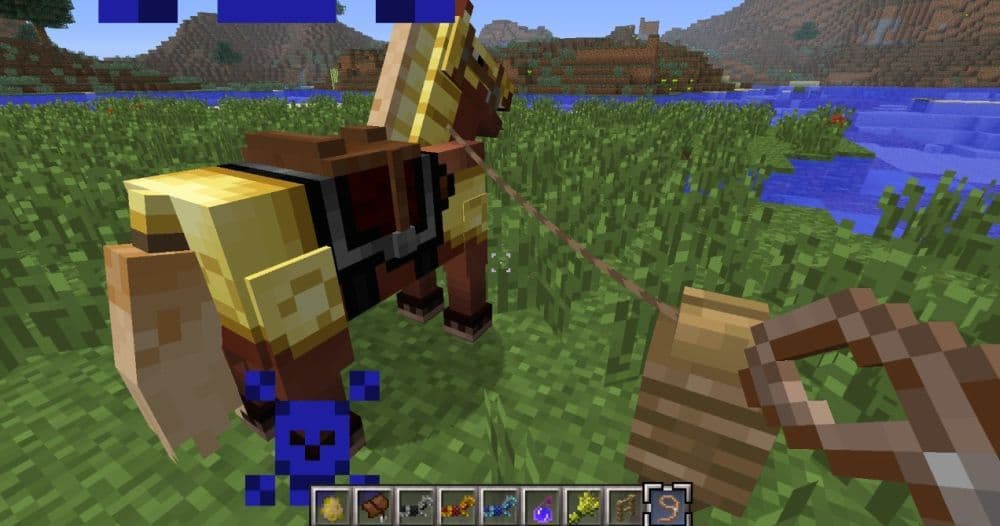
You can tie animals to fence posts with leads. This helps keep your animals safe and in one area.
Fuel Option
Wooden fences can burn as fuel in furnaces, which can be beneficial from time to time. They help you smelt items when you need extra fuel.
Sound Effects
Place a fence under a note block to create a distinct sound. Wooden fences give a “bass” tone, while Nether brick fences produce a “bass drum” sound.
Cool Designs
Fences work well with many building styles. They blend with other blocks and allow light to pass through.
What blocks do fences not connect to?
Fences only connect to blocks that have a solid surface. They do not connect to blocks like torches, slabs, glass panes, or carpets. These blocks are either too thin or do not have a full solid face. If you place a fence next to one of these blocks, it will stand alone without connecting.
Wooden fences also connect to other wooden fences. But they do not connect to Nether brick fences, even though both are fence types. This rule helps players keep different materials separate. It also makes it easier to control fence layouts when building.
If you want your fences to link together, use the same type and place them next to full blocks like stone or wood. If a fence is not connecting, the block beside it is probably not solid or not the same type.
Can you tie a lead to a fence in Minecraft?
Yes. You can tie a mob to a fence using a lead. Leads let you guide animals or mobs, and fences help you keep them in place. First, attach the lead to the mob, and then right-click or tap the fence to tie it. The mob will stay close. To release it, click the fence again.
Can I paint my fence pink in Minecraft?
In the standard version of Minecraft, you cannot change a fence's color to pink. The game does not allow you to dye or paint fences with dyes. If you want a pink fence, you may try mods that offer extra color options. You can also use resource packs that change the fence's appearance. These methods do not alter the game rules. They only change the look of your fence.
Fences are easy to craft with different wood types. They help you protect your builds and keep animals in place. They also have extra uses, such as working as fuel in furnaces. Fences are one of the simplest items in the game, and they are quite easy to do, too. Don’t forget to check these guides out:
- Minecraft barrel recipe: A better storage option than chests?
- Minecraft anvil recipe & 5 reasons it's worth the iron
- Minecraft compass recipe (+recovery) explained
- Lead recipe in Minecraft
Featured Image Credit: Minecraft
All Related Guides
 How to craft rails in Minecraft: Regular, Powered, Detector, ActivatorLearn how to craft rails in Minecraft, use minecarts, and build better tracks with a simple recipe and clear s...
 Minecraft Splash Potion of Weakness recipe: Complete brewing guideMinecraft Splash Potion of Weakness recipe guide: ingredients, brewing steps, villager curing, and common mist...
 How to craft a bookshelf in MinecraftLearn how to craft a bookshelf in Minecraft, place it around an enchanting table, and reach stronger enchants ...
 Smelting in Minecraft: A complete guide to furnaces, fuels, and efficiency tips for 2025Master Minecraft smelting in 2025: best furnaces, fuels, and pro tips to boost speed, save resources, and auto...
 Minecraft enchanting table recipe, setup, language and moreMaster Minecraft enchanting! Learn the Minecraft enchanting table recipe, setup for max levels, the secret lan...
 Minecraft blast furnace recipe: How to make a blast furnace in MinecraftWant to smelt ores faster? Here's the blast furnace Minecraft recipe and a step-by-step guide on how to craft ...
 Minecraft beacon guide: How to make a beacon in MinecraftBeacon Minecraft guide: Learn how to craft, activate & optimize a beacon for max power, buffs & effects in Min...
 Minecraft piston recipe & sticky piston guideLearn how to craft and use pistons in Minecraft! Master sticky pistons & get secret doors, traps, flying machi...
- 1
- 2
- 3
- 4
- 5