How to request a refund for game passes in Roblox
Roblox offers game passes within the game. Players buy them for VIP perks, extra features, or permanent boosts. Sometimes players buy a game pass unintentionally. A pass may not work, a child may buy it by mistake, or you may not get what you expected. In this guide, we explain how to request a refund for your game pass purchase, whatever reason there is behind the decision!
What are game passes in Roblox?
A game pass is a one-time purchase that unlocks special privileges inside a specific experience. Developers often design passes as permanent perks, like premium access, a special tool, or a permanent boost.
Roblox also offers developer products, which work best for repeat purchases. Players can buy them many times, like extra coins, consumables, or temporary boosts. That difference matters because a pass usually represents a lasting benefit, while a developer product supports repeat spending.
Roblox reviews refund requests case by case. Your odds improve when you describe a clear issue and attach the right purchase details. These situations often justify a request:
- You make an accidental purchase.
- Someone makes an unauthorized purchase on your payment method.
- The pass does not deliver the promised perk due to a technical issue.
- The experience changes in a way that removes the pass value soon after purchase.
Do not file a payment dispute first. Roblox may block a refund after a dispute starts. Contact Support before you take that step.
How to request a game pass refund through Roblox Support
Roblox routes billing help through the Support flow. If you are a beginner, you first need to understand that you may not be eligible for a refund. Use this path to reach the refund guidance and the contact form from the same area.
- Open the Roblox Support page.
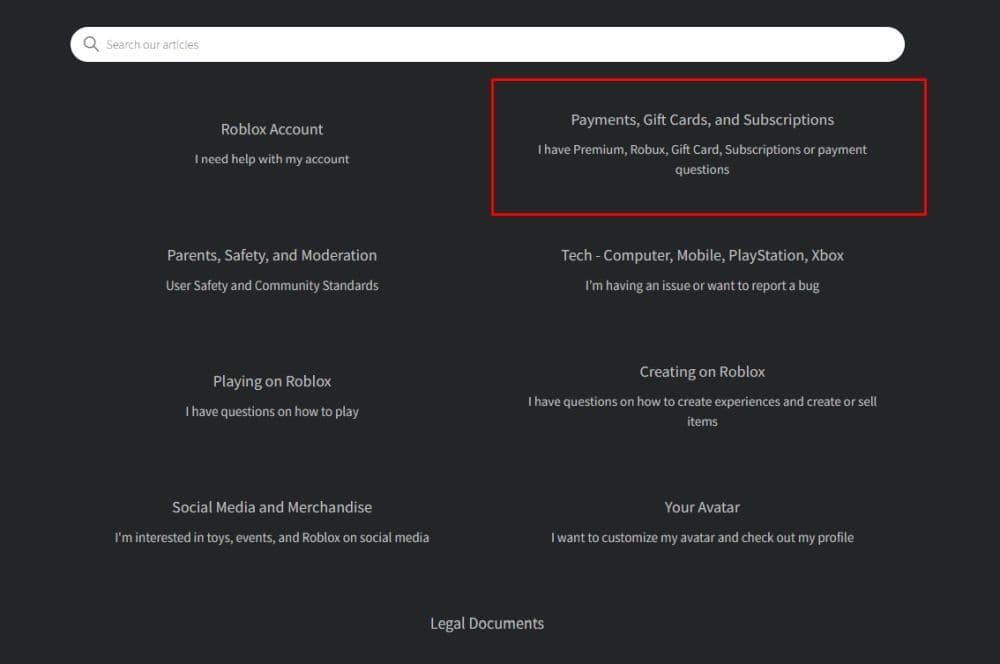
- Select Payments, Gift Cards, and Subscriptions.
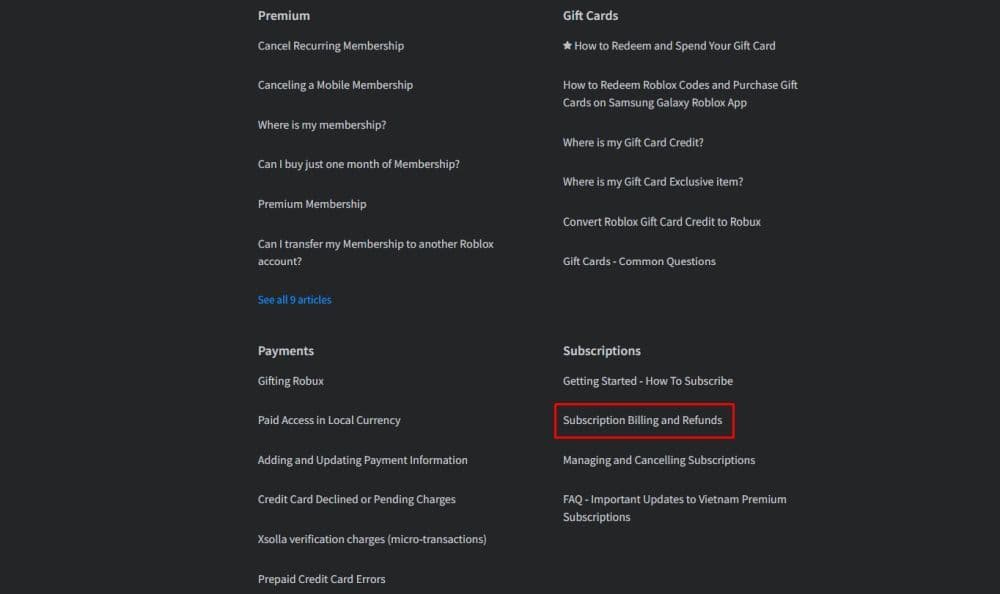
- Scroll until you find Subscription Billing and Refunds. Open it and read the requirements.
- Read the information, and submit your request through the Support form from that area.
- Add your purchase details and attach your receipt image when you have it. Use .jpg or .png for attachments.
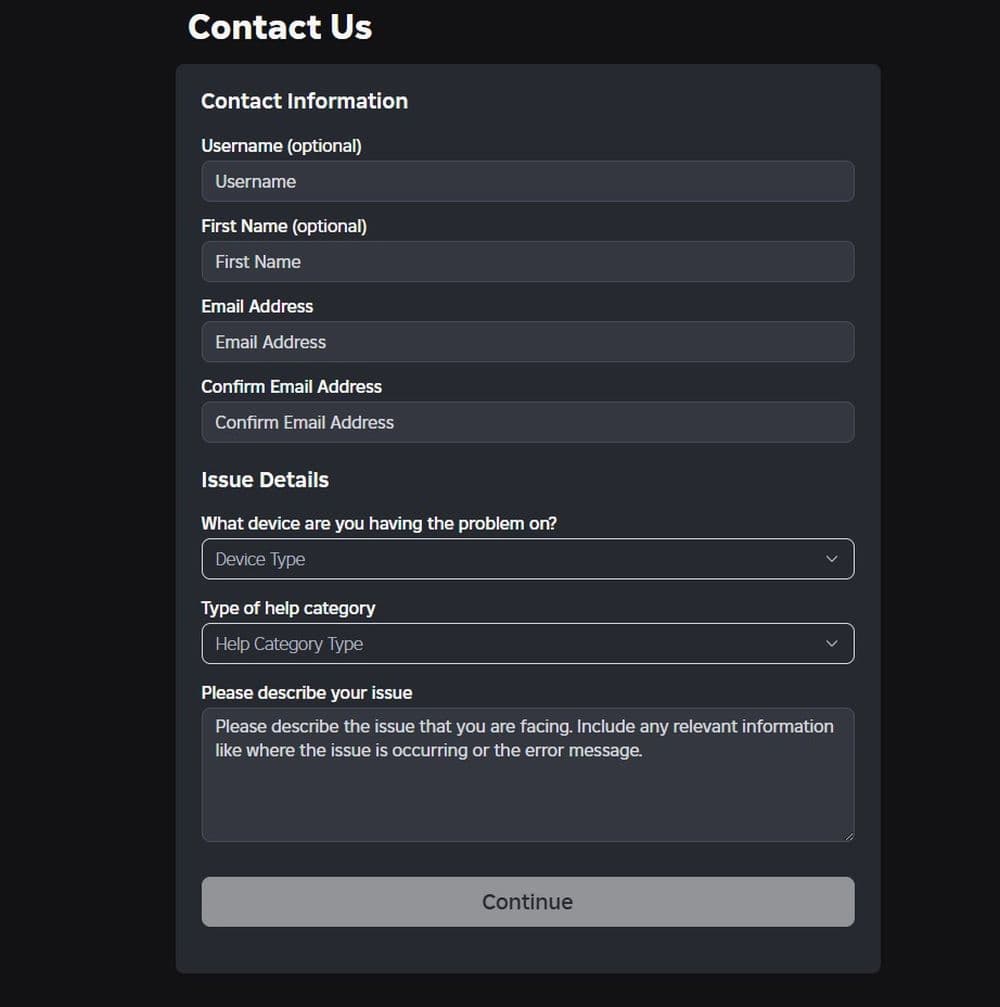
When you write the request, keep it short and specific:
- State what you bought and when you bought it.
- Explain the issue in one or two sentences.
- Ask for a refund for that exact transaction.
If you bought the game pass through Apple, Google Play, or consoles
Some purchases run through third-party platforms. In those cases, the platform may control the refund process. Roblox Support may tell you to request the refund through that store instead of Roblox.
This point matters most for:
- Mobile app store payments
- Console storefront purchases
When you write your request, mention the platform and include the platform receipt or purchase ID.
What you should collect before you contact Roblox
You save time when you prepare the details up front. Roblox Support may ask for specific billing information so the team can locate the charge and verify ownership.
Keep this checklist ready:
- Your Roblox username
- Purchase date and amount
- Billing name
- Last four digits of the card used, or Google Play purchase number (GPA)
- Receipt screenshot, if you have one
- A short reason that explains what happened
Tip: Write down the experience name and the gamepass name. Support may ask follow-up questions, and these details help you stay consistent.
What happens after you submit the request?
Roblox sends updates through email, so you should watch your inbox and spam folder. Roblox Support may ask for more proof if details do not match. You should reply with the exact information from your billing record.
You should also expect this outcome range:
- Roblox approves the refund and returns the value through the correct channel.
- Roblox declines the request if the charge comes from a platform store that controls refunds.
- Roblox declines the request after a payment dispute starts.
Don’t forget to check out more of our Roblox guides:
- How to listen to music while playing Roblox
- How to get multiple hairs on Roblox and layer hairstyles properly
- How to redo Roblox age check after the latest update
- Top Roblox DTI Tropical outfit ideas and all other details
- Roblox Practical Basketball: What It Is, How to Play, and the Full Controls Guide
Featured Image Credit: Roblox
All Related Guides
 How to get the Good Ending in Verity (Roblox)Learn how to get the Good Ending in Verity on Roblox by finding all six books, unlocking hidden badges, and av...
 How to create a player whitelist in RobloxNeed to limit Roblox game access? Learn how to create a player whitelist in Roblox using UserIds and a server-...
 How to start a hunt in Demonology (Roblox)Learn how to start a hunt in Demonology using cursed objects, Energy management, and hunt triggers to identify...
 Roblox playtime check: How to see how many hours you have on RobloxLearn how to check Roblox playtime, view weekly hours, track game activity, and estimate total time spent on R...
 How to make gamepasses in RobloxA simple guide to Roblox gamepasses, covering what they do, how to make one, and how to sell it the right way....
 Universal Tower Defense X tier list (2026): Best units & moreUniversal Tower Defense X tier list for 2026: best units, Infinite Mode picks, beginner recommendations, and c...
 How to get Dark Ring in Roblox Sailor Piece fastLearn how to get Dark Rings fast in Sailor Piece, including Jinwoo boss location, drop rate, respawn timer, an...
 Opera GX Forsaken rewards guide (2026)Opera GX Forsaken rewards guide: unlock exclusive skins, XP Boosters, Killer Chance Tokens, and daily event re...
- 1
- 2
- 3
- 4
- 5
- 6
- 7
- 8
- 9
- 10
- 11