Proximity chat arrives in Fortnite Battle Royale: What players need to know

Fortnite is evolving once again. After a year of anticipation, Fortnite proximity chat is making its way into the Battle Royale mode, allowing players to hear and interact with others nearby. This feature, previously available only in Creative mode, is set to improve the game's social dynamics.
What is proximity chat?
Proximity chat enables players to communicate vocally with others in close vicinity during a match. This means that when you're near another player, you can hear their voice chat, adding a layer of immersion and strategy to the gameplay, like we have in Warzone 2. It's particularly impactful in modes like Battle Royale, where encounters with other players are frequent.
How to enable proximity chat in Fortnite
While Epic Games has not yet officially launched proximity chat in Battle Royale, leaks suggest that it will be an optional feature. Players will likely have the ability to toggle it on or off through the in-game settings. For those who want to try it out, it's currently accessible in Fortnite's Creative mode.
To enable proximity chat in Creative mode:
- Open Island Settings.
- Go to the Mode tab.
- Find the Voice Chat section.
- Turn Proximity Chat On.
- Save your changes and you’re good to go!
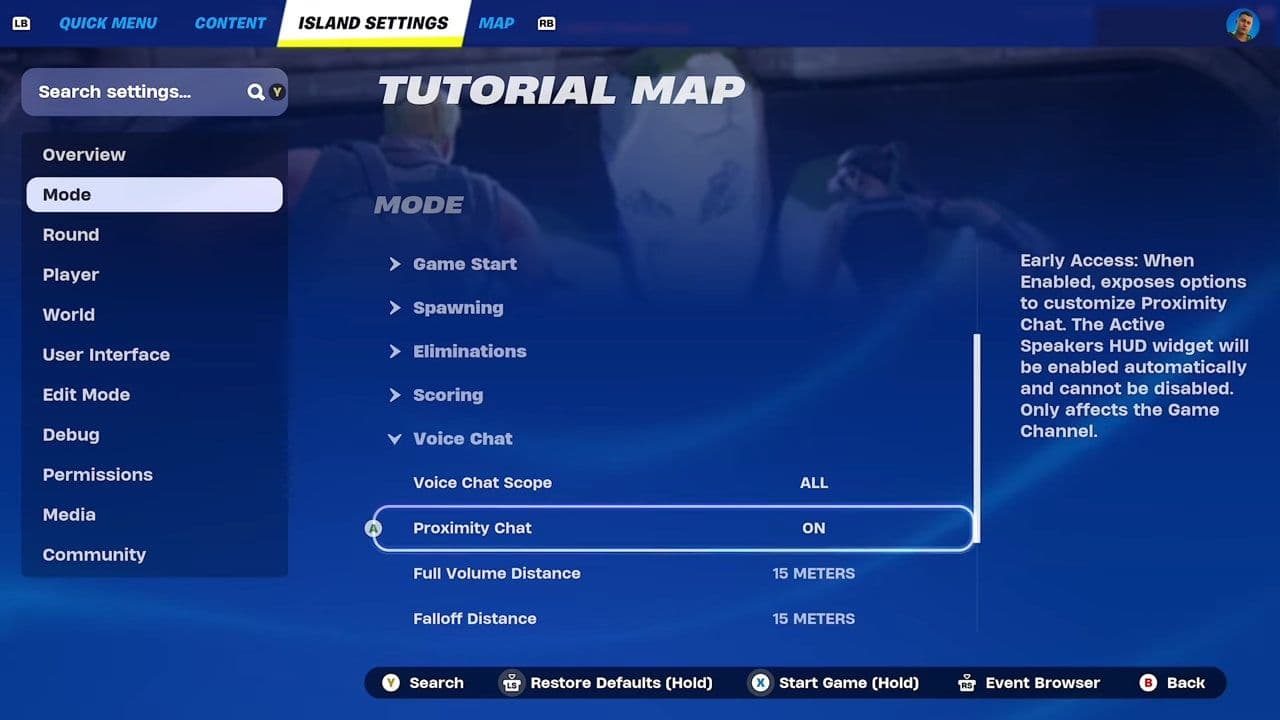
Remember, proximity chat is off by default, so it needs to be enabled manually.
When will proximity chat come to Fortnite Battle Royale?
Epic Games hasn’t announced an official release date for proximity chat in Fortnite Battle Royale yet. However, recent updates show that the feature is actively in development and could be added in a future patch. Although it’s currently only available in Creative mode, its presence there suggests Epic is working to bring it into the main Battle Royale experience.
For now, there’s no confirmed timeline on when proximity chat will launch in Battle Royale, so stay tuned for official updates.
Impact on Fortnite gameplay
Proximity chat is set to revolutionize the way we communicate. Now, when you’re near other players, you can actually hear them talk. This means you can team up, plan tricks, or even mess around with your opponents by talking to them.
It aims to make the game feel more realistic and exciting. You’ll need to use both your shooting skills and your talking skills to win.
Considerations and moderation
Voice chat is fun, but sometimes things can get out of hand. Don’t worry, though, Epic has tools to help you stay safe. You can mute or block anyone who’s being rude or annoying. And if you don’t want to use proximity chat, you can easily turn it off in the settings when it's available.

That’s all for today! Looking for more Fortnite guides? Check out these:
All Related Guides
 Fortnite Droid Tycoon Chips guide: Best ways to farm chips fastFortnite Droid Tycoon Chips guide: best farming methods, upgrades, Rebirth tips, and how to use Chips wisely....
 5 best Fortnite Star Wars games you can play right now Best Fortnite Star Wars games: Galactic Siege, Escape Vader, Droid Tycoon, creator islands, and how to play th...
 How to ride on a player's shoulders in FortniteHow to ride on a player's shoulders in Fortnite: steps, controls, quest completion tips, and how Shoulder Ride...
 All Garden vs. Brainrot codes in Fortnite: Updated listLooking for Fortnite Garden vs Brainrot codes? Get every working code, learn how to redeem them, and boost you...
 Latest Fortnite Steal the Brainrot codes (May 2026)Find all active Fortnite Steal the Brainrot codes to summon Brainrot Gods and boost rewards fast....
 Fortnite Karaoke mode explained: How to play?Discover Fortnite Karaoke mode in Fortnite Festival, including Pro Vocals, Mic Vocals setup, supported songs, ...
 How to get a refund for D4VD Fortnite cosmeticsThis guide explains the D4VD Fortnite cosmetics refund, including refund steps, eligible items, Locker Bundle ...
 Veno’s Fortnite settings: Who is he and what is his setupFind Veno Fortnite settings for mouse, keyboard, video, gear, DPI, sensitivity, and competitive setup....
- 1
- 2
- 3
- 4
- 5
- 6
- 7
- 8
- 9
- 10
- 11
- 12
- 13
- 14
- 15
- 16
- 17
- 18
- 19
- 20