Finding the Chalice with Aura's Map in Fortnite
This Chapter 5 Season 1 quest was a challenge for a lot of players. Here's how to solve it.ON THIS PAGE:
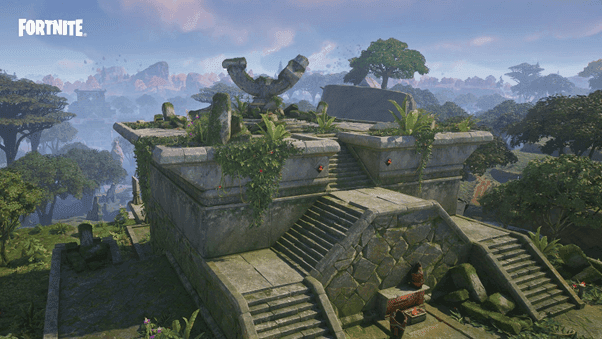
While Chapter 5 Season 1 is now happening, let's remember looking for the Chalice using Aura's map. That quest was really exciting for everyone. Unfortunately, it’s not available anymore, but this guide tells us about how fun it was back then.
Snapshot Quests and Aura's Entrustment
This place was not just pretty to look at, it was fun to explore. Imagine yourself swinging through thick plants with the Grind Vines, using the strong EvoChrome guns – a real Fortnite adventure!
Meet Aura, the famous gold thief from the Island. She goes on exciting Snapshot Quests. Aura's job is to protect the Island from the scary Chalice. She asked players to help with an important task: find the Chalice artifact and bring it back.
Following Aura's Map
Decoding Aura's mysterious map was the key to discovering the location of the Chalice. Do you recall going to see her behind the gas station, sullying over its mysteries and making plans for your journey?
Quest Phases
The Snapshot Quests unfolded in four thrilling phases. We started by securing field notes, then delivering them to Aura. Next, we investigated ancient rocks, collecting Petroglyph samples. Finally, after conquering these stages, the grand finale arrived: returning the Chalice of Cubetastrophe to Aura.
Reaching the Ruined Temple
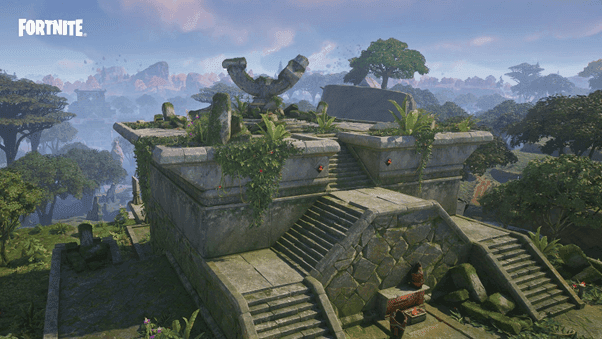
Do you recall exploring the map looking for that magnifying glass symbol showing where the Chalice was? Upon arriving at this place, a grand yet ruined temple was there. We went down the stairs, pursuing the arrow signs into a hidden hallway.
Claiming the Chalice
Inside the secret room, a platform asked for something: 100 gold bars to get the special cup. But who could say no? We right away got 20,000 experience points just for being brave enough, even before getting the reward.
Triumph and Transformation
The offering was placed and the glowing Chalice appeared. We picked it up and felt strong from the achievement, and as bonus, some extra 40,000 experience points. For some players using certain outfits, there was a bonus too - they turned into the powerful Oro or Orelia characters.
XP Time
Bringing the Chalice back to Aura completed the transaction. Our character received a significant XP boost, indicating that the mission was finished in the history of the game.
This guide attests to the excitement of Chapter 4 Season 3, even though the Snapshot Quests and the WILDS biome are already treasured memories. Let the echoes of the Chalice quest serve as a reminder of the adventures that molded the Fortnite universe as we continue on our trip through Chapter 5 of Season 1.
FAQs
Why can't I see the map in Fortnite?
This issue can occur due to various reasons, including:
- Server problems: Epic Games' servers might be experiencing issues.
- Graphics settings: Certain settings can cause rendering problems.
- Game bugs: Occasional bugs can prevent the map from loading correctly.
How to fix Fortnite map not loading?
Try the following solutions:
- Restart the game: Close and reopen Fortnite to refresh the game.
- Check server status: Visit Epic Games' status page to see if there are any ongoing server issues.
- Adjust graphics settings: Lower your graphics settings to improve performance.
- Reinstall Fortnite: Uninstall and then reinstall the game to fix any corrupted files.
How to find a Fortnite map?
To find and play a specific island:
- Go to Creative Mode.
- Select Island Code.
- Enter the map code provided for the island you want to visit.
- Once the island loads, you can start exploring.
What should I do if the map still isn't loading?
If the issue persists after trying the above steps, consider:
- Checking for game updates: Ensure your game is up to date.
- Contacting support: Reach out to Epic Games Support for further assistance.
Remember, issues like these can sometimes be temporary and may resolve after a short period.
All Related Guides
 Fortnite Loot Hacker Sprites: All variants, locations, and how to get themFind all Fortnite Loot Hacker Sprites, Cheat Code locations, Chest chances, Sprite Dust costs, and how to unlo...
 All Garden vs. Brainrot codes in Fortnite: Updated listLooking for Fortnite Garden vs Brainrot codes? Get every working code, learn how to redeem them, and boost you...
 Latest Fortnite Steal the Brainrot codes (September 2026)Find all active Fortnite Steal the Brainrot codes to summon Brainrot Gods and boost rewards fast....
 Island cheats: How to find & use Fortnite Cheat codesLearn how Fortnite Cheat Codes work, where to find them, what each panel color means, and how to unlock and ex...
 Sprite Rate Up meaning in FortniteLearn what Sprite Rate Up means in Fortnite, how these events work, which Sprites get boosted, and why they're...
 How to use a Gizmo in Fortnite (Sprite extraction tools)Learn how to use a Gizmo in Fortnite, activate the Gizmo Wheel, unlock Sprite tools, and complete the "Use a G...
 How to resummon Fortnite SpritesLearn how to resummon Fortnite Sprites in Chapter 7 Season 4, including Sprite Dust costs, levels, collection ...
 Fortnite Mastery Monday guide: Schedule, bonuses & moreLearn how Fortnite Mastery Monday works, including its weekly schedule, 2x Sprite leveling, double Sprite Dust...
- 1
- 2
- 3
- 4
- 5
- 6
- 7
- 8
- 9
- 10
- 11
- 12
- 13
- 14
- 15
- 16
- 17
- 18
- 19
- 20
- 21
- 22
- 23
- 24
- 25