How to play Fortnite in Discord: Explained
Epic Games has made it possible to play Fortnite directly inside Discord. This new feature comes from a partnership between Epic Games, Nvidia, and Discord. This trial is an easy way to try Fortnite if you don’t have it installed. Let’s take a closer look at who can benefit from this new partnership and how!
Can I play Fortnite in Discord?
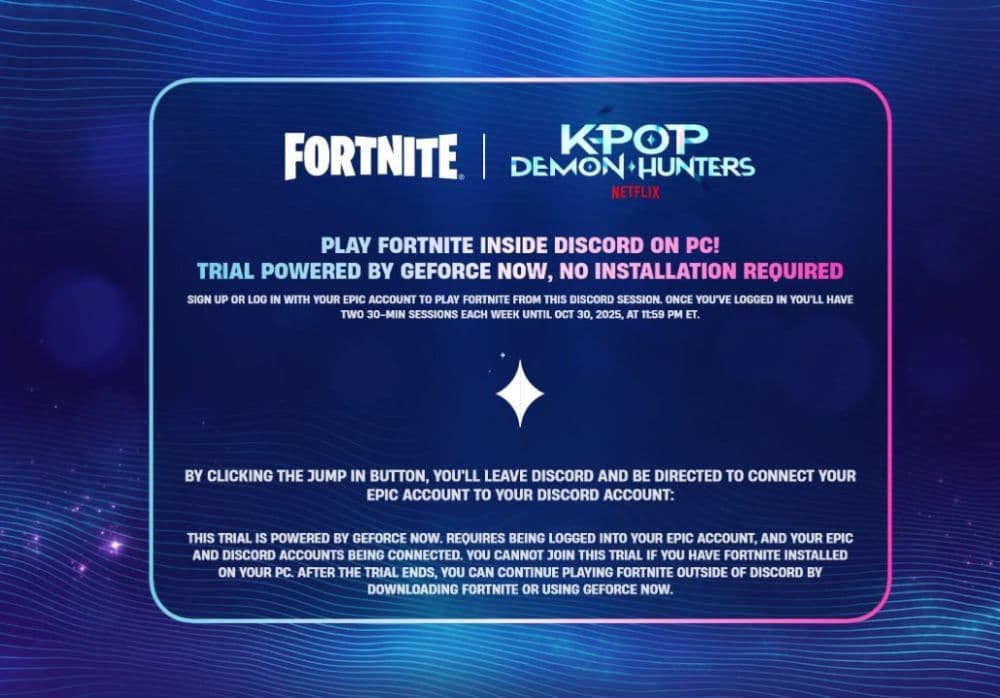
Yes, you can play Fortnite directly through Discord. Epic Games now lets players stream Fortnite using Nvidia’s GeForce NOW service. This means you don’t need to install the game or open the Epic Games Launcher. You can play inside Discord’s window as long as you connect your Epic and Discord accounts. The collaboration was released alongside the KPOP Demon Hunters partnership.
The trial is limited, so each player can use it for two 30-minute sessions every week. This setup is perfect for people who want to test Fortnite quickly before downloading it.
Available countries
- United States
- Canada
- Mexico
- United Kingdom
- Germany
- France
- Italy
- Spain
- Netherlands
- Sweden
- Norway
- Denmark
- Finland
- Poland
- Czech Republic
- Austria
- Switzerland
- Ireland
- Cyprus
Players outside these countries may not have access. This feature is currently only for PC users.
How to play Fortnite in Discord
You can start playing Fortnite in Discord in just a few minutes. The setup is quick and simple:
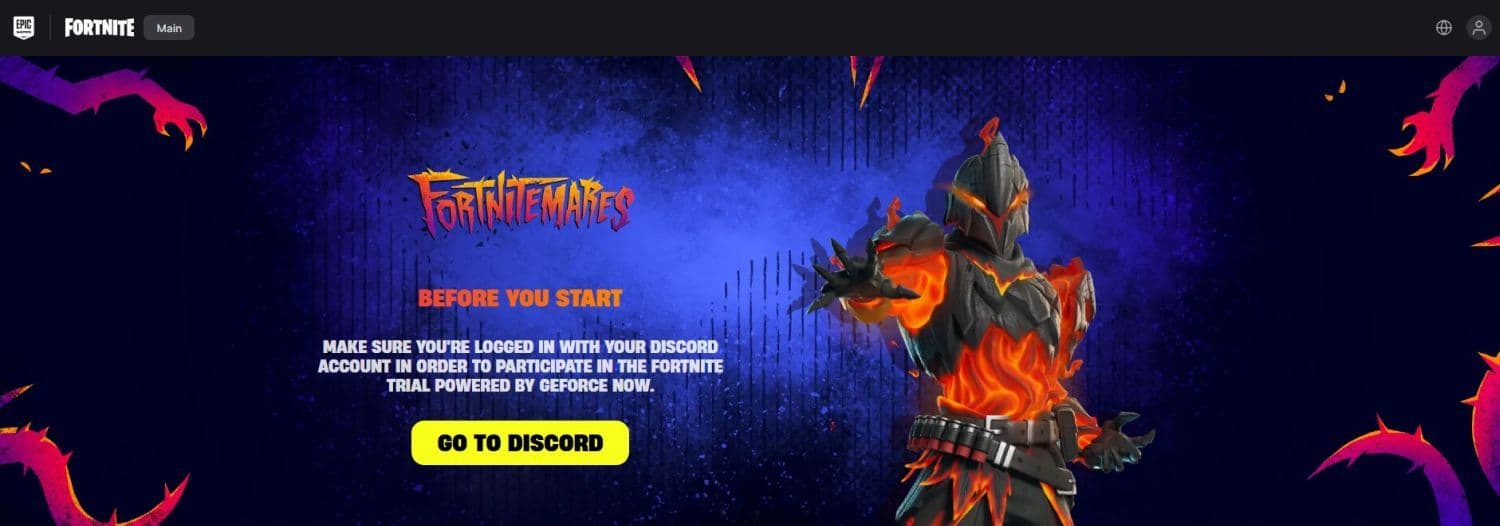
- Go to the Fortnite trial page: Visit fortnitetrial.fortnite.com. Click on the yellow “Go to Discord” button to open the link.
- Log into Discord: Make sure Discord is already installed and running. You must be logged into your account before you continue.
- Connect your accounts: The system will ask you to link your Epic Games and Discord accounts. Follow the instructions carefully. This step is required to start the trial.
- Start your trial session: Click “Jump In” when Discord loads the Fortnite screen. The game will begin to stream through Discord using GeForce NOW.
- Remember the rules:
- Each player gets two sessions per week.
- Each session lasts 30 minutes.
- If you close Discord or the game, your session will end early.
After finishing your first trial, Discord will show a “Congratulations” message. You can then start your second session anytime in the same week.
Do I need to download Fortnite to play in Discord?
No, you don’t need to download Fortnite. That’s what makes this trial special. The game runs on GeForce NOW’s cloud servers, so you don’t have to install anything. You only need to sign into your Epic Games and Discord accounts to connect them.
Because it uses cloud streaming, the game runs smoothly even on PCs that don’t meet Fortnite’s usual system requirements. All the heavy work happens on Nvidia’s servers, while you play inside Discord.
Here’s what you need before you start:
- Discord installed on your PC
- An Epic Games account
- A stable internet connection
- Living in a supported country
Who can try Fortnite trial in Discord?
The trial is open only to PC users who don’t already have Fortnite installed. If Fortnite is already on your computer, you won’t be able to join the trial through Discord.
Players must live in one of the supported countries listed above. Some users outside these countries have reported needing a VPN to access the feature.
The goal of the trial is to let new players try Fortnite instantly. It also allows current players to test how GeForce NOW’s cloud streaming works inside Discord. Since everything runs on Nvidia’s servers, even low-end computers can handle the game smoothly.
Fortnite X Discord collaboration dates
The Fortnite trial runs from October 6, 2025, to October 30, 2025, and ends at 11:59 PM ET. Epic Games updates trial sessions every Tuesday at 9:59 AM ET. Each week, players get two new 30-minute sessions to enjoy.
This partnership shows how gaming is changing. Cloud gaming now connects social platforms like Discord with major titles such as Fortnite. It’s also part of Nvidia and Discord’s plan to bring instant game demos to more players.
If this experiment performs well, other games may follow the same path, allowing users to test and play titles directly in Discord.
A big move by two gaming giants
Playing Fortnite inside Discord is a clear sign of where gaming is heading. Epic Games, Nvidia, and Discord have made a feature that removes all barriers between players and the game. For new players, this is the easiest way to try Fortnite without downloading it. For Epic Games, it’s a new method to reach more users and show the power of cloud streaming.
We have more Fortnite guides for you to take a quick look at:
- “When did Fortnite come out?” A question with 2 answers
- How much does Fortnite make in a day?
- How to redeem Fortnite codes
- What happened to Fortnite Battle Stars & how to level up in 2025
- Fortnite Superman update: Everything you need to know
Featured Image Credit: Fortnite
All Related Guides
 All Garden vs. Brainrot codes in Fortnite: Updated listLooking for Fortnite Garden vs Brainrot codes? Get every working code, learn how to redeem them, and boost you...
 Latest Fortnite Steal the Brainrot codes (April 2026)Find all active Fortnite Steal the Brainrot codes to summon Brainrot Gods and boost rewards fast....
 Fortnite Arena Boxfights mode guideFortnite Arena Boxfights guide: how it works, ranked system, dates, and tips to win close-range fights....
 Fortnite OG Season 8 guide: Maps, weapons, and moreFortnite OG Season 8 guide: map changes, weapons, Battle Pass, POIs, and tips to win more matches....
 How to change your age on FortniteLearn how to change your age on Fortnite account, how Epic support works, and what age restrictions can affect...
 Fortnite Chaos Cube locations: Where to find them fastFortnite Chaos Cube locations guide: all POIs, XP rewards, fastest routes, and tips to complete Path of the Vo...
 How to get Fortnite Slapperoni PizzaHow to get Fortnite Slapperoni Pizza: locations, stats, Slap effect, and best ways to use it for fast heals an...
 Fortnite Team Foundation or Ice King? Showdown explainedFortnite Team Foundation or Ice King: differences, rewards, playstyles, and which faction to choose in Chapter...
- 1
- 2
- 3
- 4
- 5
- 6
- 7
- 8
- 9
- 10
- 11
- 12
- 13
- 14
- 15
- 16
- 17
- 18