How to change your age on Fortnite

Fortnite players often look for a quick way to change their age in account settings. That usually happens when the wrong birth date was entered during account setup, or when age-based limits start affecting chat, purchases, or other features. The problem is that many users expect a simple edit button, but that is not how this process works. Here is how to change your age on Fortnite and Epic Games!
How to change your age on Fortnite
If you want to change your age on Fortnite, you need to correct the date of birth on the Epic Games account linked to Fortnite. There is no normal setting inside Fortnite that lets you directly edit your age.
This means the fix happens through a support request. The route is different depending on the situation:
- If you want help with your own Epic Games account, you need to contact Epic support through the standard account support route.
- If you are a parent or guardian trying to fix a child’s birth date, you need to use the parent or guardian request route.
This is important because Fortnite uses your Epic account details to manage age-related settings and protections.
If you are already over 18, check out our guide on how to turn off parental controls!
How to change age on your Epic Games account
You can’t simply change your age on Fortnite or Epic Games. That is because Epic, the platform owner, wants to keep all endpoints tight and keep children safe from any danger. However, parents can change their children’s age on the platform. Here is how:
How to send a ticket for your own Epic Games account
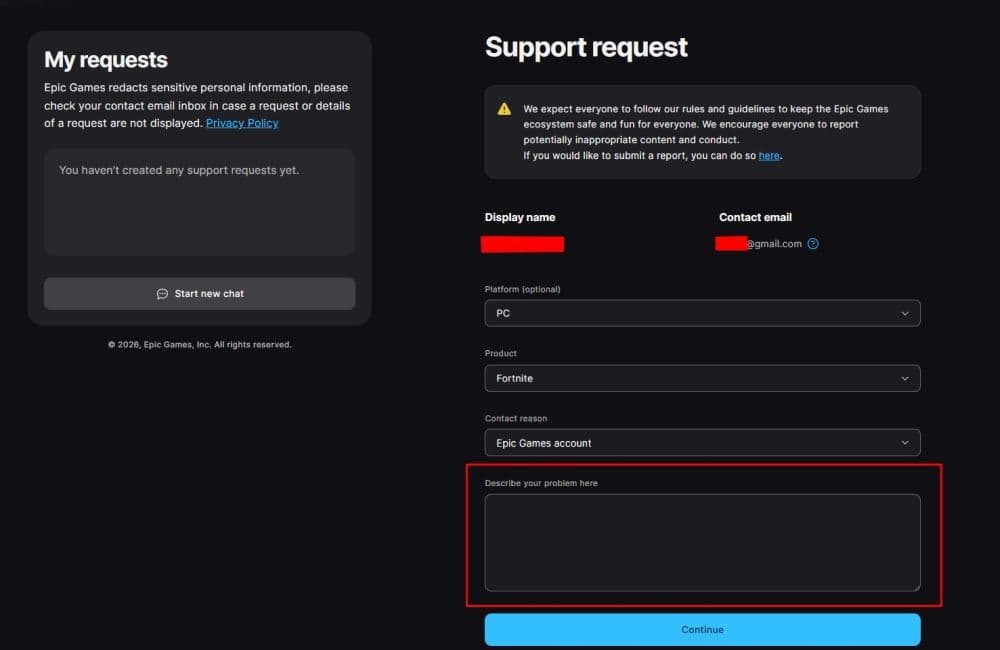
If the date of birth is wrong on your own account, follow these steps:
- Go to the Epic Games support page.
- Open the contact form for account-related help.
- Choose the category that best matches account support.
- Enter your account details carefully.
- Explain that the birth date on the account is incorrect and needs to be corrected.
- Submit the request and wait for Epic’s reply.
How to send a ticket as a parent or guardian
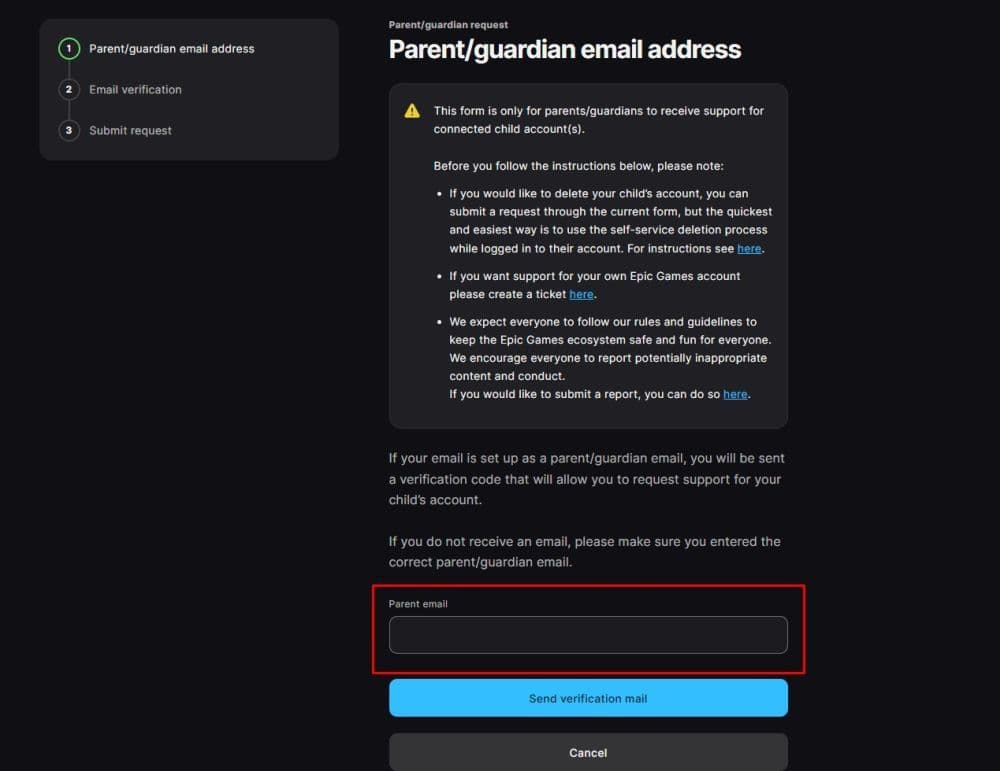
If you are correcting a child’s account, the process is different. You need to use the parent or guardian request form.
- Open the parent or guardian support request page.
- Enter the parent or guardian email address.
- Complete the email verification step.
- Fill in the child account information.
- State that the child’s date of birth was entered incorrectly.
- Submit the request.
Does Fortnite restrict features for kids?
Yes, Fortnite can limit some features for younger users. If an account is treated as a child account, certain features may stay restricted until parental consent is completed or the player reaches the required age in their country.
These limits can affect things like:
- Voice chat
- Free text chat
- Real-money purchases
- Some sign-in features
- Certain account customization options
This is one reason why users often search for age changes in the first place. A wrong birth date can lead to limits that do not match the player’s real age.
How do you turn off age restrictions on Fortnite?
You do not turn off Fortnite age restrictions with a simple switch. In most cases, these restrictions are tied to the age on the Epic Games account and to parental consent settings.
Parents can still manage many controls through Epic’s parental control system. In Fortnite, this usually includes settings related to communication, spending, and content access. If the account belongs to a younger user, some restrictions may remain in place until the correct consent steps are completed.

Is Fortnite 12+ or 13+?
This question often causes confusion because age ratings can vary by region and rating system. In broad terms, Fortnite is commonly treated as suitable for teens, and many players know it as a 13+ type of game.
At the same time, Epic also applies its own account and consent rules based on the player’s age and country. That means the account experience can depend on more than just the public age rating. Even if someone can access Fortnite, some features may still stay limited if the account falls under child safety rules.
So the simplest answer is this: Fortnite is generally seen as a teen game, but Epic account rules for younger users can still shape what features are available.
Why can’t I edit my birth date?
Many users expect to find their age inside account settings and simply update it. That usually does not happen. This system likely exists for safety and compliance reasons. Age on an Epic account affects child protections, consent flows, and feature access.
Here are even more useful Fortnite guides for you:
- “When did Fortnite come out?” A question with 2 answers
- How much does Fortnite make in a day?
- How to redeem Fortnite codes
- What happened to Fortnite Battle Stars & how to level up in 2025
- Fortnite Superman update: Everything you need to know
Featured Image Credit: Fortnite
All Related Guides
 Fortnite Droid Tycoon Chips guide: Best ways to farm chips fastFortnite Droid Tycoon Chips guide: best farming methods, upgrades, Rebirth tips, and how to use Chips wisely....
 5 best Fortnite Star Wars games you can play right now Best Fortnite Star Wars games: Galactic Siege, Escape Vader, Droid Tycoon, creator islands, and how to play th...
 How to ride on a player's shoulders in FortniteHow to ride on a player's shoulders in Fortnite: steps, controls, quest completion tips, and how Shoulder Ride...
 All Garden vs. Brainrot codes in Fortnite: Updated listLooking for Fortnite Garden vs Brainrot codes? Get every working code, learn how to redeem them, and boost you...
 Latest Fortnite Steal the Brainrot codes (May 2026)Find all active Fortnite Steal the Brainrot codes to summon Brainrot Gods and boost rewards fast....
 Fortnite Karaoke mode explained: How to play?Discover Fortnite Karaoke mode in Fortnite Festival, including Pro Vocals, Mic Vocals setup, supported songs, ...
 How to get a refund for D4VD Fortnite cosmeticsThis guide explains the D4VD Fortnite cosmetics refund, including refund steps, eligible items, Locker Bundle ...
 Veno’s Fortnite settings: Who is he and what is his setupFind Veno Fortnite settings for mouse, keyboard, video, gear, DPI, sensitivity, and competitive setup....
- 1
- 2
- 3
- 4
- 5
- 6
- 7
- 8
- 9
- 10
- 11
- 12
- 13
- 14
- 15
- 16
- 17
- 18
- 19
- 20