How to reload chunks in Minecraft: Fixing performance and visual glitches
Something that all Minecraft players should know how to do.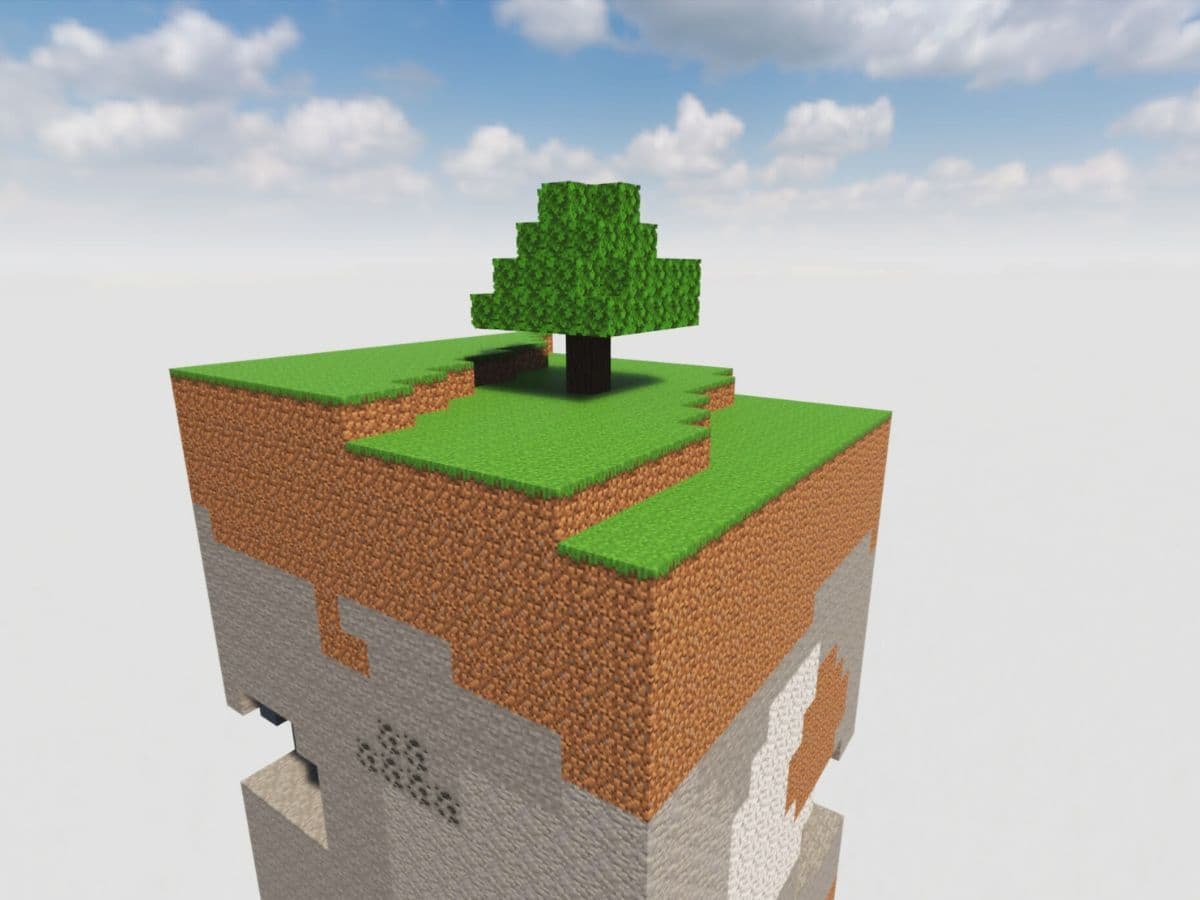
Many players don’t know this, but Minecraft actually loads the world in parts called “chunks.” These chunks help the game run smoothly, but sometimes they don’t load right. This can cause issues such as lag, missing blocks, or frozen mobs. Reloading chunks is one way to fix these issues without restarting the whole game. Let’s look at what chunks are in Minecraft, how to reload them, and why it is important to do so at certain times!
What are chunks in Minecraft?
Chunks are small sections of the Minecraft world. One chunk is 16 blocks wide, 16 blocks long, and goes from the bottom of the world to the top. In the Overworld, this means it goes from -64 to 320, making each chunk 384 blocks tall. In the Nether and The End, chunks are 256 blocks tall.
Important facts about chunks:
- One chunk has 98,304 blocks in the Overworld.
- The game loads and unloads chunks around the player to keep performance steady.
- The render distance setting controls how many chunks the game loads.
- Spawn chunks always stay loaded, even when the player is far away.
- Chunks always generate the same way if you use the same seed and version.
Minecraft uses chunks to manage memory and performance. When you move in the world, the game loads new chunks and removes the old ones that are far away.
How to reload chunks
You can easily reload chunks in Minecraft thanks to a very simple shortcut. It fixes loading problems and refreshes the world near your character.
To reload chunks:
- Press F3 + A while in the game.
- The game will reload all nearby chunks.
- You will see a message that says "Reloading all chunks."

If this doesn’t solve the issue:
- Exit the world and return to the main menu.
- Load the world again. This resets all chunks in the world.
If problems continue:
- Close and reopen Minecraft. This clears memory and reloads all data.
- You can also use mods like Chunky or Chunk-Pregenerator to manage chunk loading better. These tools help players on larger maps or lower-end devices.
Why should you reload chunks in Minecraft?
Reloading chunks helps when the game doesn’t display things correctly or starts to lag. Here are the main reasons to do it:
- Fix lag and stuttering: The game might slow down if it loads chunks incorrectly. Reloading helps the game run smoother.
- Fix visual glitches: Sometimes, you see missing terrain or invisible blocks. Reloading chunks can bring back these missing parts.
- Fix entity bugs: Mobs or items might freeze or act strangely. Reloading resets their behavior.
- Improve game performance: Reloading helps Minecraft free up memory and process data again.
You should reload chunks when:
- You teleport or use commands that change locations.
- Large buildings do not appear as they should.
- You make edits that don’t show up right away.
This process does not fix every issue, but it is a fast way to improve your game without restarting everything.
How to see chunks in Minecraft without F3?
In Java Edition, pressing F3 + G shows chunk borders. But if you don’t want to use F3, you can try these options:
- Use mods: Mods like MiniHUD let you view chunks with custom settings.
- Use commands: You can mark chunk edges with /setblock or /fill to outline chunk borders.
- Watch redstone behavior: Some redstone machines behave differently across chunks. You can use this to find borders.
In Bedrock Edition:
- Use the /tickingarea command to mark active chunks.
- Some add-ons or tools may help show chunk lines.
Most players use F3 + G, but mods and commands give more control if you want to avoid debug menus.
How far is 12 chunks in Minecraft?
Each chunk is 16 blocks wide. If your render distance is set to 12 chunks:
- You can see 192 blocks in each direction.
- The game loads a 25x25 chunk square around you.
Here is a simple chart:
If you have a high render distance, the game loads more blocks, but it may cause lag. A 12-chunk setting gives good range and keeps the game smooth on most systems.
Do chunks load vertically?
Yes, chunks load as full vertical columns. This means that when a chunk is active, it loads from the lowest to the highest point. A chunk starts at Y = -64 and goes up to Y = 320. The vertical part of a chunk is not split, and the whole column is active when loaded.
This matters especially when using farms, redstone systems, or tall buildings. If the chunk is loaded, the entire vertical space works. If not, the system stops working until the chunk loads again.
In Java Edition, the simulation and ticking distance controls how much of the game processes actions. This affects how many chunks load fully and which features work in the background.
If you are encountering visual issues or bugs in Minecraft, reloading chunks is one of the best ways to get rid of them. It helps you deal with lag, broken visuals, and bugged terrain. If you enjoyed this guide, don’t forget to check these ones too:
We have quite a few Minecraft guides for you to check out and learn more about the game. You can find some of them below, but don’t forget to check out our Minecraft page for more:
- Minecraft 2 story starter house ideas & tutorials
- Observer recipe in Minecraft and what you need to know about the item
- Minecraft compass recipe (+recovery) explained
- Minecraft medieval house ideas & tutorials
- How to make a stone cutter in Minecraft: Complete recipe
Featured Image Credit: Steam Community
All Related Guides
 Top 5 Minecraft 26.1 seeds you must try todayFind the best Minecraft 26.1 seeds for villages, rare biomes, island survival, and creative builds, with seed ...
 How to turn on keep inventory in MinecraftUse the correct Keep Inventory command in Minecraft and learn how it works across Java, Bedrock, servers, and ...
 How to breed tropical fish in MinecraftCan you breed tropical fish in Minecraft? Here is the clear answer, plus how to catch, move, and use tropical ...
 Minecraft Chaos Cubed guide: Everything new in the 2026 updateExplore everything new in Minecraft Chaos Cubed, including Sulfur Caves, Sulfur Cubes, geysers, new blocks, co...
 How to change render distance in MinecraftChange render distance in Minecraft with simple steps for Java and Bedrock, plus tips to balance better visibi...
 How to grow mangrove trees in MinecraftFind out how to grow mangrove trees in Minecraft with simple steps, growth requirements, farming tips, and com...
 How to craft a name tag in MinecraftLearn how to craft a name tag in Minecraft, how to use it with an anvil, and why it matters for pets, mobs, an...
 Here is how to make a water elevator in MinecraftHere’s how to make a water elevator in Minecraft, including the materials you need and why your bubble column ...
- 1
- 2
- 3
- 4
- 5
- 6
- 7
- 8