How to change your name in Warzone

You might open Warzone one day and realize that the name you picked months or even years ago does not really work for you anymore. Maybe you want to match a new username you use elsewhere, or you simply want something different. Either way, Warzone does let you change the name other players see.
The part that can trip people up is where that name actually comes from. Warzone uses your Activision ID as your in-game display name. So, changing your PSN ID, Xbox Gamertag, Steam name, or Battle.net name is a separate thing. If you want a different name inside Warzone, you need to change the Activision ID linked to your account.
Can you change your name in Warzone?
Yes, you can change your name in Warzone. You do it by editing the display name attached to your Activision ID.
If you have played Call of Duty for a while, you have probably seen names that look something like this:
PlayerName#1234567
The first part is the display name other players usually notice. The numbers after the # identify the full Activision ID tied to that account.
Those numbers are also why two people can sometimes appear to have the same name. They can share the same display name while still having different Activision IDs behind it.
Your Activision account also connects Warzone across supported platforms. For example, you might play on PlayStation today and then use the same Activision account on PC later. Your linked platform account can change, but Warzone still works with the same Activision profile.
That is why changing your console or PC username does not replace the Warzone name-change process.
How to change name
You do not have to open Warzone to change your name. Activision also lets you edit your Activision ID through your account page in a web browser.
This route can be more convenient if you are away from your console or PC, or if you already need to check your account details.
Follow these steps:
- Sign in to your Activision account.
- Open Basic Info.
- Find Activision ID and select Edit.
- Request the account verification code.
- Check the email linked to your Activision account.
- Enter the verification code Activision sends you.
- Return to the Activision ID section.
- Enter your new display name and save it.
- Enter your Activision password when asked.
- Submit the change.
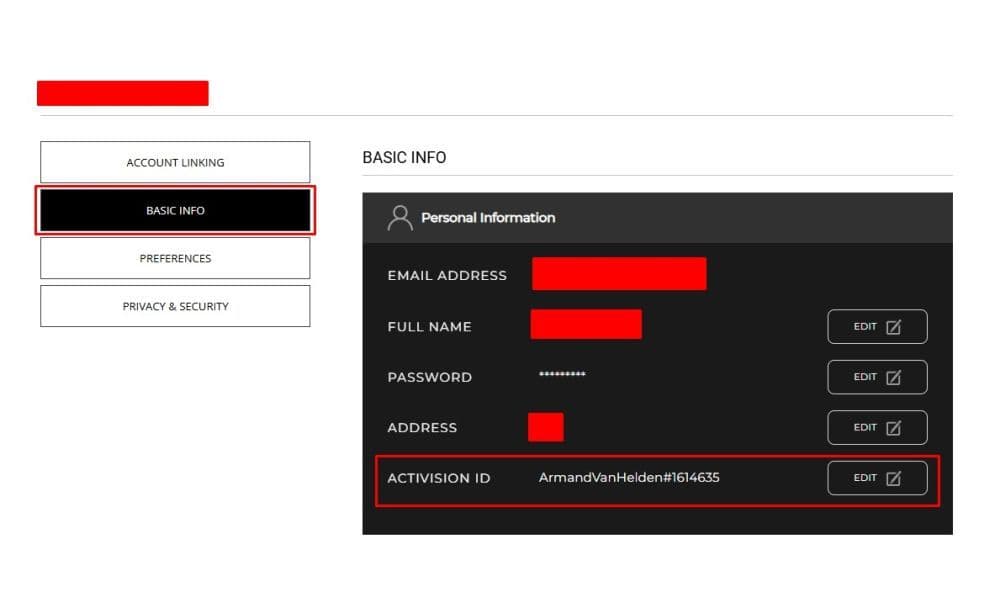
One thing is worth checking before you begin. You need access to the email address attached to your Activision account.
That can become a problem with older accounts. Maybe you created yours years ago and barely use that email anymore. In that case, make sure you can still get into the inbox before you start changing account information.
How Warzone name change tokens work
Here is the main limitation with Warzone name changes: you cannot keep renaming your account whenever you feel like it.
Activision uses Username Change Tokens for this system. Every time you change your display name, you spend one token.
You receive one new token every six months, and your account can hold a maximum of two tokens at once.
So, if you already have two tokens and another six months pass, you do not get a third one. Your balance stays at two.
Warzone display name rules
You have a name in mind, type it in, and Warzone refuses to accept it. That does happen, and it does not always mean another player already took the name.
Activision has its own rules for display names. Your name needs to contain between 2 and 16 characters. Standard special characters are not allowed, although Activision supports Unicode characters.
Activision can also reject or remove names that break its rules on offensive or inappropriate account names.
If your new Warzone name will not go through, check a few things:
- Make sure the name stays within the 2 to 16 character limit.
- Remove unsupported special characters.
- Check that the name follows Activision's username rules.
- Make sure you still have a Username Change Token.
Do not worry too much if someone else appears to use the same visible name. The numerical part of the Activision ID separates accounts, so identical display names can exist.
Changing your name in Warzone is simple once you know which account actually controls it. Find your Activision ID, make sure you have a Username Change Token, and choose the new name carefully before you confirm it.
Looking for more pieces to learn about Warzone? Start here:
- Is Warzone 2 Split Screen?
- How To Show FPS In Warzone
- How To Get A Nuke In Warzone 2?
- How To Turn On Proximity Chat In Warzone 2
- How To Slide Cancel In Warzone
Featured Image Credit: Call of Duty
Guide Categories
All Related Guides
 How to make footsteps louder in Warzone: PC, PS5, and Xbox settingsLearn how to make footsteps louder in Warzone with the best audio settings for PC, PS5, and Xbox, including EQ...
 How to get easy lobbies in Warzone: Bot lobbies & moreLearn how to get easier Warzone lobbies, what bot lobbies actually are, and how matchmaking, playtime, playlis...
 How to Prestige in Warzone fastLearn how to Prestige in Warzone, what resets at Level 55, how Permanent Unlocks work and the fastest route th...
 How to check MW4 Beta stats: K/D, wins, kills & Combat RecordLearn how to check your MW4 Beta stats, including K/D, wins, kills, playtime, weapon stats, Combat Record, and...
 How to inspect your gun in WarzoneLearn how to inspect your gun in Warzone on PC, PS5, PS4, and Xbox, plus how to view a weapon’s equipped attac...
 What are Loot Caches in Warzone? Caches vs. Crates explainedWhat are Loot Caches in Warzone? Learn what counts, the difference between caches and crates, and the fastest ...
 What is an infil weapon in Warzone?What is an Infil Weapon in Warzone? Learn what counts and how to get Infil Weapon eliminations....
 Warzone Lockdown Casual guide (New mode)Learn how Warzone Lockdown Casual works, including objectives, respawns, loadouts, rewards, and the best strat...
- 1
- 2
- 3
- 4
- 5
- 6