Minecraft Waifucraft Mod: Features and community reception

Minecraft has a huge library of mods that change how the game feels and plays. Some focus on new blocks or biomes, while others add role-playing elements. Waifucraft is one of the more unique mods available today. It adds companions inspired by anime, manga, and games. It provides Minecraft players with a new way to experience the game. Check out all of the details about Waifucraft below!
What is Waifucraft?
Waifucraft is a Minecraft mod that adds tameable companions, known as waifus. These characters come from anime, manga, and game references. Some are advanced with full interaction menus, while others are simple “Mob-Waifus” created by turning mobs into companions.
Each waifu has unique abilities known as quirks. For example, Hinata can reveal nearby mobs through walls, Megumin uses explosions to finish enemies, and Aqua heals or grants special effects.
Unlike the Werewolves mod and ProjectE mod, Waifucraft looks at the game from a much different angle.
How to install Waifucraft
Installing Waifucraft is straightforward, but you must follow the right steps. The mod works with Forge and NeoForge depending on the Minecraft version you use. Always download the mod from trusted sites such as CurseForge.
Here are the steps to install Waifucraft:
- Download Forge or NeoForge: Choose the correct loader for your Minecraft version.
- Download Waifucraft: Get the mod file that matches your Minecraft version from a verified source.
- Locate the mods folder: Open your Minecraft directory and find the “mods” folder.
- Place the mod file: Copy the downloaded Waifucraft file into the “mods” folder.
- Launch Minecraft: Open the game using the Forge or NeoForge profile. The mod should load automatically.
Once installed, Waifucraft works in both creative and survival modes.

Is Waifucraft multiplayer?
Yes, Waifucraft works in multiplayer. If the server supports mods and runs the same version of Waifucraft, you can use your waifus in multiplayer worlds. They follow the same mechanics as in single-player. They fight, trade, and interact while you play with friends. However, not every server allows mods, so always check server rules before trying to join.
Is Waifucraft free to play?
Waifucraft is free to download and use. Like most mods, it does not require payment. You only need a licensed copy of Minecraft and the correct mod loader. The developer updates the mod regularly and shares it on official platforms without charging users.
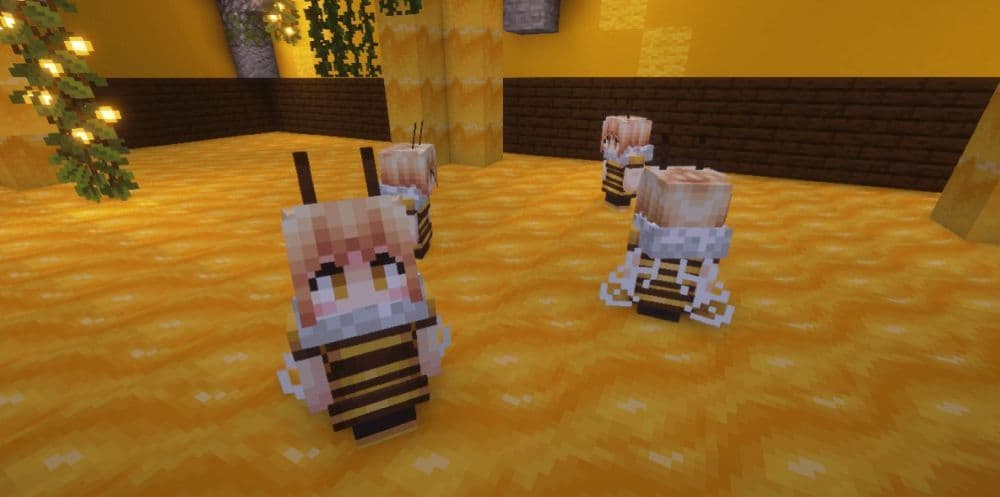
How to play Waifucraft in Minecraft
Playing Waifucraft goes beyond spawning characters. It is about managing companions, unlocking features, and using them in combat or exploration.
After summoning a waifu, you can:
- Interact with her through the menu.
- Give gifts that raise the Infatuation Meter.
- Unlock outfit changes and transformation into Waifu Totems.
- Decide if she should follow you, stay put, or wander freely.
Tamed waifus fight against hostile mobs, regenerate health slowly, and can be healed with head pats. Each character also has quirks that make gameplay different. For example, Zelda fires glowing arrows, Power gains strength from kills, and Aqua provides blessings.
Mob-Waifus offer another way to play. They are created by using Waifu Potions on regular mobs. They are easier to tame but do not have full interaction menus.
Waifucraft also adds items like Gravity Boots, Kunai, Megumin’s Staff, and the Waifu Ring.

How to use the Book of Love in Waifucraft
The Book of Love is the main guide and control item in Waifucraft. It provides details about waifus and allows players to summon and manage them. It has a different recipe from other common items.
Here is how to use it for Minecraft beginners:
- Craft the book: Combine one book with four poppies.
- Open the book: Use it to see available waifus and their preferences.
- Summon untamed waifus: Spawn new companions directly from the book.
- Check the Info page: Learn how the mod works through built-in instructions.
- Manage abilities: Enable or disable combat and teleport companions through the book.
The Book of Love is essential because it also organizes likes, dislikes, and trades for each waifu.

How to tame a waifu in Minecraft
Taming a waifu requires building trust through interaction. Players must fill the Infatuation Meter before taming.
Here are the steps:
- Summon a waifu: Use the Book of Love to bring her into the world.
- Give gifts: Find items she likes and give them to raise her Infatuation Meter.
- Fill the meter: Continue gifting until the bar reaches full.
- Use the Waifu Ring: Right-click on the waifu with the ring to tame her.
- Unlock features: Once tamed, you can change outfits, store her as a Waifu Totem, and access advanced interactions.
Mob-Waifus follow a similar process but are easier to tame. Use a Waifu Potion on a mob and then gift their favorite item.
Waifucraft supported Minecraft versions
Waifucraft supports multiple versions of Minecraft. Always download the correct file to avoid compatibility issues.
Is Waifucraft safe to install?
Waifucraft is safe if you download it from official sources like CurseForge. The developer updates the mod often, fixes bugs, and adds improvements. Unofficial websites may provide modified or harmful files, so players should avoid them. For safety, always use verified platforms.
Are Waifucraft textures and models original?
Most textures and models in Waifucraft are original or adapted for Minecraft. Known characters inspire the designs, but they have been customized for use in the game. Updates often include improvements in models, animations, and outfits. This ensures that the mod remains polished.
Are the Minecraft mods legal?
Mods are legal in Minecraft as long as they do not copy or sell copyrighted content without permission. Mojang supports community-created mods, and Waifucraft is free on official platforms. It does not sell copyrighted content, so it is safe to use.
Waifucraft turns Minecraft into a more interactive and character-driven game. It adds companions who fight, trade, and bring unique skills. The mod is updated often, supports the latest versions, and is safe when downloaded from official sites.
Check out more of our Minecraft guides below:
- Minecraft Serene Seasons Mod: A deep dive into seasonal dynamics and gameplay
- Here is a closer look at the free Japanese government Minecraft map
- Minecraft Movie's Post-Credits Scene: Implications for the Minecraft Universe
- Minecraft blast furnace recipe: How to make a blast furnace in Minecraft
- How to make a stone cutter in Minecraft: Complete recipe
Featured Image Credit: Waifucraft
All Related Guides
 Top 5 Minecraft 26.1 seeds you must try todayFind the best Minecraft 26.1 seeds for villages, rare biomes, island survival, and creative builds, with seed ...
 How to turn on keep inventory in MinecraftUse the correct Keep Inventory command in Minecraft and learn how it works across Java, Bedrock, servers, and ...
 How to breed tropical fish in MinecraftCan you breed tropical fish in Minecraft? Here is the clear answer, plus how to catch, move, and use tropical ...
 Minecraft Chaos Cubed guide: Everything new in the 2026 updateExplore everything new in Minecraft Chaos Cubed, including Sulfur Caves, Sulfur Cubes, geysers, new blocks, co...
 How to change render distance in MinecraftChange render distance in Minecraft with simple steps for Java and Bedrock, plus tips to balance better visibi...
 How to grow mangrove trees in MinecraftFind out how to grow mangrove trees in Minecraft with simple steps, growth requirements, farming tips, and com...
 How to craft a name tag in MinecraftLearn how to craft a name tag in Minecraft, how to use it with an anvil, and why it matters for pets, mobs, an...
 Here is how to make a water elevator in MinecraftHere’s how to make a water elevator in Minecraft, including the materials you need and why your bubble column ...
- 1
- 2
- 3
- 4
- 5
- 6
- 7
- 8