How to remove tokens in League of Legends

You equip a few Challenge Tokens on your League profile, leave them there for a while, and then decide you want a cleaner look. That sounds simple enough. The problem is that League makes it much easier to add or replace tokens than it does to remove them completely.
So, if you are trying to figure out how to remove tokens in League of Legends, you may not find the button you expected. The client currently has no simple option that clears every equipped Challenge Token. There are still ways to do it, though, including a client workaround that does not require another program.
What are tokens in League of Legends?
Challenge Tokens are the small achievement badges you can display on your League profile. They come from the Challenges system, which tracks different things you accomplish while playing the game.
You might earn progress through champion mastery, combat achievements, team-based goals, collection milestones, or other parts of League. As you improve a Challenge, its tier can also increase.
You can display up to three Challenge Tokens on your profile. Other players may see them when they check your profile, join your lobby, or enter a loading screen with you. Hovering over a token also shows which Challenge it belongs to and the tier you reached.
They are mainly there for presentation. A Challenge Token does not change your MMR, champion stats, or League of Legends ranks.
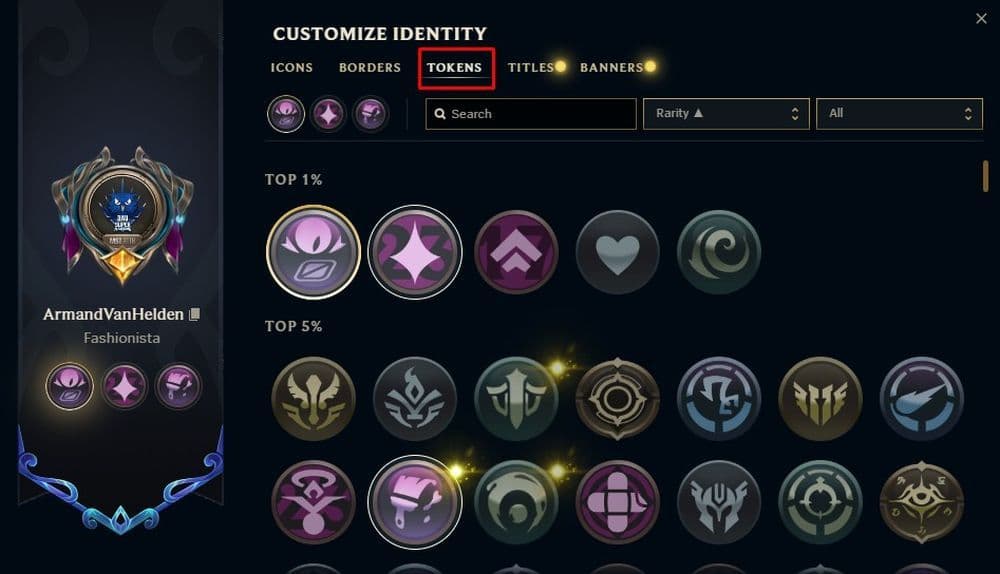
How to remove tokens
This is where League makes things a little strange. You can open your profile and swap an equipped token for another one without much trouble. However, once you want every slot empty again, there is no normal “remove” button waiting for you.
The best option is to try the League client workaround first.
Try the League client workaround first
Players have found that you can sometimes clear equipped Challenge Tokens by using the profile menu immediately after starting the client.
Here is the process:
- Close League of Legends completely.
- Start the client again and sign into your account.
- Open your profile as soon as League finishes loading.
- Quickly click or double-click your profile icon several times.
- Open the profile or Identity customization screen if it appears.
- Return to your profile and check whether the tokens have disappeared.
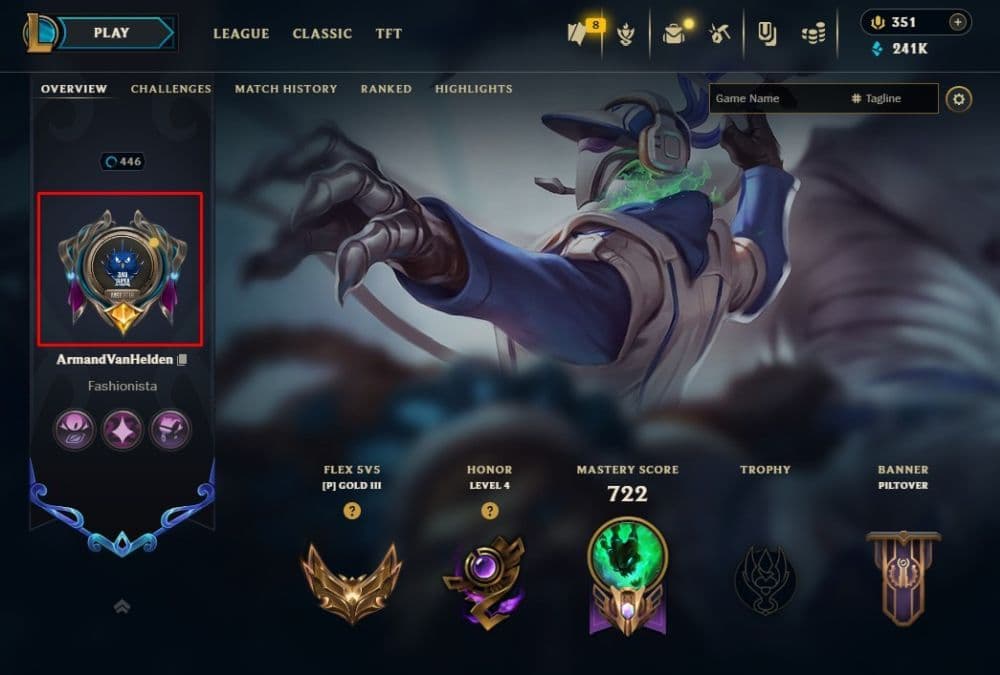
The timing can be a little awkward. You may try it once and see nothing happen, then repeat the same process and get a different result.
That is because this is a client workaround rather than a normal setting Riot added for removing tokens. If it does not work on the first attempt, close League and start again from a fresh login.
If you are on the wrong account, log out of League of Legends first and repeat the process after signing into the account where you equipped the tokens.
Remove Challenge Tokens with ChallengesAreEvil
ChallengesAreEvil is a community-made, open-source program built specifically around League's Challenge Token system. It connects to the League client running on your PC and can reset the tokens you currently display.
To use it, you generally need to:
- Open League and sign into your account.
- Download ChallengesAreEvil from its original GitHub repository.
- Run the program while League remains open.
- Use its token removal option.
- Go back to your League profile and check the result.
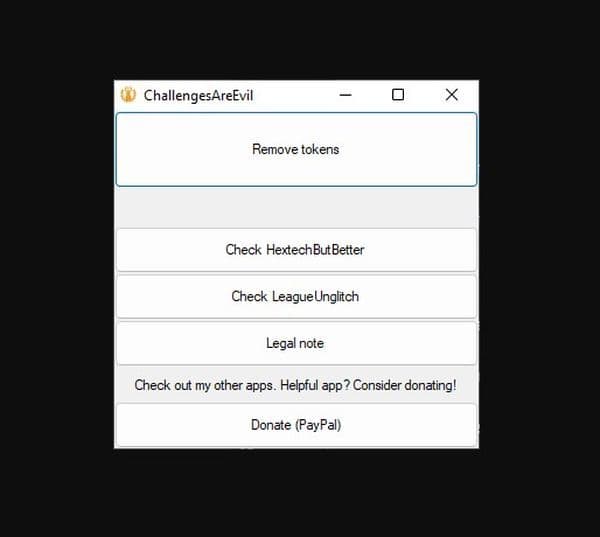
There is one thing you should know before using it. ChallengesAreEvil is not an official Riot Games program. It uses the League Client API, and Riot does not officially support that API for third-party applications.
That does not automatically mean the program is unsafe, but it does mean Riot can change the client and break the method at any time. If you use it, stick to the original GitHub repository and avoid random mirrors or repackaged downloads.
How to change Challenge Tokens in League of Legends
Maybe you do not actually need to remove every token. If you simply dislike the ones currently sitting on your profile, changing them is much easier.
Open your League profile and go into the Identity or profile customization menu. From there, find your Challenge Token slots and select a different token you have already earned.
League lets you display up to three at once, so you can simply replace an old choice with something that better matches what you want people to see.
Your Challenge Token choices also have nothing to do with basic League of Legends account settings such as your Riot ID.
Does removing tokens reset your Challenge progress?
You do not lose your Challenges when you remove the tokens from your profile.
Think of the token as the badge you choose to display. Your actual Challenge progress stays tied to your account, regardless of whether that badge currently appears next to your profile.
So, if you remove a token and later change your mind, you can equip it again. The Challenge should still have the same progress and tier you earned before removing it.
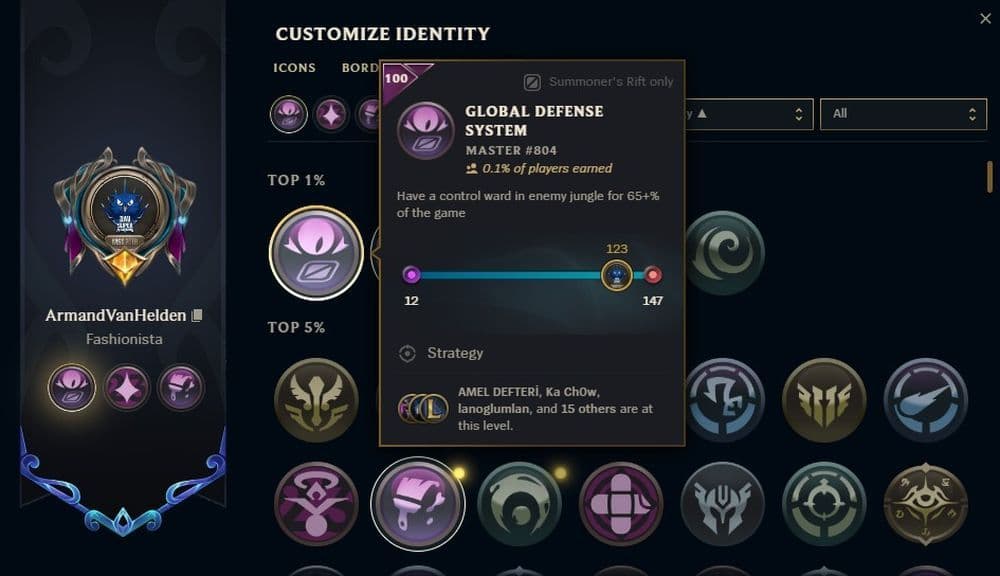
Why can't you remove Challenge Tokens normally?
This is mostly a problem with how Riot built the profile customization menu.
The client expects you to choose Challenge Tokens and swap them around. Once a slot contains a token, though, League does not give you an obvious empty option that returns the slot to its original state.
That is why removing them feels much harder than equipping them.
You may still come across old guides that suggest changing your Summoner Name or even reinstalling League. Those methods belong to older versions of the game and account system, so there is little reason to go through that trouble today.
Find more LoL guides below:
- How to change server in League of Legends
- How to check how much have I spent on League of Legends
- How to change your League of Legends language
- League of Legends player lookup: How to check an account
- What is low priority queue in League of Legends and how to fix it
Featured Image Credit: Riot Games
All Related Guides
 How to jungle in League of Legends: A beginner’s guideLearn how to jungle in League of Legends with beginner-friendly champions, clear routes, ganking tips, Smite m...
 2026 Riot Games parental controls update (LoL, VALORANT & TFT)Learn how Riot Games parental controls (2026) work for League of Legends, VALORANT, and TFT, including setup, ...
 How to disable Parental Controls in League of Legends (2026 update)Learn how to disable Riot's League of Legends parental controls, who can remove Parent Permissions, and what t...
 How to change the install path in League of LegendsFind the League of Legends install location and move the game safely to a new drive with this clear step-by-st...
 League of Legends player lookup: How to check an accountCheck a LoL account with a League of Legends player lookup tool and learn what Riot ID, match history, rank, a...
 How to link your Twitch account to League of LegendsWant League of Legends Twitch drops? Learn how to connect your Riot Account, watch eligible streams, and claim...
 What is low priority queue in League of Legends and how to fix itGot a 10-minute low priority queue in League of Legends? Learn how many games it lasts and what resets the pen...
 Guide to League of Legends Partner ProgramLeague of Legends Partner Program guide: benefits, requirements, application dates, Creator Hub access, and ho...
- 1
- 2
- 3
- 4
- 5
- 6