League of Legends player lookup: How to check an account

If you want to check a player’s latest games or how they are doing in the ranking ladder, you can check their account using third-party websites. OP.GG is one of the most used examples, but there are also other stat sites such as U.GG, Tracker.gg, and Mobalytics. These tools usually need the player’s Riot ID, tagline, and region to show the correct account. In this piece, we guide you through the whole player lookup process in League of Legends and how to do it!
What is a player lookup in LoL?
A player lookup in LoL means searching for a League of Legends account to view public profile and match data. It does not give access to the account itself but gives you an overall understanding of what champions that player is playing and more.
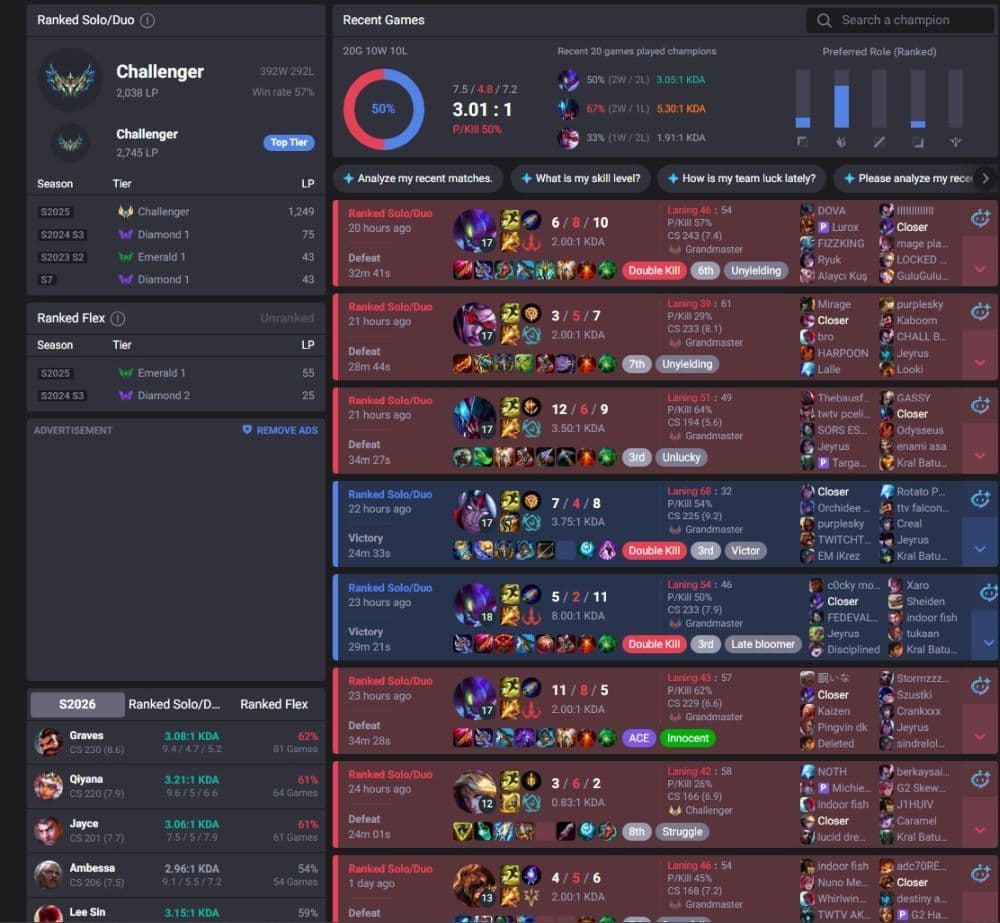
A lookup tool usually shows gameplay-related data. This can include current rank, LP, recent match history, champion pool, most-played roles, win rate, KDA, builds, runes, and ranked season history. Some sites also show live game data, champion mastery, and performance trends.
League of Legends now uses Riot ID instead of the old Summoner Name system. A Riot ID has two parts: the game name and the tagline. For example, a player name may look like this: “PlayerName#EUW.” The tagline is an important indicator because many players can share the same visible name but their taglines are different.
Region is also another important filter. A player on EUW will not appear correctly if you search in NA or Korea. If a lookup fails, the wrong region or missing tagline is often the reason.
How to check an account in LoL
You can check a LoL account through several third-party websites. OP.GG gives one of the simplest lookup flows, so it works well as the main example for most players.
To search for a player on OP.GG:
- Go to OP.GG.
- Choose the correct League of Legends region.
- Enter the player’s Riot ID in the search bar.
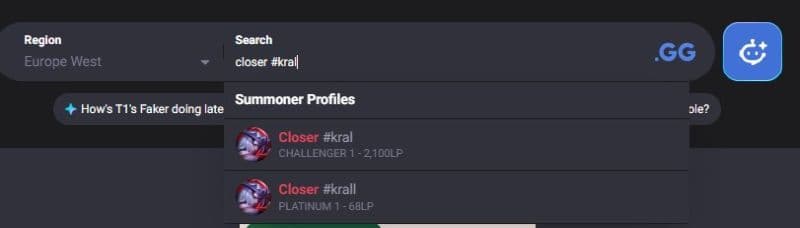
- Use the full format with the tagline, such as Name#Tag.
- Open the correct account from the results.
- Review the player’s rank, recent games, champions, roles, and win rate.
Benefits of checking an account before or after games
Checking an account can help before and after matches. Before a game, you can see if a player usually plays the role they selected, which champions they use often, and how active they are in ranked. This can help premade teams, Clash groups, and players who want to prepare better.
It also helps after a match. You can review your own performance, check builds, compare champion results, and see where a game turned. This use is more useful than checking someone only to blame them. Match history gives context, but it does not tell the full story of a game.
A player may have a bad match, test a new champion, swap roles, or return after a break. Use the data as a guide, not as a final judgment.
What can you see in a League of Legends account lookup?
A good LoL player lookup tool usually gives enough information to understand a player’s recent form. The most useful areas are simple:
- Rank and LP: Shows current ranked level and progress.
- Match history: Shows recent wins, losses, champions, and scorelines.
- Champion stats: Shows which champions the player uses most.
- Role trends: Shows where the player usually plays.
- Win rate: Shows results across recent or ranked games.
- Builds and runes: Shows item choices and rune setups from recent matches.
These details can also help players learn from others. For example, you can search a high-ranked player, check how they build a champion, and compare their rune choices with your own.
Why a LoL player lookup may not find an account
A lookup tool may fail even if the account exists. This usually happens because the search details are wrong or the site has not updated yet.
The most common reasons are:
- The Riot ID has a typo.
- The tagline is missing or wrong.
- The wrong server region is selected.
- The player changed their Riot ID.
- The account has no recent public match data.
- The stat website needs time to update.
- Riot privacy or anonymity tools limit some live-game information.
Related: How to change server in League of Legends
If OP.GG does not find the account, try another trusted stat site. Also search again with the full Riot ID and the correct region.
If you want to learn more about LoL, check out the pieces below:
- The Best Beginner Champions In League Of Legends
- Is League Of Legends Free To Play?
- What Are Eternals In League Of Legends?
- How To Get Mythic Essence In League Of Legends
- Can I Play League Of Legends On Mac? Let’s Find Out How To Download LoL For Mac
Featured Image Credit: Riot Games
All Related Guides
 How to jungle in League of Legends: A beginner’s guideLearn how to jungle in League of Legends with beginner-friendly champions, clear routes, ganking tips, Smite m...
 How to remove tokens in League of LegendsLearn how to remove tokens in League of Legends, clear Challenge Tokens from your profile, and fix them if the...
 2026 Riot Games parental controls update (LoL, VALORANT & TFT)Learn how Riot Games parental controls (2026) work for League of Legends, VALORANT, and TFT, including setup, ...
 How to disable Parental Controls in League of Legends (2026 update)Learn how to disable Riot's League of Legends parental controls, who can remove Parent Permissions, and what t...
 How to change the install path in League of LegendsFind the League of Legends install location and move the game safely to a new drive with this clear step-by-st...
 How to link your Twitch account to League of LegendsWant League of Legends Twitch drops? Learn how to connect your Riot Account, watch eligible streams, and claim...
 What is low priority queue in League of Legends and how to fix itGot a 10-minute low priority queue in League of Legends? Learn how many games it lasts and what resets the pen...
 Guide to League of Legends Partner ProgramLeague of Legends Partner Program guide: benefits, requirements, application dates, Creator Hub access, and ho...
- 1
- 2
- 3
- 4
- 5
- 6