How to link your Twitch account to League of Legends

If you want to get free Twitch drops, you must link your Twitch and Riot accounts. Your Riot and League of Legends accounts are tied to each other, so it works the same for both. Once the accounts are linked, you can join eligible Twitch campaigns when Riot or its partners run them. Here is how to link your Twitch account to League of Legends!
How to link a Twitch account with League of Legends
You link Twitch to League of Legends through your Riot Account. Use the Riot Account that you use to play League of Legends, because rewards go to the connected account. If you choose the wrong account, there might be another chance to transfer the items to your main.
Follow these steps:
- Open Twitch and sign in.
- Click your profile icon.
- Go to Settings.
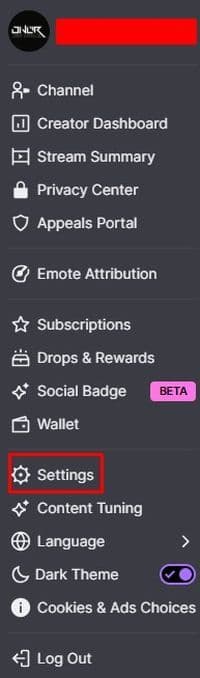
- Open the Connections tab.

- Find Riot Games in the list.
- Click Connect.
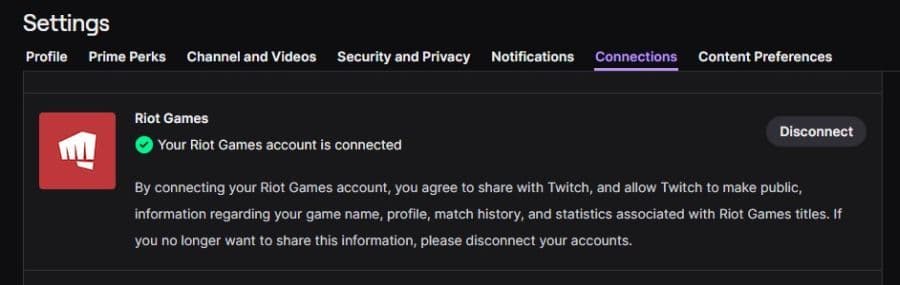
- Sign in with your Riot Account.
- Approve the connection.
After this, Twitch and Riot are connected. You do not need to open League of Legends during. The link works through your Riot Account, so make sure you choose the correct login before you confirm it.
If you play on another region or use an older account, rewards may go there instead. Before a major League event, check the connection again from Twitch settings to avoid issues.
You should also know that Twitch and Prime Gaming links may not cover the same thing. A Prime Gaming connection does not always mean your regular Twitch account is connected to Riot. If a campaign asks for a Twitch connection, check the Riot Games link inside Twitch Connections.
How to get drops and in-game rewards from Twitch
League of Legends Twitch drops usually work through eligible broadcasts. You watch a stream with drops enabled, build progress through watch time, and then claim the reward from your Twitch Drops Inventory when the campaign requires it.
Here is how to do it:
- Link Twitch to your Riot Account.
- Watch an eligible League of Legends or Riot stream.
- Check your drop progress from Twitch.
- Claim the reward in your Twitch Drops Inventory.
- Open League of Legends after the reward reaches your Riot Account.
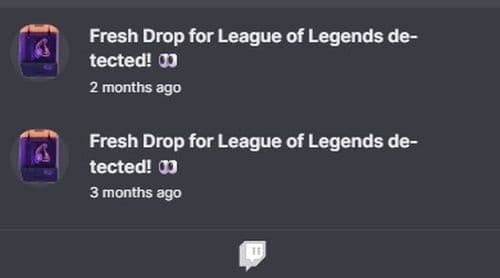
Some campaigns send the reward directly after you claim it. Others may take longer. Event rules can also change, so always check the campaign page before you spend time watching.
LoL Esports watch rewards can work differently from Twitch drops. For LoL Esports rewards, you usually need to watch matches through the official LoL Esports site while signed in with your Riot Account.
These rewards may include capsules, icons, emotes, or event items. Live matches, VODs, and rebroadcasts may not all count the same way, so check the event page before you start.
How to check if your League Twitch drops are working
You can check your progress from the Twitch Drops Inventory page. This page shows active campaigns, progress bars, claim buttons, and past rewards.
If progress does not move, check these points:
- You signed in to the correct Twitch account.
- Twitch shows Riot Games as connected.
- You used the right Riot Account.
- The stream has drops enabled.
- The campaign is still active.
- Your region can receive the reward.
- You claimed the drop after earning it.
Ad blockers, muted tabs, browser issues, or account mix-ups can also stop progress from tracking correctly. If something feels wrong, refresh the stream, reopen Twitch, or try another browser. Do this early so you do not lose watch time during a short event.
Link Twitch before the next League event
The best time to link your Twitch account to League of Legends is before an event starts. The setup only takes a few minutes, but it can save you from missed drops, wrong-account problems, and claim issues.
Once Twitch and Riot are connected, keep the Drops Inventory open during major events and check the rules for each campaign. That gives you the safest path to League of Legends Twitch drops and in-game rewards.
Here are more LoL guides for you:
- The Best Beginner Champions In League Of Legends
- Is League Of Legends Free To Play?
- What Are Eternals In League Of Legends?
- How To Get Mythic Essence In League Of Legends
- Can I Play League Of Legends On Mac? Let’s Find Out How To Download LoL For Mac
Featured Image Credit: Riot Games
All Related Guides
 How to jungle in League of Legends: A beginner’s guideLearn how to jungle in League of Legends with beginner-friendly champions, clear routes, ganking tips, Smite m...
 How to remove tokens in League of LegendsLearn how to remove tokens in League of Legends, clear Challenge Tokens from your profile, and fix them if the...
 2026 Riot Games parental controls update (LoL, VALORANT & TFT)Learn how Riot Games parental controls (2026) work for League of Legends, VALORANT, and TFT, including setup, ...
 How to disable Parental Controls in League of Legends (2026 update)Learn how to disable Riot's League of Legends parental controls, who can remove Parent Permissions, and what t...
 How to change the install path in League of LegendsFind the League of Legends install location and move the game safely to a new drive with this clear step-by-st...
 League of Legends player lookup: How to check an accountCheck a LoL account with a League of Legends player lookup tool and learn what Riot ID, match history, rank, a...
 What is low priority queue in League of Legends and how to fix itGot a 10-minute low priority queue in League of Legends? Learn how many games it lasts and what resets the pen...
 Guide to League of Legends Partner ProgramLeague of Legends Partner Program guide: benefits, requirements, application dates, Creator Hub access, and ho...
- 1
- 2
- 3
- 4
- 5
- 6