How to fix error code 773 for Roblox "teleport failed"
This can be a confusing error for some. Here's how to deal with error code 773 in Roblox.ON THIS PAGE:
Roblox is a popular platform where millions of players and creators meet. Sometimes, players face issues like error code 773, which can stop them from enjoying different games. We all hate error codes in Roblox because they simply take away our right to have fun either on our own or with our friends. This error usually means there is a problem with moving between games or locations within Roblox. It shows up in two main ways that tell us why it's happening and how we can fix it. In this guide, we explain everything you need to know about error code 773 in Roblox. If you are a creator and want to know what the issue is, keep reading!
What does error code 773 mean in Roblox?
Error code 773 in Roblox is linked to teleportation problems. This error means there are restrictions that prevent players from moving to different games or places. Here are the two common messages you might see:
- "Teleport Failed: This game has not been approved, yet. (Error Code: 773)" – This message means the game you want to enter is under review by Roblox moderators. This usually happens if the game has issues or other players have reported it.
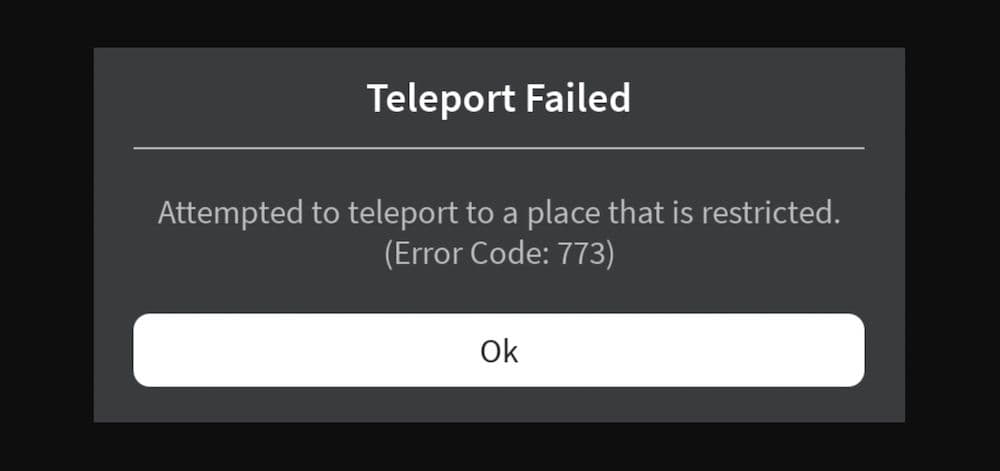
- "Teleport Failed: Attempted to teleport to a place that is restricted. (Error Code: 773)" – This error occurs when the place you're trying to enter has specific restrictions set by the creator.
Many players discuss this error on platforms like Quora and Reddit, trying to figure out why they can't join certain servers or move between places. You can see this error is being discussed mostly on the developer forums because it is an issue that is about the developing side of the game.
How to fix error code 773 in Roblox
To fix error code 773, you need to follow several steps that help ensure you're trying to teleport under the right conditions. Because it is an issue that game developers face most of the time, start with the first fix that we listed below. If that doesn’t work, try other fixes too, but it may mean that the issue is related to the servers or Roblox itself. This means that you don’t have anything to do but to wait for the developers to fix any errors. Here are some effective methods:
Verify Place ID and Permissions
- Correct Place ID: Make sure the Place ID you use matches the one you put into the console commands. If they don't match, you might see error 773.
- Check World Permissions: Ensure the place you want to visit is set to public and allows other users to enter, not just the creator.
Platform Considerations
- Use PC Version: The PC version of Roblox usually works better for creating and entering different experiences. Players often report fewer issues on PC compared to consoles like the Xbox.
Server and Developer Communication
- Check Server Status: Look at the official Roblox status page to see if there are any problems with the servers.
- Contact Game Developers: If the issue seems linked to a specific game, talking to the developers might help understand any teleportation limits they've set.
Technical Adjustments
- Clear Cache and Cookies: Go to your browser settings and clear cached images, files, and cookies. This helps remove old data that might be causing the error.
- Disable VPN and Proxy: If you use a VPN or a proxy, try turning them off. These services can interfere with your connection to Roblox servers.
Following these steps should help you deal with error code 773. Keep your Roblox and browser updated, check settings regularly, and stay informed about any server issues. This approach will help you enjoy a smoother experience on Roblox.
FAQs
Does Error Code 773 mean my game is banned?
Not necessarily. If you see the message saying the game "has not been approved yet," it usually means Roblox moderators are reviewing it—not that it’s banned. The review can be triggered by reports, policy checks, or moderation flags.
Is there a way to prevent Error 773 as a developer?
Yes. Always double-check place permissions before publishing, test teleportation in Team Create mode or private servers, and make sure any linked places are fully published and publicly accessible.
Can VPNs really cause Error 773?
Yes, VPNs or proxies can sometimes interfere with your connection to Roblox servers, especially when teleporting across regions. Disabling them may help avoid the error.
Who should I contact if I’ve tried everything and it’s still not working?
For general issues or if you suspect a bug, reaching out to Roblox Support or checking the Roblox Developer Forum is recommended.
We also have more Roblox guides on error coeds and a bunch of other topics. Here are some of the ones that you may be interested in:
All Related Guides
 How to fix Roblox error code 600 Learn how to fix Roblox error code 600, understand the new IP-based ban system, and explore potential workarou...
 How to fix Roblox error code 429: Authentication issues and too many requestsRoblox error code 429 explained: causes, rate limits, and potential malware risks. Learn how to avoid it and f...
 What does error code e01 mean in Roblox?Roblox error code e01 is one of those uncommon errors but we have a couple of fixes that you must try to fix t...
 How to fix Roblox error code 268: 8 easy waysLearn 8 simple ways to fix Roblox error code 268 and resolve the "unexpected client behavior" issue. Troublesh...
 How to fix error while updating worn items in RobloxFix the 'error while updating worn items' on Roblox with simple steps. Learn why it happens and how to resolve...
 How to fix Roblox connection error on WindowsThere are many Roblox error codes on Windows and luckily we know a couple of ways to fix them. Check them out ...
 How to fix error code 264 for RobloxRoblox error code 264 is one of the frustrating hiccups that will prevent you from playing the game, unless yo...
 What does code 288 mean in Roblox?All Roblox error codes have different meanings and error code 288 is one of the worst. Here is how to fix it!...
- 1
- 2
- 3
- 4