How to complete the “Enter The Simpsons house to search for answers” quest and fix bugs in Fortnite

The new season of Fortnite turns the island into a version of Springfield from The Simpsons, and it introduces a series of story quests that tie into that world. One of the key quests is “Enter the Simpsons’ House to Search for Answers,” where players visit the famous home of the Simpsons family. Some people face bugs while others don’t understand how to complete this quest. Here is everything you need to know about it!
The Simpsons are now in Fortnite
The Springfield Stories event transforms the Fortnite map into a weird version of Springfield. You will find places like Evergreen Terrace, the Simpsons’ house, and other familiar spots from the show. The game mixes story-quests with hidden gag tasks. Players move through objectives, follow clues, and earn XP rewards along the way.
The specific quest “Enter the Simpsons’ House to Search for Answers” asks you to go inside the iconic house in Evergreen Terrace, interact with items shown by clue icons, and gather information. At the same time you can knock out some hidden gags, meaning you get story progress and gag-hunting progress in one go.
If you are looking for more guides about the event, start from our guide on how to sit on The Simpsons’ couch and all Fortnite Simpsons bosses.
How to complete the “Enter The Simpsons house to search for answers” quest
Follow these steps to finish the quest quickly:
1. Find the Simpsons’ House
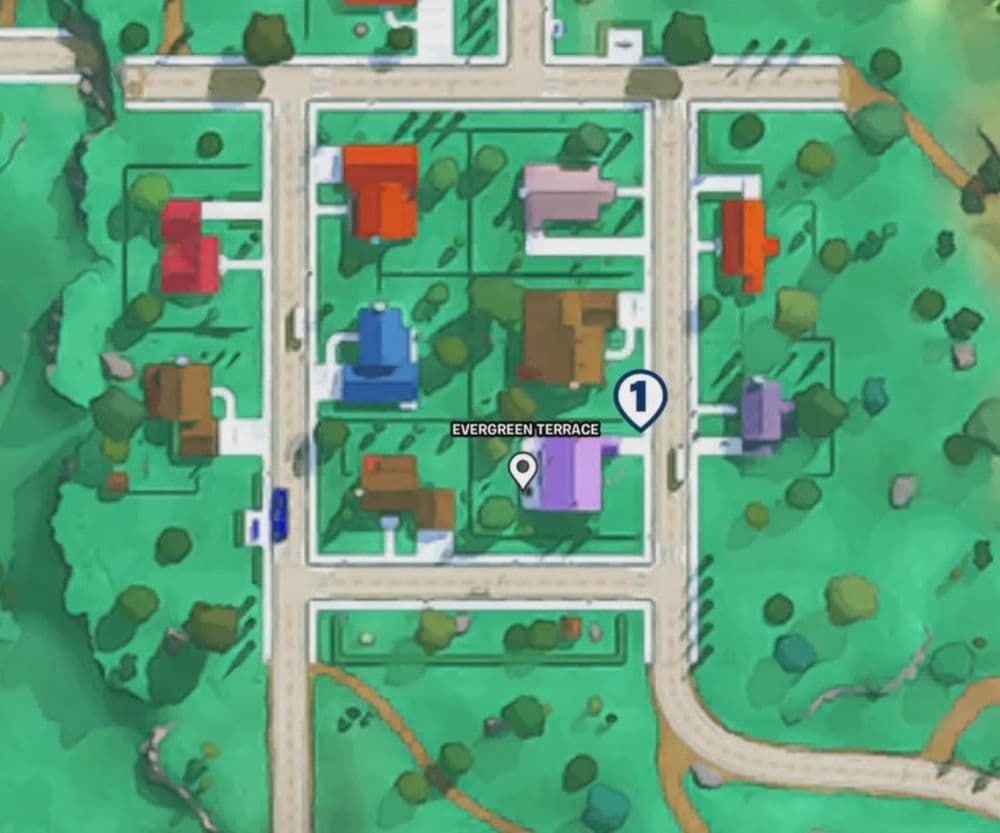
- Land or travel to Evergreen Terrace on the Springfield-themed map.
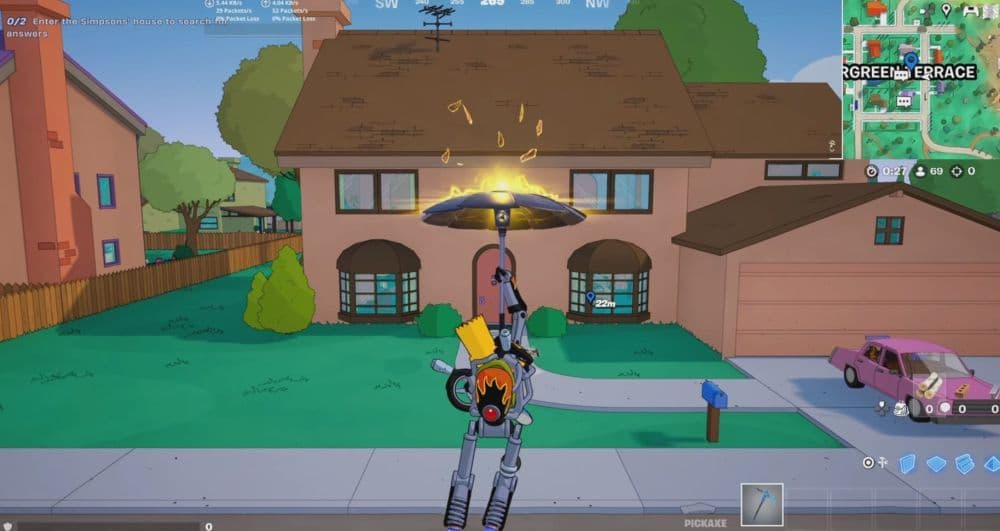
- The house has a brown roof and is located in the second column, second row of that area.
- You will see the pink Simpsons family car parked outside.
2. Enter the House
- Walk through the front door of the house to start the quest stage.
- Make sure you trigger the quest by stepping inside.
3. Search for Clue Icons and Items
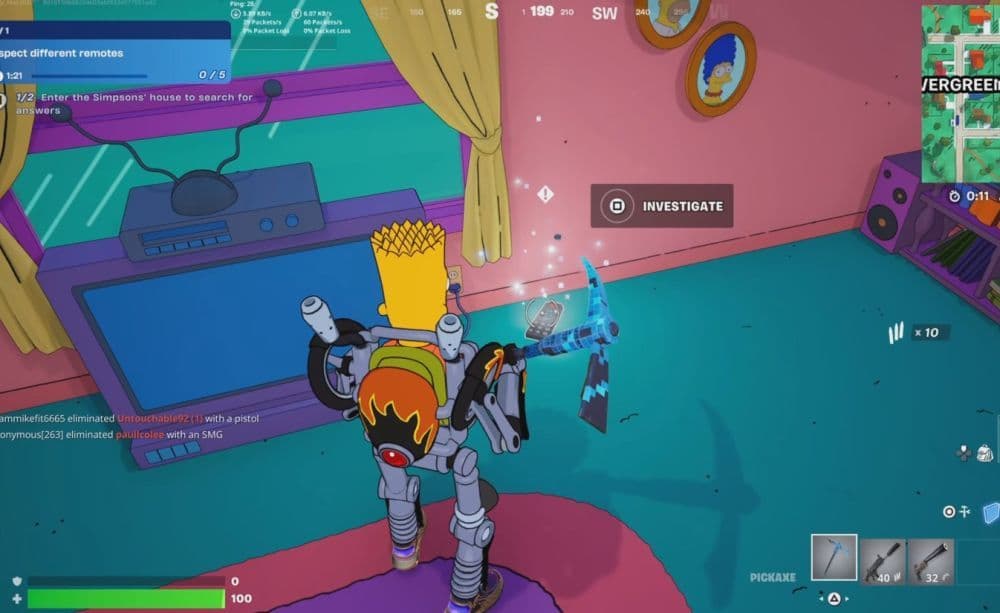
- Once inside, look around for glowing or highlighted clue icons.
- These icons may sit on tables, walls, or other fixtures.
- Interact with each item to collect the clue and complete the “search for answers” objective.
- While you’re inside, find the couch in the living room and sit on it. That act completes one of the hidden gag tasks tied to “Fortnite Simpsons find hidden gags.”
4. Exit and Move to the Next Objective
- After you finish interacting with all required items, leave the house.
- Locate the vehicle outside and drive to the next location (usually the Power Plant).
- Speak with the character Homer at the Power Plant.
- Then report back to Hope at the Donut District to wrap up this story chapter.
Tips & Tricks
Here are key tips to help you complete the quest smoothly and maximise your XP:
- Drop early: Choose the Simpsons’ house as your landing spot so you face fewer competing players.
- Collect gear first: Grab weapons or shields near the house before heading inside, in case you encounter combat.
- Complete a hidden gag at the same time: Sitting on the couch inside the house counts toward the hidden gag collection, so you save time and effort.
- Use a vehicle: There is a car parked right outside the house. Driving to your next target saves time and lets you finish faster.
- Combine objectives: While doing the story quest, also focus on hidden gag tasks (such as sit on the couch) to optimise your session and XP yield.
- Stay aware of other players: The house is a hotspot for others doing the same quest, so move quickly and stay alert.
What to do if the quest bugs
If the quest fails to register, the clue icons don’t appear, or you see no progress, follow these steps based on community fixes:
Exit and Re-Enter the House
- Enter The Simpsons’ house to trigger the quest.
- Walk outside for about 10-20 seconds and then return inside.
- Many players reported that the missing remotes or clue icons appeared once they came back in.
Restart the Game Session
- Fully close Fortnite on your platform (e.g., Switch, PS5, PC).
- Relaunch the game and load into a new session.
- Return to the house and check if the quest now progresses.
Wait and Try a New Match
- If the above steps don’t work, leave the match or lobby.
- Return after an hour or more, since sometimes the server needs time to sync.
- If the bug persists repeatedly, use the in-game Feedback tool (Settings →
Support & Feedback) to report the issue to the developers.
Here are more Fortnite guides for you:
- “When did Fortnite come out?” A question with 2 answers
- How much does Fortnite make in a day?
- How to redeem Fortnite codes
- What happened to Fortnite Battle Stars & how to level up in 2025
- Fortnite Superman update: Everything you need to know
Featured Image Credit: Epic Games
All Related Guides
 Fortnite Droid Tycoon Chips guide: Best ways to farm chips fastFortnite Droid Tycoon Chips guide: best farming methods, upgrades, Rebirth tips, and how to use Chips wisely....
 5 best Fortnite Star Wars games you can play right now Best Fortnite Star Wars games: Galactic Siege, Escape Vader, Droid Tycoon, creator islands, and how to play th...
 How to ride on a player's shoulders in FortniteHow to ride on a player's shoulders in Fortnite: steps, controls, quest completion tips, and how Shoulder Ride...
 All Garden vs. Brainrot codes in Fortnite: Updated listLooking for Fortnite Garden vs Brainrot codes? Get every working code, learn how to redeem them, and boost you...
 Latest Fortnite Steal the Brainrot codes (May 2026)Find all active Fortnite Steal the Brainrot codes to summon Brainrot Gods and boost rewards fast....
 Fortnite Karaoke mode explained: How to play?Discover Fortnite Karaoke mode in Fortnite Festival, including Pro Vocals, Mic Vocals setup, supported songs, ...
 How to get a refund for D4VD Fortnite cosmeticsThis guide explains the D4VD Fortnite cosmetics refund, including refund steps, eligible items, Locker Bundle ...
 Veno’s Fortnite settings: Who is he and what is his setupFind Veno Fortnite settings for mouse, keyboard, video, gear, DPI, sensitivity, and competitive setup....
- 1
- 2
- 3
- 4
- 5
- 6
- 7
- 8
- 9
- 10
- 11
- 12
- 13
- 14
- 15
- 16
- 17
- 18
- 19
- 20