Minecraft Phonk Edits Mod: Integrating viral phonk music and visual effects into gameplay

The Minecraft Phonk Edits Mod brings viral phonk edit effects into the game and turns key moments into short cinematic reactions. The mod adds skull overlays, grayscale visuals, phonk sound bursts, and other dramatic effects. It recreates the style of short-form phonk videos on platforms like TikTok and YouTube Shorts, and it reacts to in-game events in real time. This guide explains how the mod works, how to install it, and more!
What is the Minecraft Phonk Edits mod?
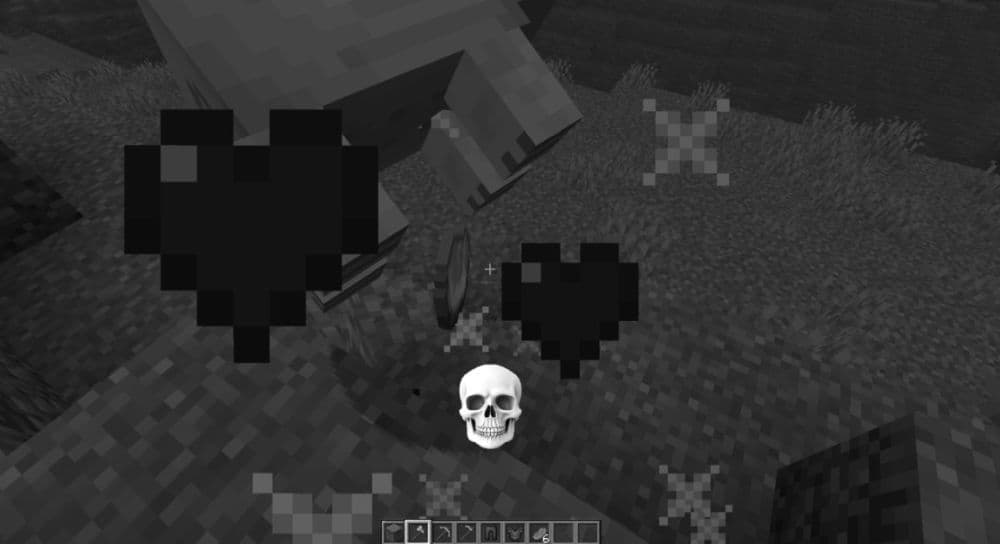
The Minecraft Phonk Edits Mod creates highlight reactions during gameplay. It freezes the screen for a moment and plays a phonk track while showing skull images and dramatic visual effects. The goal is to amplify intense situations such as combat or clutch moments and deliver an edit that looks like a viral Minecraft meme clip. The video below demonstrates how this mod works:
If you are an avid Minecraft gamer, don’t forget to check out other fun modes like ProjectE, Waifucraft, or Werewolves.
Key features of the Phonk Edits Mod
The mod includes a set of visual and audio effects that react to gameplay triggers. These are the core features:
- 12 phonk tracks for cinematic reactions
- 19 skull images that appear during triggers
- Support for custom skull PNGs that users can add
- Motion blur that increases the dramatic tone
- Freeze frame and grayscale effect on trigger
- Cinematic black bars for a 9:16 phone-style look
- Screen shake for stronger visual impact
- Aura effect around the focus area
- One hidden easter egg
- Six trigger types such as combat or air time
- Sliders and toggles for full customization
These features make the mod flexible and suitable for both casual and creator-focused gameplay
How to download and install the Phonk Edits mod
Here is a ste-by-step guide on how to download and install the Phonk Edtis Minecraft mod:
Step 1: Install CurseForge Launcher
Download the CurseForge Launcher and log in with your Microsoft account.
Step 2: Enable Fabric
Create a new Minecraft instance with Fabric as the selected mod loader.
Step 3: Search for the Mod
Search for Phonk Edits Mod by colevrlive on CurseForge.
Step 4: Install Through CurseForge
Click Install and wait until the launcher completes the setup.
Step 5: Launch Minecraft
Start the Fabric instance from CurseForge. Open Mod Menu to verify that the
mod is active.
Manual Option
You can download the mod file and place it in .minecraft/mods if you prefer a manual setup. Fabric must remain active on the selected profile for the mod to run.
If you run into questions about Fabric setup or mod loader choices you may refer to our Fabric installation tutorial for further detail.

Requirements for the Mod
The Phonk Edits Mod runs on Minecraft Java Edition with Fabric. It also requires:
- Mod Menu for in-game configuration
- Cloth Config API for settings and sliders
Install these files in the mods folder together with the Phonk Edits Mod. All of them are available through CurseForge.
How the mod works in gameplay
The mod triggers a phonk edit when specific events occur. These events can include:
- Breaking blocks
- Taking or dealing damage
- Reaching low health
- Spending time in the air
The screen freezes, and the visual effects start. A skull image appears and a phonk track plays for a short burst. After the reaction finishes, the game returns to normal. This creates a repeatable cycle of cinematic edits during gameplay.
How to customize Phonk Edit settings
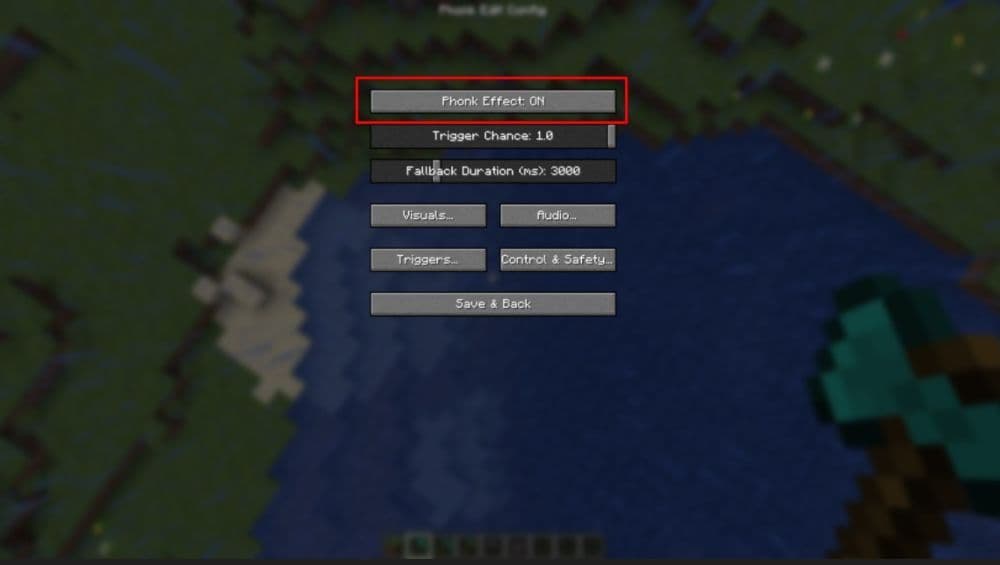
You can tune the mod in the settings screen through Mod Menu. Cloth Config API unlocks all configuration options. The mod offers control through sliders, toggles, and dropdown selections. The main settings include:
- Phonk frequency slider
- Phonk speed range slider
- Grayscale on or off
- Variable speed on or off
- Motion blur on or off
- Screen shake on or off
- Cinematic bars on or off
- Blur intensity slider
- Fade intensity slider
- Shake intensity slider
- Trigger selection control
These tools let players decide how often phonk edits appear and how dramatic they look. You can create subtle reactions or extreme highlight effects. The mod adapts to different playstyles and content goals.
How to add custom skull Images
The mod supports custom PNG files for skull overlays. Follow this process:
- Go to .minecraft/config/phonkedit/images/
- Copy your PNG skull images into the folder
- Restart Minecraft
The custom images will become part of the rotation when the mod triggers. This feature allows personal meme edits, clan icons, or themed reaction sets.
Compatibility and performance
The Phonk Edits Mod is a client-side Fabric mod. It does not affect server gameplay logic, and players can use it in multiplayer. It is compatible with many shaders and visual packs because it operates as a top-layer visual effect.
Is the mod safe and allowed
Yes. The mod is safe and legal under Minecraft’s rules. It does not modify core mechanics, and it does not provide competitive advantages. It only affects the player’s client and works in both single-player and multiplayer sessions without risk of enforcement issues.
Best uses for this mod
The Minecraft Phonk Edits Mod works especially well for:
- PvP highlight clips
- TikTok and YouTube Shorts
- Stream reactions
- Challenge runs
- Meme content
It gives players a way to generate short, dramatic reactions without video editing software.
FAQ
Is the Phonk Edits Mod free?
Yes. It is free on CurseForge.
Does the mod work on servers?
Yes. It runs on the client and does not conflict with Minecraft servers.
Can I use the mod without Mod Menu?
Yes, but Mod Menu makes configuration easier.
Do I need Fabric to run this mod?
Yes. The mod requires Fabric.
The Minecraft Phonk Edits Mod turns key gameplay moments into meme-style phonk reactions. It is simple to install with Fabric and CurseForge, and it includes full customization through Mod Menu and Cloth Config API. Players can adjust visual intensity, change triggers, and even add their own skull images.
For more Minecraft guides:
- How to find the Copper Cape in Minecraft after the Copper Age update
- How Minecraft’s Official AI Assistant Supports Players and Its Current Limitations
- Mojang introduces Minecraft Bedrock 1.21.120.23 Beta
- What does Respiration do in Minecraft: Everything you need to know
- What does Mending do in Minecraft and how do you get it?
Featured Image Credit: Coah
All Related Guides
 How to breed frogs in MinecraftBreed frogs in Minecraft with this simple guide to slimeballs, frogspawn, tadpoles, frog variants, and common ...
 Best Minecraft PS5 seeds in 2026 - Version 26.2Discover the best Minecraft PS5 seeds in 2026, with strong Bedrock worlds for survival and creative projects....
 Best Minecraft PS5 seeds in 2026 - Version 26.2Find the best Minecraft PC seeds in 2026, with great worlds for survival, villages, building, exploration, and...
 Top 5 Minecraft 26.1 seeds you must try todayFind the best Minecraft 26.1 seeds for villages, rare biomes, island survival, and creative builds, with seed ...
 How to turn on keep inventory in MinecraftUse the correct Keep Inventory command in Minecraft and learn how it works across Java, Bedrock, servers, and ...
 How to breed tropical fish in MinecraftCan you breed tropical fish in Minecraft? Here is the clear answer, plus how to catch, move, and use tropical ...
 Minecraft Chaos Cubed guide: Everything new in the 2026 updateExplore everything new in Minecraft Chaos Cubed, including Sulfur Caves, Sulfur Cubes, geysers, new blocks, co...
 How to change render distance in MinecraftChange render distance in Minecraft with simple steps for Java and Bedrock, plus tips to balance better visibi...
- 1
- 2
- 3
- 4
- 5
- 6
- 7
- 8
- 9