How to craft a name tag in Minecraft

Mojang made it much easier to create name tags in Minecraft with updates. In newer versions of the game, players can make a name tag with 1 Paper and 1 Metal Nugget. That means players no longer need to depend only on lucky chest loot, fishing, or villager trades. Here is how name tags work, how to craft one, and how to use it correctly.
What is a name tag?
A name tag is an item that lets you give a custom name to a mob in Minecraft. You can use it on animals, villagers, hostile mobs, and many other creatures. Once you name a mob, its name appears above it when you look at it closely.
Name tags are useful because they also stop most mobs from despawning naturally. That is especially important if you want to keep a zombie for an iron farm, save a rare mob, or name a pet that you do not want to lose.
You cannot use a normal name tag on players. You also cannot rename the Ender Dragon this way. For most regular mobs, though, the item works as expected after you prepare it with an anvil.
How to craft a name tag
To craft a name tag in Minecraft, you need 1 Paper and 1 Metal Nugget. The recipe works with any valid metal nugget in supported versions, such as iron, gold, or copper.
- Related: Minecraft paper recipe in 4 steps
You can craft a name tag this way:
- Get Paper from sugar cane.
- Get a Metal Nugget from a metal ingot or other source.
- Open your crafting grid.
- Place the Paper and Metal Nugget into the grid.
- Take the name tag from the result slot
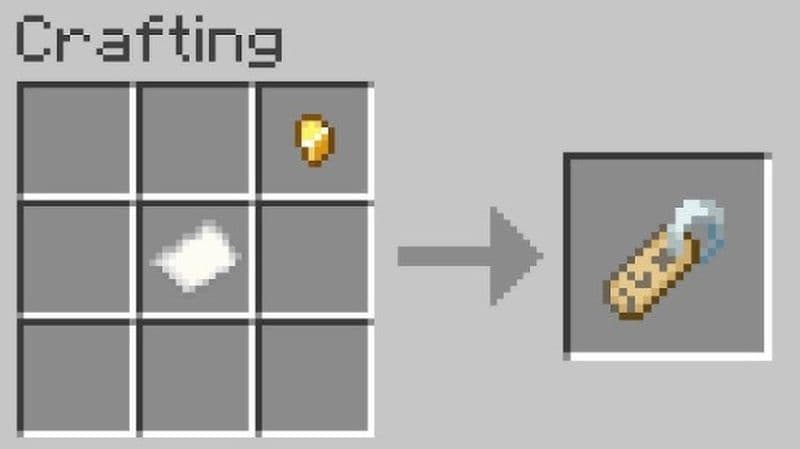
Paper is easy to make once you find sugar cane near water. Metal nuggets are also easy to get after your first mining trip.
Why would you need to create a name tag?
You need a name tag when you want to protect a mob from natural despawning or keep your world more organized. For example, you can name a horse, wolf, cat, axolotl, villager, zombie villager, or farm mob. This helps you tell important mobs apart, especially when they look similar.
Name tags also help in technical builds. Many farms use hostile mobs as part of the setup. If that mob despawns, the farm can stop working. A name tag solves that problem in most cases.
How to use a name tag in Minecraft
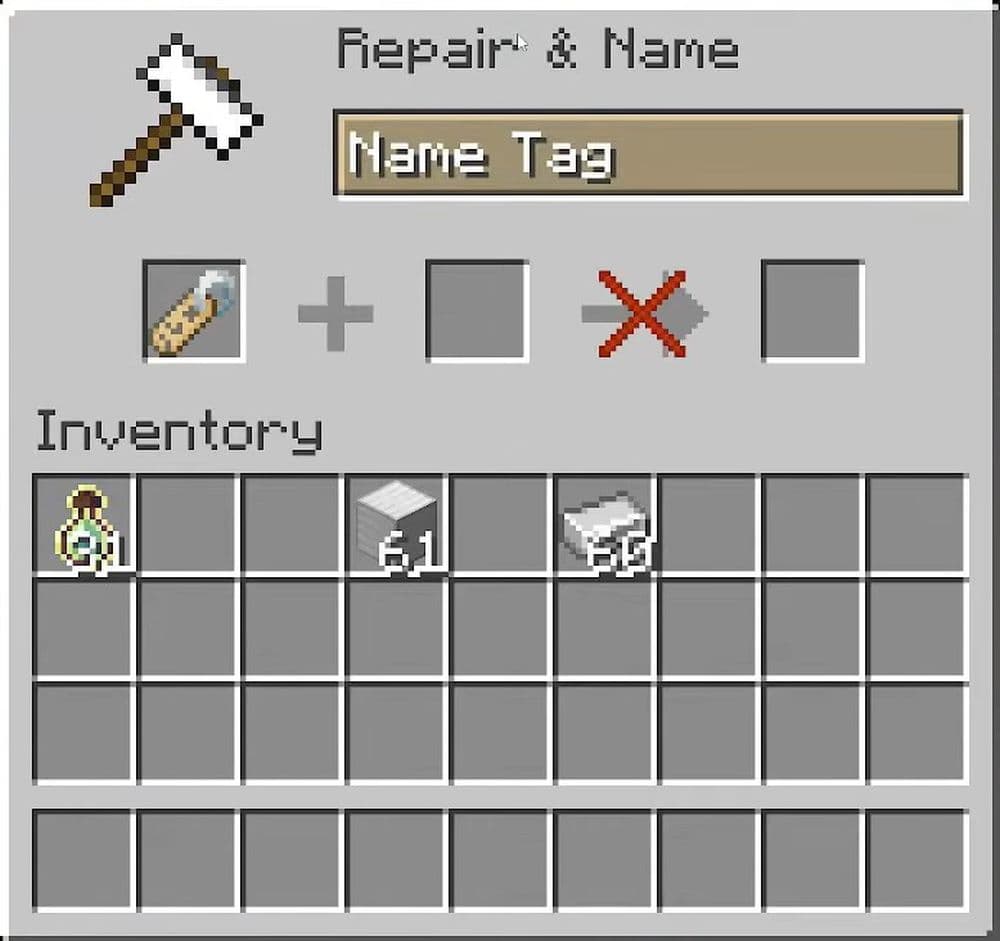
Crafting the name tag gives you the item, but it does not make it ready for use. You must rename it with an anvil first.
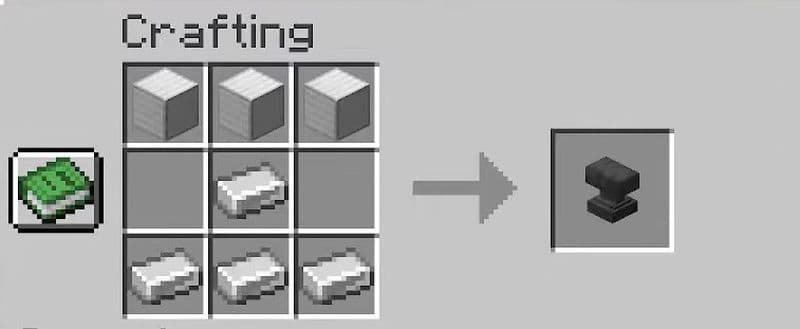
Place the name tag in the anvil, type the name you want, and take the renamed tag. This usually costs 1 experience level. After that, hold the name tag and use it on the mob you want to name.
Once you use the name tag, Minecraft consumes it. You need another name tag if you want to name another mob.
The process is simple:
- Craft or find a name tag.
- Place it in an anvil.
- Type the mob’s name.
- Take the renamed tag.
- Use it on the mob.
Make sure you choose the name before you apply it. If you want to change the mob’s name later, you need to use another renamed name tag.
Best mobs to name with a name tag
The best mobs to name are the ones you want to keep long term. Pets are the most obvious choice, but name tags also matter in farms and survival projects.
Good mobs to name include:
- Wolves, cats, horses, and parrots
- Villagers and zombie villagers
- Axolotls and rare animals
- Zombies, skeletons, and other farm mobs
- Mobs used in custom builds or adventure maps
A name tag does not protect a mob from danger. A named mob can still die from lava, attacks, fall damage, suffocation, or other hazards. It also may disappear if the game changes difficulty in certain cases, such as hostile mobs on Peaceful mode.
Check out more Minecraft guides below:
- How to change skin in Minecraft (Java, Bedrock, PC, and Console)
- How to TP in Minecraft: Teleportation explained (Coordinates, Villages, Death Location)
- How to tame Parrots in Minecraft: Seeds, advantages, and more
- Smelting in Minecraft: A complete guide to furnaces, fuels, and efficiency tips for 2025
- Minecraft enchanting table recipe, setup, language & everything you need to know
Featured Image Credit: Eyecraftmc on YouTube
All Related Guides
 How to turn on keep inventory in MinecraftUse the correct Keep Inventory command in Minecraft and learn how it works across Java, Bedrock, servers, and ...
 How to breed tropical fish in MinecraftCan you breed tropical fish in Minecraft? Here is the clear answer, plus how to catch, move, and use tropical ...
 Minecraft Chaos Cubed guide: Everything new in the 2026 updateExplore everything new in Minecraft Chaos Cubed, including Sulfur Caves, Sulfur Cubes, geysers, new blocks, co...
 How to change render distance in MinecraftChange render distance in Minecraft with simple steps for Java and Bedrock, plus tips to balance better visibi...
 How to grow mangrove trees in MinecraftFind out how to grow mangrove trees in Minecraft with simple steps, growth requirements, farming tips, and com...
 Here is how to make a water elevator in MinecraftHere’s how to make a water elevator in Minecraft, including the materials you need and why your bubble column ...
 New Minecraft capes alert: How to get the Crafter and Builder CapesMinecraft Crafter and Builder Capes guide: unlock requirements, TwitchCon rewards, Minecraft LIVE details, and...
 What is the “getsockopt” error in Minecraft and how to fix itFix the getsockopt Minecraft error with simple checks for firewall, server address, DNS, LAN settings, and con...
- 1
- 2
- 3
- 4
- 5
- 6
- 7
- 8