How to turn on keep inventory in Minecraft
One of the scariest things in Minecraft’s survival mode is dying, expectedly or unexpectedly. Because when you die, you literally start from scratch, as you lose all your inventory. What if we told you there is a way to bypass that? Keep Inventory removes much of the risk that comes with death. You keep your equipment and experience after respawning, which makes long mining trips and dangerous areas less stressful. Here is how to enable it!
What is keep inventory?
Keep Inventory is a Minecraft game rule that controls what happens to your items when you die. Minecraft normally drops your inventory at the place where your character died. You then need to return before the items disappear, or another player collects them.
When Keep Inventory is active, your items stay with your character after death. You still return to your bed, Respawn Anchor, or world spawn as normal. The rule only changes what happens to your items and experience.
Keep Inventory can protect:
- Items in your main inventory
- Items in your hotbar
- Equipped armor
- Your off-hand item
- Experience points and levels
How to turn on keep inventory
The Minecraft keep inventory command changes between Java and Bedrock Edition. Make sure you use the correct capital letters for the version you play.
How to turn on keep inventory in Minecraft Java Edition
Java Edition players should use this command:
/gamerule keepInventory true
Follow these steps:
- Open your Minecraft world.
- Press T to open the chat window.
- Type /gamerule keepInventory true.
- Press Enter.
- Check the chat for a confirmation message.
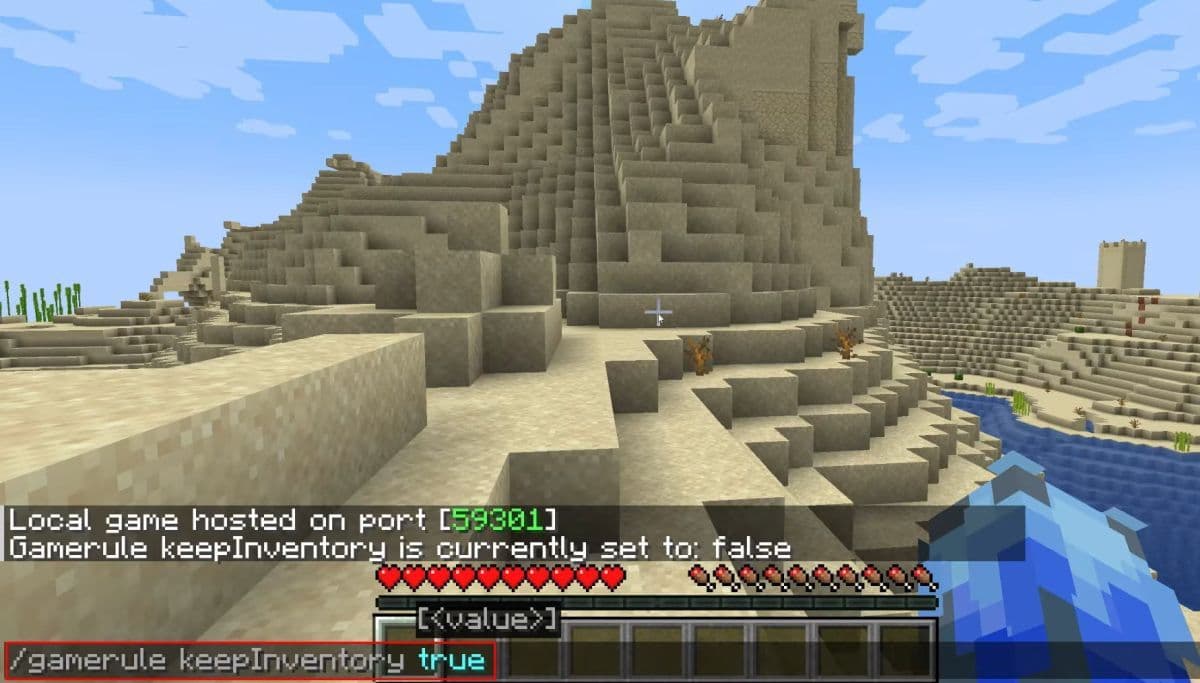
The capital I in keepInventory is important in Java Edition. Copy the command exactly if Minecraft reports an error.
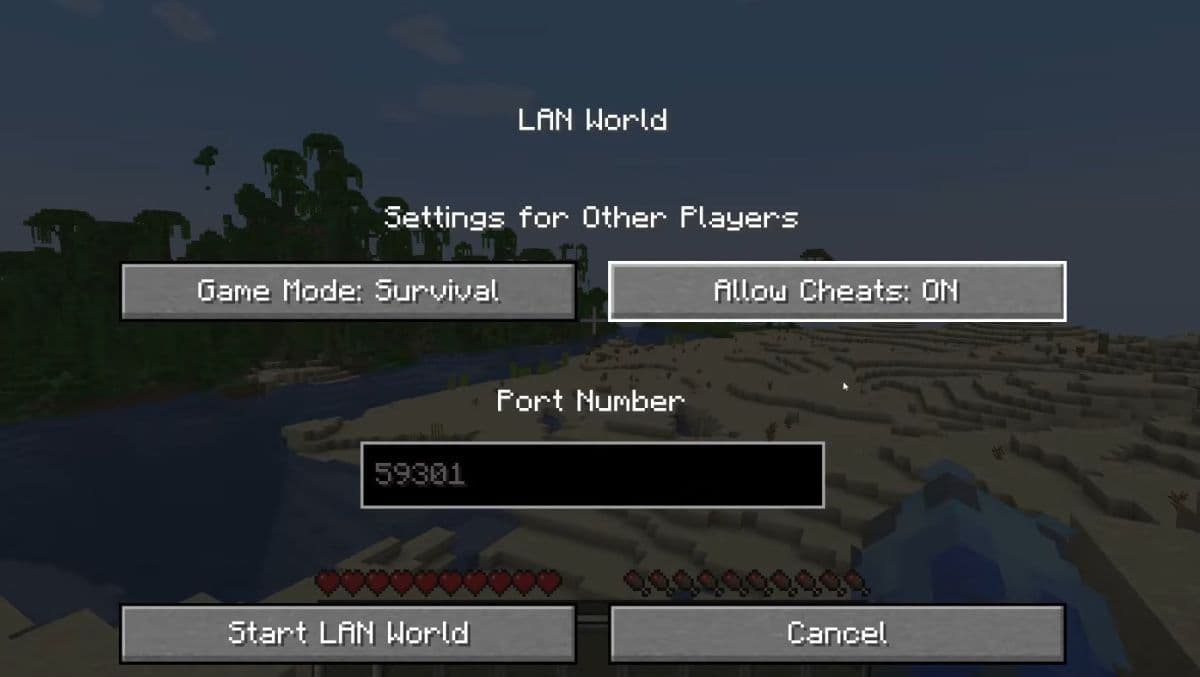
You also need command permission. Players can activate cheats while creating a world. In an existing single-player world, open the pause menu and select:
Open to LAN > Allow Cheats: On > Start LAN World
You do not need to invite another player. This option gives you temporary command access until you leave the world. The Keep Inventory setting remains active after you close and reopen the save.
Players who want to learn other shortcuts can check the full Minecraft commands guide.
How to turn on keep inventory in Minecraft Bedrock Edition
Bedrock Edition covers Xbox, PlayStation, Nintendo Switch, mobile devices, and the Bedrock version on Windows.
You can activate Keep Inventory from the settings menu:
- Open the world or select its edit button.
- Open Settings.
- Go to the Game section.
- Find the Cheats options.
- Turn on Activate Cheats.
- Switch on Keep Inventory.
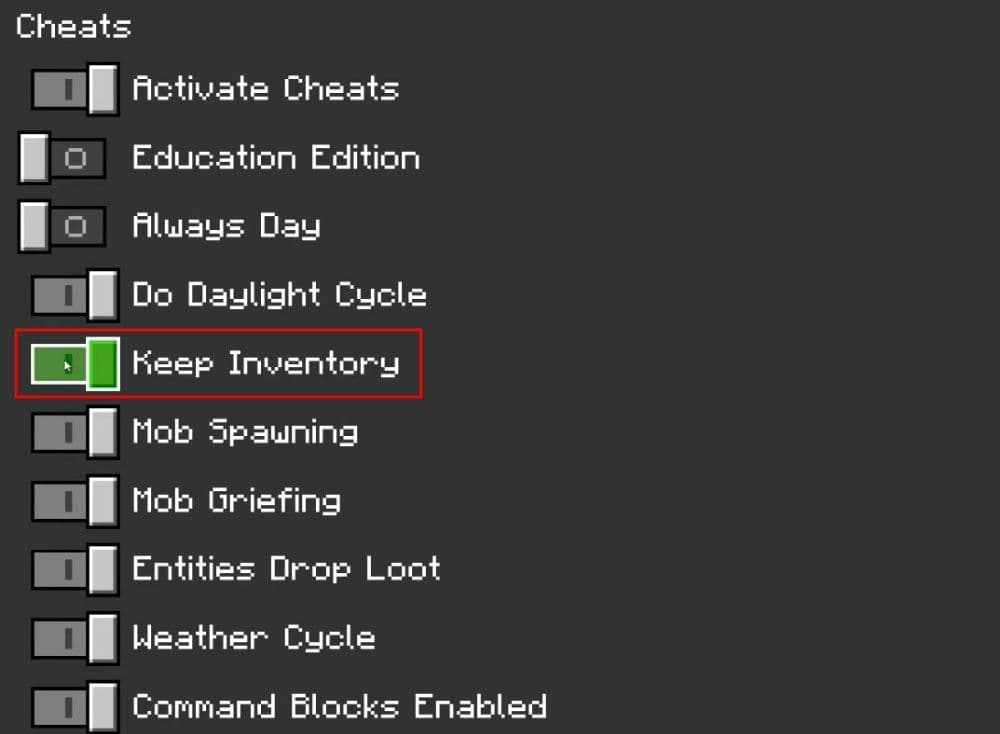
The names and menu positions may look slightly different after an update, but Keep Inventory usually appears with the other cheat and world rule settings.
You can also enter this command in chat:
/gamerule keepinventory true
Bedrock uses the lowercase keepinventory format in its command documentation. The command sets the rule to a Boolean value, so true turns it on and false turns it off.
How to check or turn off keep inventory
You can check the rule by entering the command without true or false:
- Java: /gamerule keepInventory
- Bedrock: /gamerule keepinventory
Minecraft should show the current value in chat.
To turn Keep Inventory off, change the value to false:
- Java: /gamerule keepInventory false
- Bedrock: /gamerule keepinventory false
The normal death system returns at once. Any player who dies after that point will drop carried items and lose experience.
Why is the Minecraft keep inventory command not working?
The command usually fails because of permissions or incorrect spelling.
Cheats are not active
Enable commands when creating the world. Java players can also use Open to LAN, while Bedrock players can activate cheats through the Game settings.
You do not have operator permission
Regular server and Realm members cannot change world rules. Ask the owner or an operator to enter the command.
You used the wrong command format
Java uses keepInventory with a capital I. Bedrock documentation lists keepinventory in lowercase.
You changed a different world
Game rules stay with the world where you entered them. Turning Keep Inventory on in one save does not change your other worlds, servers, or Realm slots.
Check out more of our Minecraft pieces:
- How to change skin in Minecraft (Java, Bedrock, PC, and Console)
- How to TP in Minecraft: Teleportation explained (Coordinates, Villages, Death Location)
- How to tame Parrots in Minecraft: Seeds, advantages, and more
- Smelting in Minecraft: A complete guide to furnaces, fuels, and efficiency tips for 2025
- Minecraft enchanting table recipe, setup, language & everything you need to know
Featured Image Credit: Mojang
All Related Guides
 How to start a raid in Minecraft: Java and Bedrock guideLearn how to start a raid in Minecraft Java and Bedrock, get Ominous Bottles, trigger Raid Omen, prepare villa...
 How to breed frogs in MinecraftBreed frogs in Minecraft with this simple guide to slimeballs, frogspawn, tadpoles, frog variants, and common ...
 Best Minecraft PS5 seeds in 2026 - Version 26.2Discover the best Minecraft PS5 seeds in 2026, with strong Bedrock worlds for survival and creative projects....
 Best Minecraft PS5 seeds in 2026 - Version 26.2Find the best Minecraft PC seeds in 2026, with great worlds for survival, villages, building, exploration, and...
 Top 5 Minecraft 26.1 seeds you must try todayFind the best Minecraft 26.1 seeds for villages, rare biomes, island survival, and creative builds, with seed ...
 How to breed tropical fish in MinecraftCan you breed tropical fish in Minecraft? Here is the clear answer, plus how to catch, move, and use tropical ...
 Minecraft Chaos Cubed guide: Everything new in the 2026 updateExplore everything new in Minecraft Chaos Cubed, including Sulfur Caves, Sulfur Cubes, geysers, new blocks, co...
 How to change render distance in MinecraftChange render distance in Minecraft with simple steps for Java and Bedrock, plus tips to balance better visibi...
- 1
- 2
- 3
- 4
- 5
- 6
- 7
- 8
- 9