How to turn off narrator in Minecraft (All platforms)
Make Minecraft quiet againON THIS PAGE:
- What is narrator in Minecraft?
- How to turn off narrator in Minecraft (PC shortcut)
- How to turn off narrator in Minecraft Java Edition
- How to turn off narrator in Minecraft Bedrock Edition
- How to turn off narrator in Minecraft on Xbox
- How to turn off narrator in Minecraft on PlayStation
- How to turn off the narrator in Minecraft on mobile
- Is the Minecraft narrator still on? Try these fixes
The narrator in Minecraft can be helpful, but if you didn’t turn it on intentionally, it can feel intrusive, repetitive, and frankly a bit annoying. Fortunately, disabling it is quick once you know where to look. This guide explains exactly how to turn off narrator in Minecraft, covering all platforms including PC, console, and mobile.
First of all, what is narrator in Minecraft?
The Minecraft narrator is a text-to-speech (TTS) feature that reads:
- Menu options
- Chat messages
- System notifications
It’s helpful for accessibility, but it’s often turned on by mistake, especially on PC through a keyboard shortcut.
How to turn off narrator in Minecraft (PC shortcut)
The fastest way to fix the issue on PC is using a simple shortcut.
- Press Ctrl + B
This will cycle through narrator modes:
- Off
- All
- Chat
- System
Keep pressing until it says “Narrator: Off.”
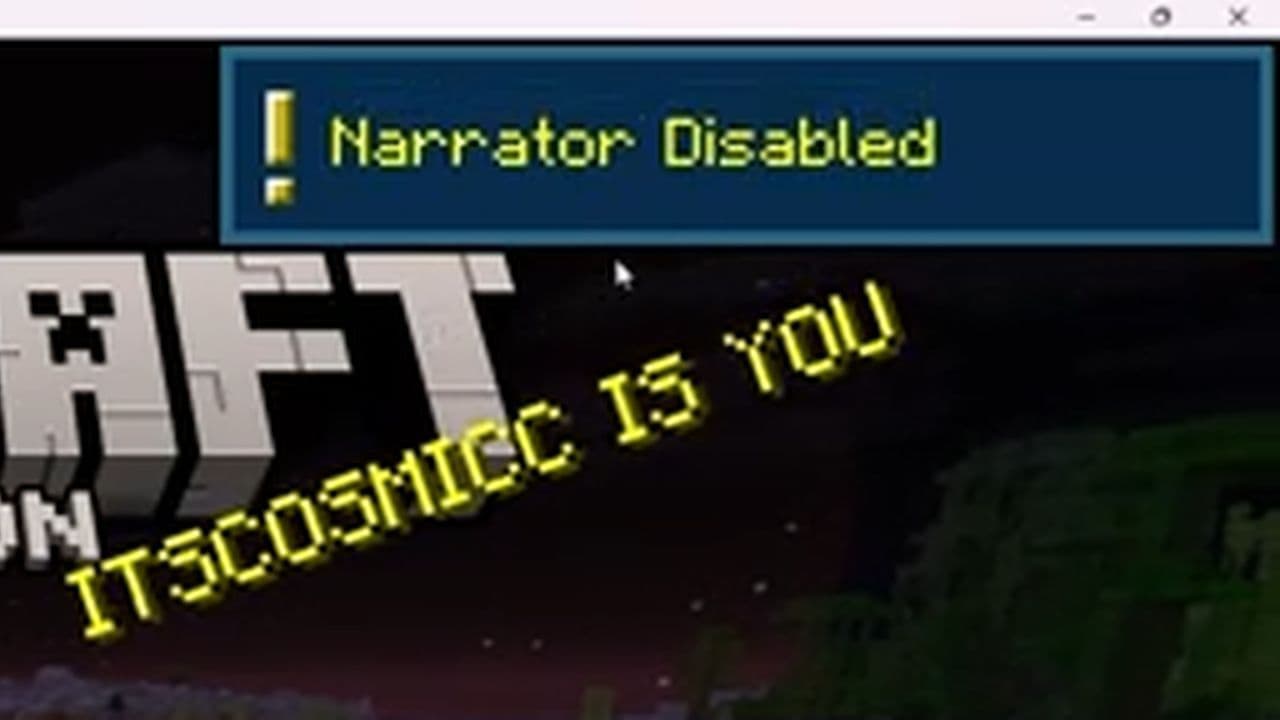
This is the most common solution if the narrator suddenly starts talking.
How to turn off narrator in Minecraft Java Edition
If you want to disable it properly through settings, follow these steps:
- Open Minecraft Java Edition
- Click Options from the main menu
- Select Accessibility Settings
- Find the Narrator option
- Set it to OFF
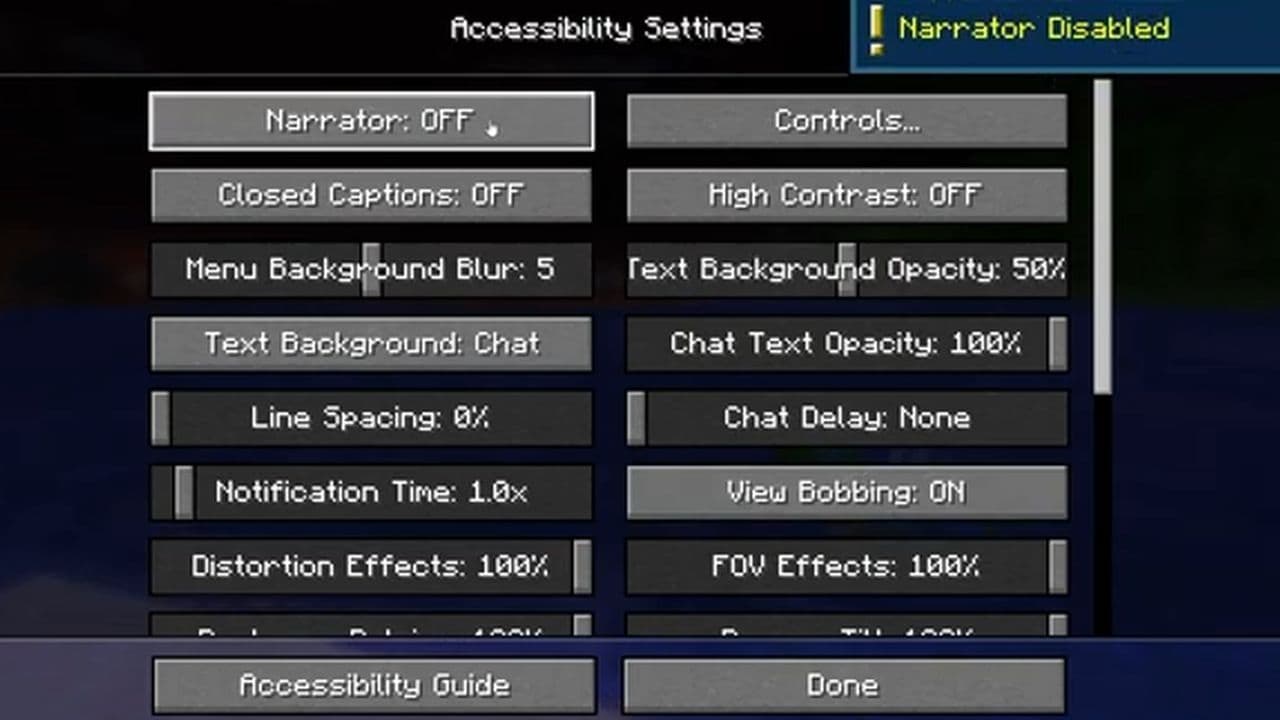
This ensures the narrator stays disabled even after restarting the game.
How to turn off narrator in Minecraft Bedrock Edition
In Bedrock Edition, the narrator settings are split into two options. Steps:
- Open Minecraft
- Go to Settings
- Select Accessibility
- Turn OFF:
- Text-to-Speech for UI
- Text-to-Speech for Chat
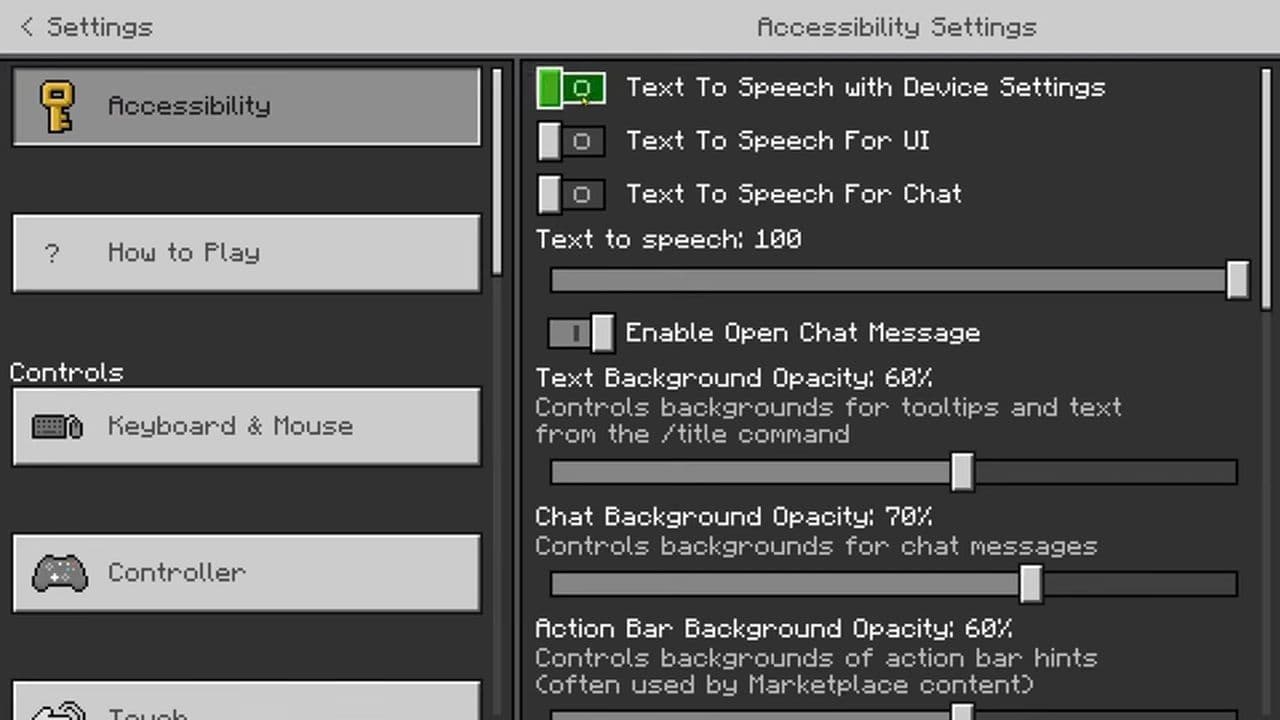
Both must be disabled to fully turn off the narrator.
How to turn off narrator in Minecraft on Xbox
On Xbox, the narrator may come from both the game and the console system.
In-game steps:
- Open Settings → Accessibility
- Turn off Text-to-Speech for UI and Chat
Xbox system steps:
- Press the Xbox button
- Go to Profile & System → Settings
- Select Ease of Access → Narrator
- Turn it OFF
If you skip the system setting, the narrator may continue.
How to turn off narrator in Minecraft on PlayStation
PlayStation uses a built-in screen reader. Steps:
- Go to Settings
- Open Accessibility
- Select Screen Reader
- Turn it OFF
Then check Minecraft’s Accessibility settings to make sure text-to-speech is disabled.
How to turn off the narrator in Minecraft on mobile
The process is simple and similar to Bedrock Edition.
- Open Minecraft
- Tap Settings
- Go to Accessibility
- Turn OFF:
- Text-to-Speech for UI
- Text-to-Speech for Chat
Is the Minecraft narrator still on? Try these fixes
If you followed all steps and the Minecaft narrator is still active, try the following:
- Check system settings (Windows Narrator, VoiceOver, console narrator)
- Restart the game
- Update Minecraft
- Re-check both TTS options in Bedrock
In most cases, the issue comes from system-level accessibility settings.
Now you know exactly how to turn off narrator in Minecraft across all platforms. The key steps are simple:
- Use Ctrl + B on PC for a quick fix
- Disable narrator in Accessibility Settings
- Turn off both TTS options in Bedrock
- Check system-level narrator settings on consoles and devices
Once you follow these steps, the narrator should be completely disabled and won’t interrupt your gameplay again.
That’s all for today! Looking for more Minecraft news & guides? Check out these:
- Minecraft Phonk Edits Mod: Integrating viral phonk music and visual effects into gameplay
- Finding diamonds in Minecraft: Everything you need to know
- Minecraft Orbital Railgun Mod: Complete guide to download, craft and use the weapon
- Exploring the best Minecraft shaders for enhanced visuals
- Minecraft Controlify Mod: How to install and use
All Related Guides
 How to breed frogs in MinecraftBreed frogs in Minecraft with this simple guide to slimeballs, frogspawn, tadpoles, frog variants, and common ...
 Best Minecraft PS5 seeds in 2026 - Version 26.2Discover the best Minecraft PS5 seeds in 2026, with strong Bedrock worlds for survival and creative projects....
 Best Minecraft PS5 seeds in 2026 - Version 26.2Find the best Minecraft PC seeds in 2026, with great worlds for survival, villages, building, exploration, and...
 Top 5 Minecraft 26.1 seeds you must try todayFind the best Minecraft 26.1 seeds for villages, rare biomes, island survival, and creative builds, with seed ...
 How to turn on keep inventory in MinecraftUse the correct Keep Inventory command in Minecraft and learn how it works across Java, Bedrock, servers, and ...
 How to breed tropical fish in MinecraftCan you breed tropical fish in Minecraft? Here is the clear answer, plus how to catch, move, and use tropical ...
 Minecraft Chaos Cubed guide: Everything new in the 2026 updateExplore everything new in Minecraft Chaos Cubed, including Sulfur Caves, Sulfur Cubes, geysers, new blocks, co...
 How to change render distance in MinecraftChange render distance in Minecraft with simple steps for Java and Bedrock, plus tips to balance better visibi...
- 1
- 2
- 3
- 4
- 5
- 6
- 7
- 8
- 9