How to scrape stickers in CS2
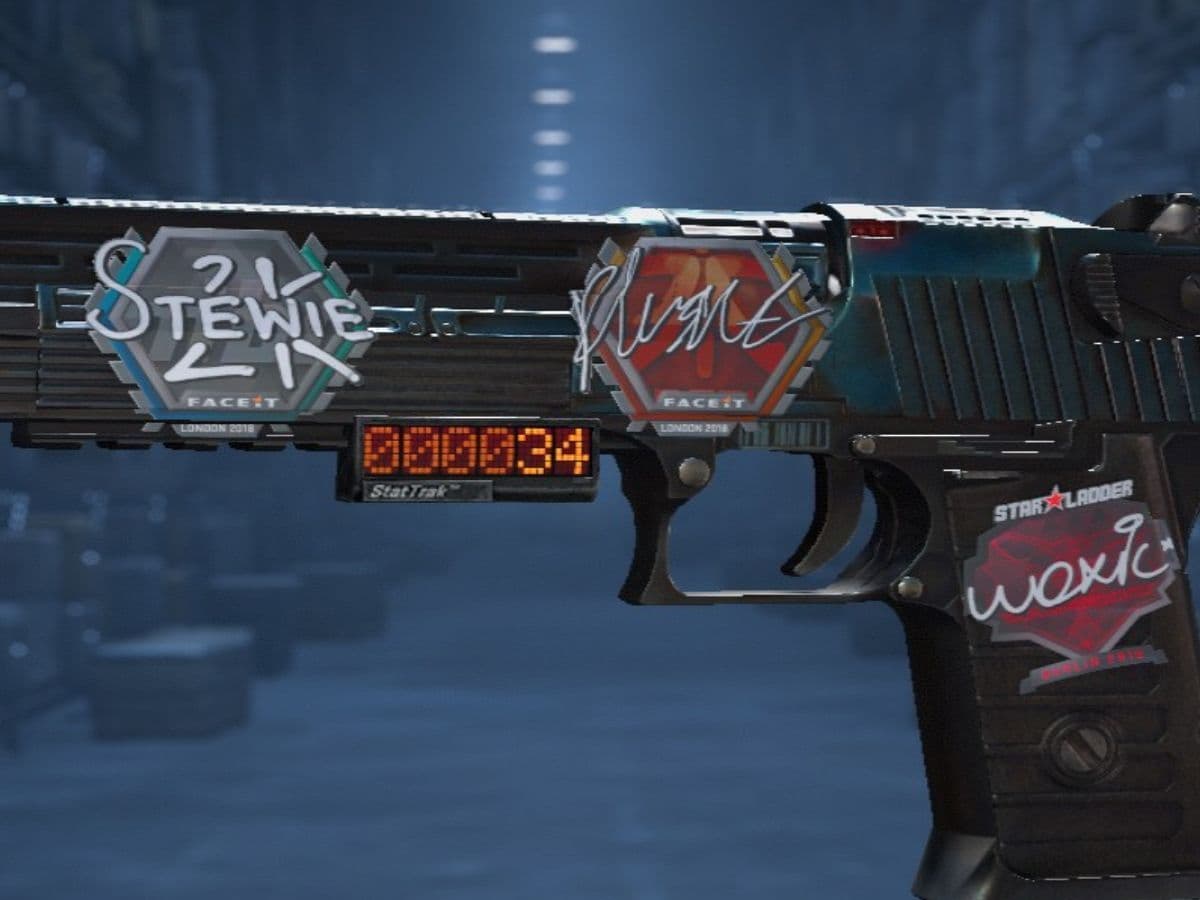
Stickers make your weapon look different; for example, adding a pro player’s signature to it makes it look pretty cool sometimes. However, sometimes you may get bored or try something else, and that is when you will need to scrape the sticker off your weapon. However, you should be aware that scraping means losing that sticker forever. Once you remove a sticker from a weapon, it is gone. That means players should check the sticker’s value and think carefully before they confirm full removal. Here is everything you need to know about scraping stickers in CS2!
Can you fully scrape stickers?
Yes, you can fully scrape stickers in CS2. A fully scraped sticker disappears from the weapon skin, but it does not return as a separate item. Once you scrape a sticker, it gets deleted from everywhere, so it is gone for good.
This makes sticker scraping different from simply customizing a weapon. You are changing an item that may affect the look and value of the skin. Some stickers cost very little, but others can add strong collector appeal. Older tournament stickers, holo stickers, gold stickers, and rare team stickers need extra care.
You probably won’t scrape a sticker by accident, because the game gives a warning before a sticker gets fully removed. This warning matters because it gives players one last chance to stop. If you only want a scratched effect, do not confirm the final removal step.
A scraped sticker can look different after each scrape. Some designs lose color. Some show damage around the edges. Some stickers reveal hidden details or look better when worn. That is why some players scrape stickers on purpose rather than remove them completely.
How to scrape stickers
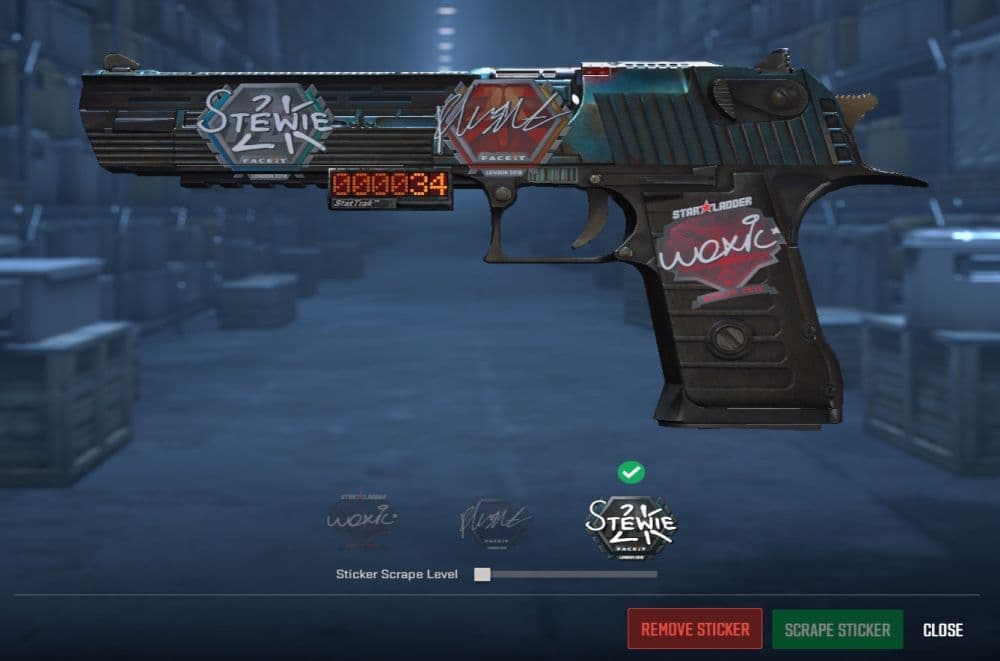
You can scrape stickers from the CS2 inventory screen. The process is simple, but you should move slowly if the sticker has any value.
Follow these steps:
- Open Counter-Strike 2.
- Go to your Inventory.
- Select the weapon skin with the sticker.
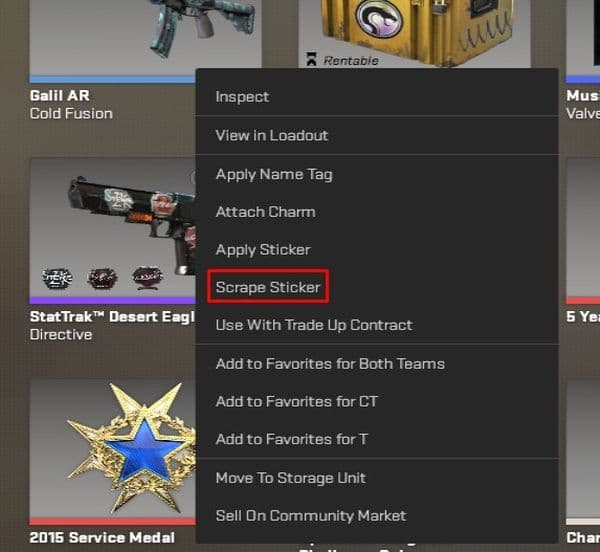
- Choose the Scrape Sticker option.
- Select the sticker you want to scrape.
- Scrape it step by step until it has the look you want.
- Stop before the final warning if you want to keep the sticker.
- Confirm removal only if you want the sticker gone forever.
The safest way to scrape a sticker is to inspect the weapon after each scrape. This helps you catch the exact look you want. It also lowers the risk of removing a sticker by mistake.
Why would you scrape stickers?
Players scrape stickers in CS2 for several reasons. The most common reason is visual cleanup. Many skins on the market come with stickers that do not match the finish. Scraping lets the player remove a bad-looking sticker and keep the weapon clean.
Some players also scrape stickers to improve a craft. CS2 gives players more freedom with sticker placement than older versions of Counter-Strike. Because of that, players now care more about sticker layout, spacing, and theme. If an old sticker ruins the design, scraping can make room for a better sticker.
Why can’t you scrape stickers?
Sometimes players cannot scrape stickers because the inventory menu does not work as expected. This can happen after a game update, a temporary UI issue, or a loading problem.
Firstly, there is a 7-day cooldown after you buy an item with a charm attachment or sticker. For those 7 days, you cannot scrape stickers or remove anything with the skin. If that’s not the case, check the options below:
You may be selecting the wrong option
Sticker scraping only works through the correct inventory action. You need to select the weapon first, then choose the sticker-related option from the menu.
Clicking only on the weapon model may not open the scrape tool. If the option does not appear, go back to the inventory, select the skin again, and look for the sticker action.
The sticker may already be removed
You cannot scrape a sticker that has already been fully removed. Once the sticker disappears from the weapon, it no longer exists on that item.
CS2 does not keep a hidden version of the removed sticker. It also does not return the sticker to your inventory for later use.
A game file or update issue may block scraping
If scraping still does not work, check for CS2 updates through Steam. You can also verify the game files from the Steam library.
This can fix missing files, broken menu behavior, or inventory display issues. If the problem started right after a CS2 patch, it may also resolve after a later update.
Here are more CS2 guides for you to check out:
- Everything about CS2 workshop map 1v1 commands
- Why is my FPS low and how to boost FPS in CS2: Guide for older and problematic systems
- CS2 jumpthrow bind
- All CS2 roles and positions: How to play and improve each
- Explained: Best CS2 surf servers & maps
Featured Image Credit: THESPIKEGG
All Related Guides
 donk crosshair CS2: Current code and how to copy itWant to try donk’s crosshair in CS2? Check the current donk crosshair CS2 code and see how his setup works....
 How to change the HUD color in CS2Change your HUD color in CS2 with a few quick steps. See the available colors, command values, and which choic...
 How to make CS2 look like CSGOMiss the old CS:GO visuals? This guide explains how to adjust CS2 graphics, brightness, colors, HUD, and weapo...
 How to bind mousewheel to jump CS2Find the best CS2 mousewheel jump bind commands, learn how to set them up, and see how scroll jumping can supp...
 How to fix net jitter in CS2: Best solutions for packet loss, lag & rubberbandingLearn how to fix net jitter in CS2 with the best solutions for packet loss, lag, rubberbanding, and unstable c...
 ropz CS2 settings: Crosshair, viewmodel, and moreCopy ropz CS2 settings for mouse, crosshair, viewmodel, video, and radar, then adjust them to match your own a...
 How to remove screen shake in CS2How to reduce screen shake in CS2 using console commands, viewmodel settings, graphics tweaks, and autoexec co...
 How to trade up souvenir skins CS2 with the new updateCan you trade up souvenir skins CS2? Here’s the answer, plus the key rules, risks, and best collections to che...
- 1
- 2
- 3
- 4